Electronics / Headphones Earbuds
User Guide for JBL Tune 230NC TWS Earbuds
Quick start guide for JBL Tune 230NC TWS earbuds. Learn how to pair, use touch controls, manage ANC, charge, and reset your device.
Quick answers from the manual
Quick answer
- To pair your JBL Tune 230NC TWS, open the charging case and select 'JBL TUNE230NC TWS' in your device's Bluetooth settings. For Android 6.0+, use the Fast Pair pop-up. p. 7
Key actions
- Pairing new device p. 11
- Factory reset p. 11
First start
- Open the case and select the earbuds in your Bluetooth settings. p. 6, 7
Show 4 more answers Show less
Problems and fixes
Bluetooth connection issues
Perform a factory reset.
p. 11Maintenance and reset
- Factory reset: Place earbuds in case, tap twice, and hold for 5 seconds. p. 11
Technical specifications
| Parameter | Value | Meaning | Pages |
|---|---|---|---|
| Bluetooth Version | 5.2 | Wireless connectivity standard | p. 15 |
| Battery Life (ANC off) | Up to 10 hours | Music playback time | p. 15 |
| Battery Life (ANC on) | Up to 8 hours | Music playback time | p. 15 |
Where to find it in the PDF
- What's in the box p. 3
- Controls p. 9
- Technical Specifications p. 15
Table of contents
Manual images
Click an image to enlargeQuick guide from the manual
This guide provides essential instructions for setting up and using your JBL Tune 230NC TWS earbuds. For advanced features and customization, download the free JBL Headphones app.
What's in the box
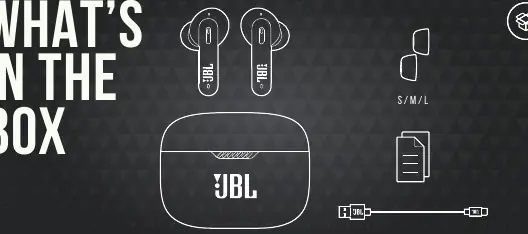
- JBL Tune 230NC TWS earbuds
- Charging case
- Ear tips (S/M/L sizes)
- USB-C charging cable
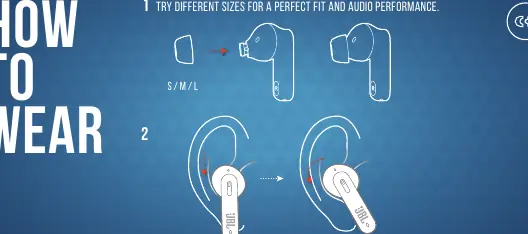
How to wear
For the best audio performance and fit, try the different ear tip sizes included in the box. Ensure the earbuds are inserted securely into your ears.
Power on & connect
To connect your earbuds for the first time:
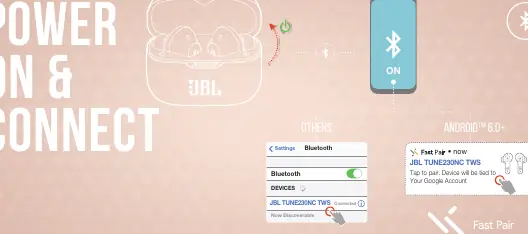
- Open the charging case.
- Ensure Bluetooth is enabled on your device.
- Select "JBL TUNE230NC TWS" from your device's Bluetooth settings.
- For Android 6.0+ devices, use the Fast Pair feature for quick connection.
Controls
The earbuds feature touch controls on both the left (L) and right (R) sides:
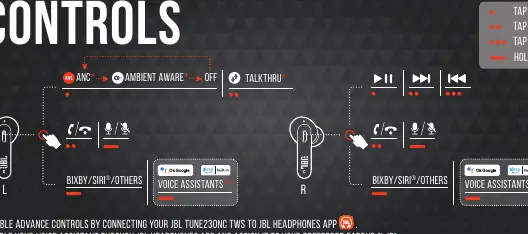
- Tap x1: Play/Pause, Answer/End call.
- Tap x2: Next track, Mute/Unmute microphone.
- Tap x3: Previous track.
- Hold (2s): Activate Voice Assistant (Bixby/Siri/Others).
- ANC/Ambient Aware: Cycle through ANC, Ambient Aware, and Off modes.
Note: Advanced controls and voice assistant assignment can be configured in the JBL Headphones app.
Manual setup
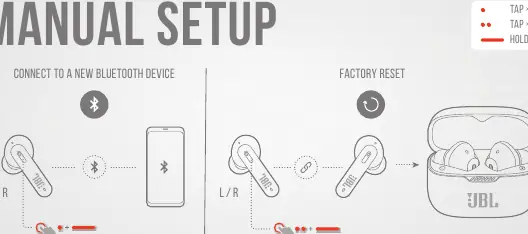
- Connect to a new Bluetooth device: With the earbuds in the case, hold the touch control for 5 seconds.
- Factory reset: With the earbuds in the case, tap twice and hold for 5 seconds.
Charging
Charge the case using the provided USB-C cable. A full charge takes approximately 2 hours. Ensure the earbuds are properly seated in the case for charging.
LED behaviors
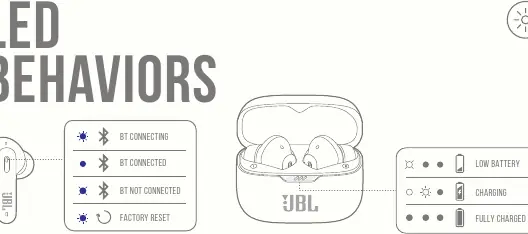
- BT connecting: Flashing blue light.
- BT connected: Solid blue light.
- BT not connected: Flashing blue light.
- Low battery: Flashing light on the case.
- Charging: Solid light on the case.
- Fully charged: Light off.
Technical specifications
- Driver size: 6 mm / 0.24" Dynamic Driver
- Bluetooth version: 5.2
- Music playtime (BT on, ANC off): Up to 10 hours
- Music playtime (BT on, ANC on): Up to 8 hours
- Charging time: 2 hours from empty
- Frequency response: 20 Hz – 20 kHz
- Impedance: 16 ohm
- Maximum operation temperature: 45°C
Manufacturer information
JBL
Practical help
Common problems
Earbuds not connecting to Bluetooth
Perform a manual setup by placing earbuds in the case and holding the touch control for 5 seconds to enter pairing mode.
Earbuds not charging
Ensure the charging case is charged and the earbuds are correctly seated in the case. Check the charging cable connection.
Need to reset to factory settings
Place earbuds in the case, tap twice, and hold for 5 seconds.
Before use
- Charge the earbuds fully before first use.
- Download the JBL Headphones app for advanced features.
- Try all ear tip sizes (S/M/L) to find the best fit.
- Ensure Bluetooth is enabled on your smartphone.
Show more Show less
Specs in practice
- ANC (Active Noise Cancelling)
- Reduces ambient noise for a more immersive listening experience.
- Ambient Aware
- Allows you to hear your surroundings while listening to music.
Images and diagrams
- The touch controls are located on the outer surface of the earbud stems.
- LED indicators on the case show charging status and battery level.
- The earbuds can be used in Stereo mode (both) or Mono mode (one earbud).
Model compatibility
- Compatible with Android 6.0+ for Fast Pair.
- Requires JBL Headphones app for advanced customization.

Manual page author
Emily Carter
User documentation editor