Electronics / Headphones Earbuds
User Manual for JBL Tune 230NC TWS Earbuds
Comprehensive user guide for the JBL Tune 230NC TWS earbuds. Learn how to pair, use touch controls, manage Active Noise Cancelling, charge, and troubleshoot your device.
Quick answers from the manual
Quick answer
- The JBL Tune 230NC TWS are wireless earbuds featuring Active Noise Cancelling, touch controls, and up to 40 hours of total battery life. They are IPX4 water-resistant and support the JBL Headphones App for customization. p. 2, 8
Key actions
- Pairing the earbuds p. 10
- Performing a factory reset p. 14
- Charging the earbuds p. 16
First start
- Open the charging case to automatically enter pairing mode, then select the device in your phone's Bluetooth settings. p. 9, 10
Show 4 more answers Show less
Problems and fixes
Earbud not charging
Clean the charging contacts on the earbud stem and inside the charging case.
p. 19
Bluetooth connectivity issues
Turn off Bluetooth for a couple of minutes, then turn it back on.
p. 8Maintenance and reset
- Perform a factory reset by following the tap and hold sequence shown in the manual. p. 14
Technical specifications
| Parameter | Value | Meaning | Pages |
|---|---|---|---|
| Battery Life | Up to 40 hours | Total playtime including case (10+30 hours). | p. 8 |
| Water Resistance | IPX4 | Sweat and water resistant. | p. 8 |
| Drivers | 10mm | Audio driver size for bass sound. | p. 7 |
Where to find it in the PDF
- What's in the box p. 4
- Controls p. 12
- Charging p. 16
Table of contents
Manual images
Click an image to enlargeIntroduction
The JBL Tune 230NC TWS are wireless earbuds designed for an immersive audio experience. Key features include True Wireless Stereo, Active Noise Cancelling (ANC), Bluetooth connectivity, and touch controls. They are rated IPX4 for water and sweat resistance.
What's in the box
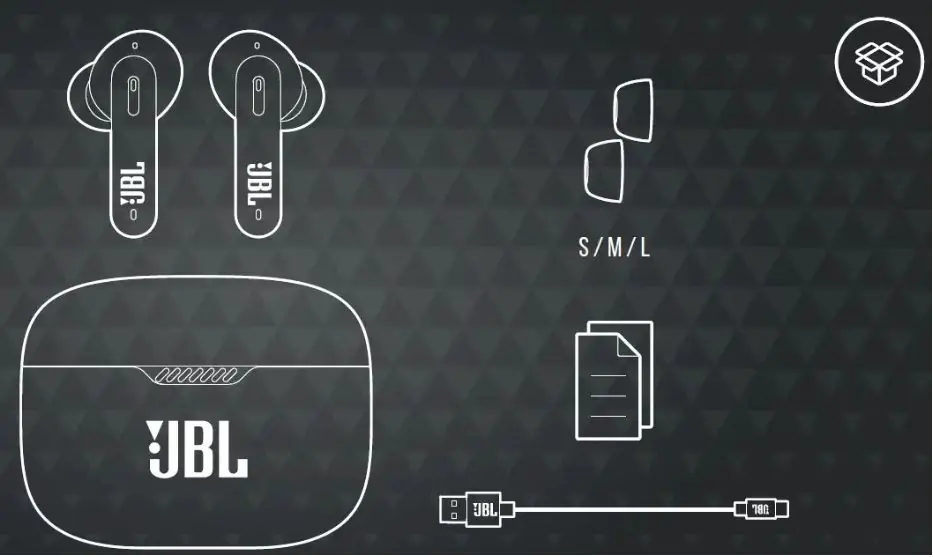
- JBL Tune 230NC TWS earbuds
- Charging case
- Ear tips (S/M/L sizes)
- USB-C charging cable
Getting Started
For the best experience, download the JBL Headphones App from the Google Play Store or Apple App Store. This app allows for further control and personalization of your listening experience.
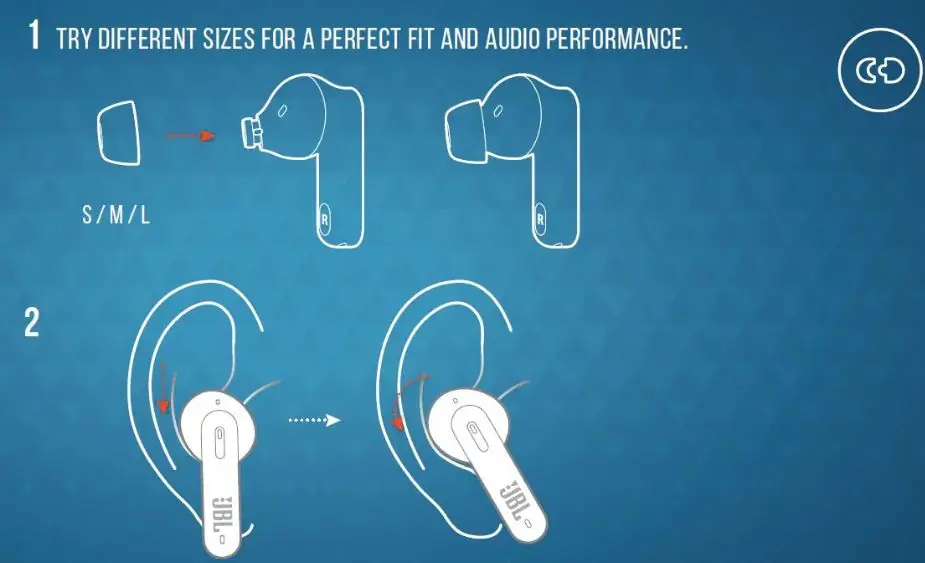
How to wear
To ensure a perfect fit and optimal audio performance, try the different sizes of ear tips provided (S, M, L). Ensure the earbuds are worn properly in your ears for the best sound quality and call performance.
Power on & Connect
To connect your earbuds:
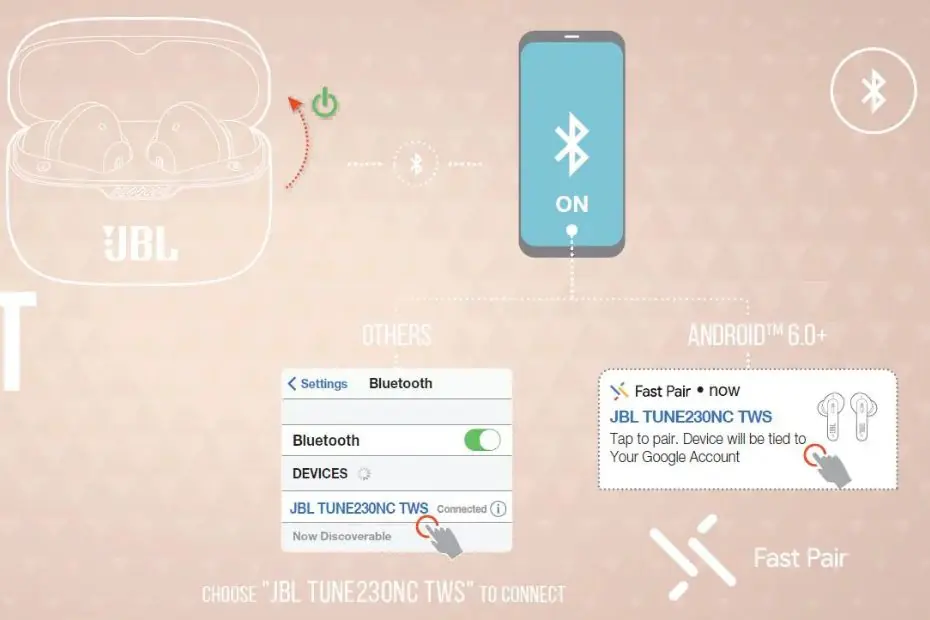
- Open the charging case.
- The earbuds will automatically enter pairing mode.
- On your device, go to Bluetooth settings and select "JBL TUNE230NC TWS" to connect.
- For Android 6.0+ devices, you can use Google Fast Pair for a quick connection.
Controls
The earbuds feature touch controls on the earpieces. You can assign specific functions to your preferred earbud (L/R) using the JBL Headphones App.
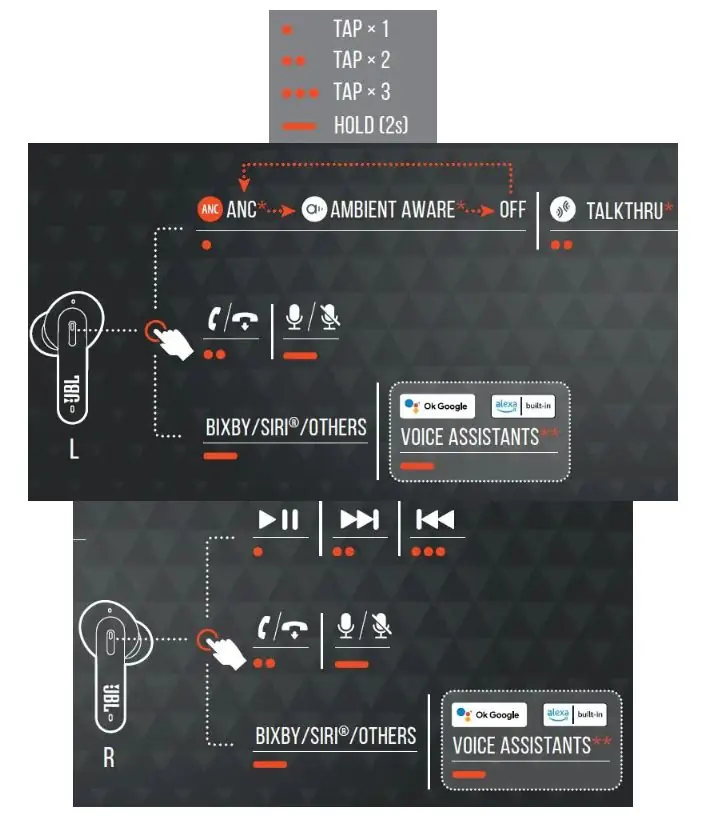
- Tap x 1: Play/Pause or Answer/End call.
- Tap x 2: Next track or Mute/Unmute microphone.
- Tap x 3: Previous track.
- Hold (2s): Activate Voice Assistant or toggle ANC/Ambient Aware/TalkThru.
Charging
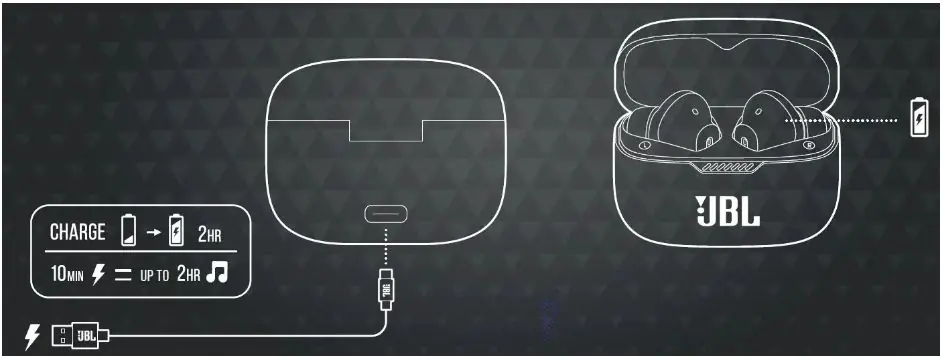
The charging case acts as a portable power bank. A quick 10-minute charge provides up to 2 hours of playtime.
LED behaviors
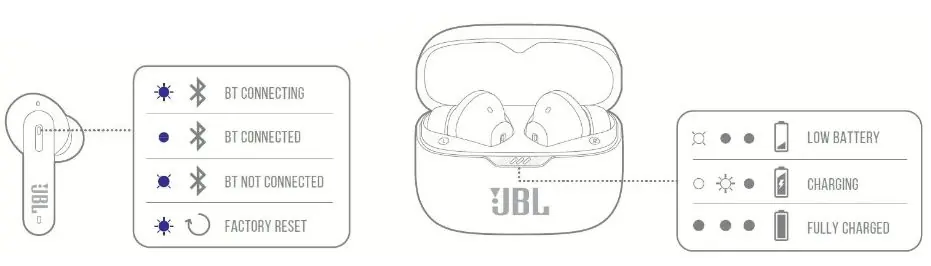
- BT Connecting: Flashing blue light.
- BT Connected: Solid blue light.
- BT Not Connected: Flashing blue light.
- Factory Reset: Flashing blue light.
- Low Battery: Flashing white light on case.
- Charging: Pulsing white light on case.
- Fully Charged: Solid white light on case.
Troubleshooting
If you experience issues with Bluetooth connectivity, turn off the Bluetooth function on your device for a few minutes, then turn it back on. If one earbud is not charging, ensure the charging contacts on the earbud stem and inside the charging case are clean and free of grime.
Manufacturer information
JBL
Practical help
Common problems
Left or right earbud not charging
Clean the charging contacts on the earbud stem and inside the charging case to remove any grime or dirt.
Bluetooth connectivity issues
Turn off the Bluetooth function on your smartphone for a couple of minutes, then turn it back on to re-establish the connection.
One side of the earphone is silent
Ensure the earbuds are worn properly and the ear tips match your ear canal size for a secure fit.
Before use
- Check ear tip size (S/M/L) for a perfect fit.
- Download the JBL Headphones App for advanced controls.
- Charge the earbuds and case fully before first use.
- Ensure Bluetooth is enabled on your source device.
Show more Show less
Images and diagrams
- Tap gestures: 1 tap for play/pause, 2 taps for next track, 3 taps for previous track.
- Hold gesture: 2 seconds hold for voice assistant or ANC control.
- LED indicators: Different patterns indicate charging status, battery level, and Bluetooth connection status.
Model compatibility
- Compatible with both Android and iOS devices.
- Supports Qi wireless charging standard.
- Products with electrical plugs are designed for US use; adapters may be required internationally.

Manual page author
David Miller
Documentation analyst