Computers / Laptops
User Manual for LG 17MB15T Series LED LCD Monitor
Quick start guide and setup instructions for the LG 17MB15T, 17MB15TP, 19MB15T, and 19MB15TP LED LCD monitors. Includes connection diagrams, safety warnings, and component usage recommendations.
Table of contents
Manual images
Click an image to enlargeQuick guide from the manual
This document serves as a quick start guide for the LG 17MB15T series LED LCD monitors. It emphasizes the importance of using the supplied components to ensure proper device functionality and prevent malfunctions. Users are advised to download the full manual from the official LG website for detailed specifications and advanced settings.
Package contents
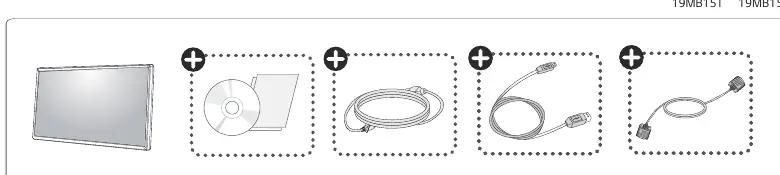
The package includes the monitor and the necessary cables. It is strongly recommended to use only the components supplied with the product. Using third-party cables may result in image noise, connection issues, or device malfunction.
Connecting the monitor
To set up the monitor, follow these steps:
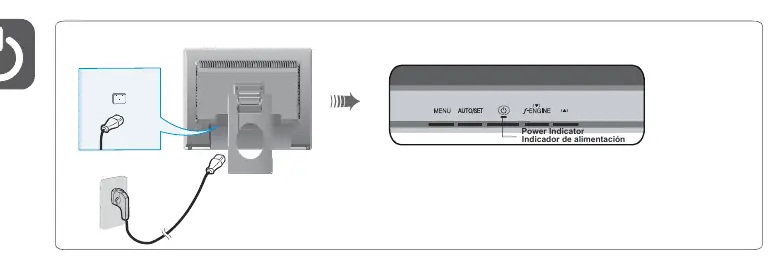
- Connect the power cable to the monitor and the power outlet.
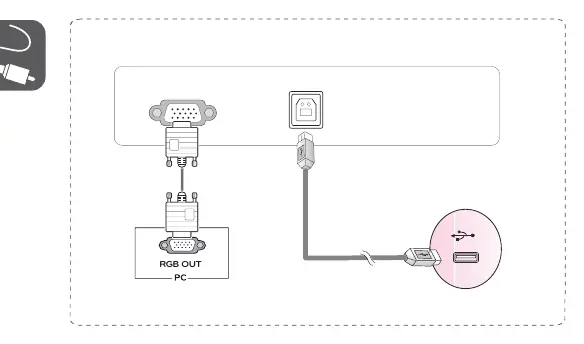
- Connect the RGB/VGA cable from the monitor to the RGB OUT port on your PC.
- Ensure all connections are secure.
Safety and usage warnings
To maintain eye health and device longevity, please observe the following:
- Eye health: It is recommended to rest for 10 minutes after every 30 minutes of use.
- Children: Children under 2 years old should not view the screen. Children over 2 years old should not view the screen for more than 1 hour per day.
- Cable usage: Always use the provided cables. Using unauthorized cables can cause device failure or compatibility issues.
- Adapters: Avoid using DVI to HDMI or DisplayPort to HDMI adapters, as these may cause compatibility problems.
Support
For additional information, troubleshooting, or to download the full user manual, please visit the official LG website at www.lg.com.
Official resources from the manual
Manufacturer information
LG Electronics
Practical help
Common problems
Device malfunction or image noise
Ensure you are using the original cables supplied with the monitor. Using third-party cables can cause these issues.
Compatibility issues
Avoid using DVI to HDMI or DisplayPort to HDMI adapters, as they may cause compatibility problems with the device.
Before use
- Verify that all supplied components are present in the box.
- Ensure you have the correct power cable and signal cable.
- Place the monitor on a stable, flat surface.
- Check that your PC has an available RGB/VGA output port.
Specs in practice
- Power Indicator
- Located on the front panel of the monitor; indicates the power status of the device.
Images and diagrams
- The connection diagram illustrates the correct way to connect the power cable to the monitor and the RGB cable to your computer's output port.
Model compatibility
- The monitor is designed to work with the supplied cables. Using other cables may lead to malfunction.
- Avoid using signal adapters (DVI/DP to HDMI) to prevent compatibility issues.

Manual page author
David Miller
Documentation analyst
Organizes user manual content into clear summaries, with attention to model details, product context, and everyday usability.