Sports / Bicycle Accessories
User Manual for Magicshine ALLTY 1500S Bicycle Light
Quick guide for the Magicshine ALLTY 1500S bicycle light. Learn how to install, operate, pair the remote, use the app, and understand the OLED display and modes.
Table of contents
Manual images
Click an image to enlargeQuick guide from the manual
The Magicshine ALLTY 1500S is a high-performance bicycle light featuring an OLED display, app connectivity, and remote control support. Before using the device, ensure it is charged and properly mounted. Always use lockout mode during transport to prevent accidental activation.
In the Box
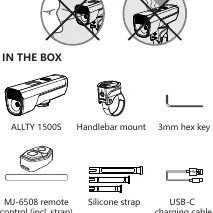
- ALLTY 1500S light unit
- Handlebar mount
- 3mm hex key
- MJ-6508 remote control (with strap)
- Silicone strap
- USB-C charging cable
Installation
Install on Handlebar:
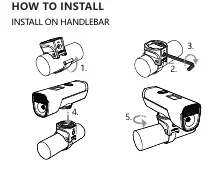
- Place the mount on the handlebar.
- Use the 3mm hex key to secure the mount.
- Slide the light unit onto the mount until it clicks into place.
- Adjust the angle as needed.
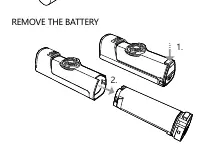
Remove the Battery:
- Press the release mechanism on the light unit.
- Slide the battery pack out of the housing.
Battery and Charging
The light features an OLED screen that displays the remaining battery percentage in 5 equal parts. Standard charging time is approximately 3 hours using a 5V, 2A power source. While the light can operate during charging, it is recommended not to do so to extend battery life.
OLED Display
The OLED screen provides real-time status updates:
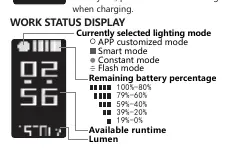
- Battery Percentage: Shows 0%-100% remaining charge.
- Lighting Mode: Indicates the currently selected mode (APP customized, Smart, Constant, or Flash).
- Available Runtime: Estimated time remaining based on current settings.
- Lumen: Current brightness output.
Operation
Lockout/Unlock: When the light is off, press and hold the switch for 3 seconds to enter lockout mode. To unlock, press and hold for 3 seconds or connect the charger.
On/Off: Press and hold the switch to turn the light on or off. The light defaults to the last used mode.
Adjust Brightness: While the light is on, click the switch to cycle through brightness levels (LOW, MEDIUM, HIGH) or flash patterns (SLOW FLASH, QUICK FLASH).
Change Mode: Double-click the switch to toggle between constant mode and flash mode.
App Connectivity
- Download the Magicshine app (iOS users scan the QR code in the manual; Android users visit www.magicshine.com).
- Enable Bluetooth on your smartphone.
- Open the app, click Add New Devices, and select M1-B3.
- Use the app to customize brightness, modes (up to 20), and activate features like Smart Mode or Sleep Mode.
Remote Control
Pairing: Turn on the light. Press and hold the O and □ buttons on the remote for about 10 seconds until the indicator flashes blue. Bring the remote close to the light until the pairing icon appears on the OLED screen.
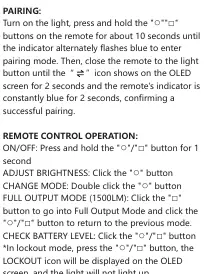
Operation:
- On/Off: Press and hold O or □ for 1 second.
- Adjust Brightness: Click O.
- Change Mode: Double-click O.
- Full Output (1500LM): Click □.
- Check Battery: Click O or □.
Output and Runtime
- Constant Mode Low: 300LM, 9.5H
- Constant Mode Medium: 750LM, 4H
- Constant Mode High: 1500LM, 3.5H
- Flash Mode Slow: 500~0LM, 10.5H
- Flash Mode Quick: 500~0LM, 31H
Official resources from the manual
Practical help
Common problems
Light will not turn on
The light may be in lockout mode. Press and hold the switch for 3 seconds to unlock it.
Remote control not responding
Ensure the remote is paired. Press and hold the O and □ buttons on the remote for 10 seconds until the indicator flashes blue, then bring it close to the light.
Light turns to low mode automatically
Battery power is below 10%. Charge the light as soon as possible.
Before use
- Charge the battery fully using a 5V, 2A charger.
- Ensure the handlebar mount is securely tightened with the 3mm hex key.
- Download the Magicshine app for advanced configuration.
- Pair the remote control if you intend to use it.
- Check that the light is not in lockout mode before first use.
Specs in practice
- Lockout Mode
- Safety feature to prevent accidental activation during transport or storage.
Images and diagrams
- Handlebar installation: Shows the strap and hex key usage.
- Battery removal: Shows how to detach the battery unit.
- OLED Display: Explains icons for battery percentage, lumen, and mode.
Model compatibility
- Compatible with MJ-6508 remote control.
- App supports iOS and Android devices.
- Data measured in accordance with ANSI/NEMA FL 1-2009.

Manual page author
Michael Turner
Technical manual editor
Reviews PDF manuals for structure, safety notes, and practical product details so readers can find the right information quickly.