Power / Solar Panels
Knog Scout Bike Alarm and Finder User Guide
Quick start guide for the Knog Scout bike alarm and finder. Learn how to pair, mount, arm, disarm, and troubleshoot your device.
Table of contents
Quick guide from the manual
The Knog Scout is a security device that requires a specific pairing sequence. Do not attempt to pair directly through your phone's Bluetooth settings. Always use the Knog app for initial setup. Ensure the device is charged before use. The device must be disarmed before performing a factory reset.
Setup and Pairing
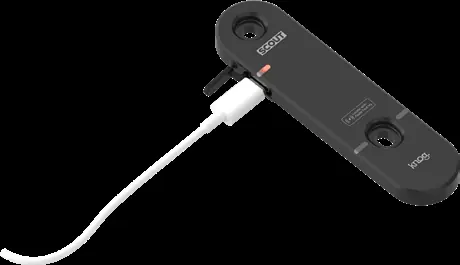
1. Download and install the Knog app from the app store. 2. Create a profile. 3. Connect the Scout to a USB-C charger to enable pairing mode (you will hear a 3-tone beep). 4. In the app, select the '+' button to add the device. 5. Follow the prompts to complete the connection and register the device.
Mounting
The Scout can be mounted in two ways:
- Overt: Mount directly to standard bottle cage screw bosses.
- Stealth: Mount under a bottle cage using the provided spacers.
Use the included Security tool to tighten the screws. Do not over-tighten the screws and keep the Security tool safe.
Arming and Disarming
To arm or disarm the device, ensure your phone is in close Bluetooth range and the Knog app is active. Press the bell icon in the app to toggle the state. You can also press and hold the button on the device for 1 second to arm or disarm.
Firmware Updates
Once connected, select the 3 dots in the app for more options and choose 'Update Firmware'. The process will begin automatically. Do not cancel the update once it has started.
Troubleshooting and Factory Reset
If the device is unresponsive, quit the app and restart it, or ensure the device is fully charged. To perform a factory reset: 1. Turn the Scout upside down on a horizontal surface. 2. Press and hold the button while plugging in the USB-C cable. 3. Continue holding for 10 seconds until 3 long beeps are heard.
Manufacturer information
Knog
Practical help
Common problems
Scout not pairing
Ensure you are pairing via the Knog app, not the phone's Bluetooth settings. Connect to USB-C to enable pairing mode.
Scout not arming/disarming
Ensure your phone is in close Bluetooth range and the Knog app is active.
Device unresponsive
Quit the Knog app, ensure it's updated, and try reconnecting to the USB-C charger.
Before use
- Charge the device fully using a USB-C cable.
- Download and install the Knog app.
- Ensure your phone has Bluetooth enabled.
- Have the security tool ready for mounting.
Images and diagrams
- Mounting (Overt): Attaches to standard bottle cage bosses.
- Mounting (Stealth): Attaches under the bottle cage using provided spacers.
Model compatibility
- Requires iOS, iPadOS, watchOS, or macOS for Apple Find My.
- Only pair via Knog app.

Manual page author
Emily Carter
User documentation editor
Prepares concise manual descriptions and highlights the most useful setup, operation, and maintenance information for readers.