Home / Clocks
User Manual for Mooas Foldable 4-in-1 MagSafe Power Bank & Wireless Charger
Quick guide for the Mooas Foldable 4-in-1 MagSafe Power Bank & Wireless Charger. Learn how to use the detachable power bank, charging station, mood light, and safety precautions.
Table of contents
Manual images
Click an image to enlargeQuick Guide
Before using your Mooas Foldable 4-in-1 MagSafe Power Bank, please remove the protective film from the wireless charging area. For optimal performance and fast wireless charging, use a PD charger (QC3.0 or higher, 9V/3A) along with the included USB-C cable. Ensure your device is properly centered on the charging pad for efficient power transfer.
Product Overview
The device consists of two main parts: the detachable MagSafe Power Bank and the Charging Station. It features a 10,000mAh capacity, 18W PD fast charging, and a built-in mood light.
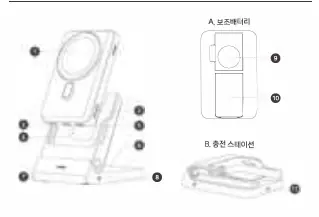
Power Bank (MagSafe)
- Detachable for portable wireless charging.
- Supports MagSafe-compatible smartphones, wireless earphones, and smartwatches.
- Can charge another device via USB-C cable while wirelessly charging a smartphone.
- Battery status is indicated by LED lights.
Charging Station
- Functions as a stand-type wireless charger when the power bank is attached.
- Includes a mood light with adjustable brightness.
- Connects via USB-C port on the back.
How to Use

Power Bank Operation
- Power ON: Place a smartphone or wireless earphone on the MagSafe charging area to begin charging. Press the power button at the bottom to check battery level or charge a watch.
- Power OFF: The device turns off automatically if charging does not start within 30 seconds.
Charging Station Operation
- Connect the included USB-C cable to the power port on the back of the station.
- Place your device at the center of the charging pad.
- Mood Light: Touch the button on the right side to cycle through settings: Lowest Brightness -> Highest Brightness -> OFF.
Safety Precautions
- Do not place metal objects, cards, or magnets between your device and the charger.
- Keep the product away from shock, heat, and humidity.
- Do not disassemble or modify the product.
- If the product is not used for an extended period, charge it at least once a month to maintain battery performance.
- If the Foreign Object Detection (FOD) function activates, immediately remove the detected object.
Specifications
- Battery Capacity: 10,000mAh
- Rated Input: 9V/3A
- Wireless Output (Smartphone/Earbuds): 5W, 7.5W, 10W, 15W
- Wireless Output (Watch): 1-3W
- Operating Temperature: -10 to 35°C
Contact Information
For support, visit www.mooas.com or call +82-31-757-3309.
Official resources from the manual
Practical help
Common problems
Charging does not start
Ensure the device is properly centered on the charging pad. Remove any thick or metal cases.
Slow charging speed
Use a PD charger (9V/3A) instead of a 5V charger. Ensure the device supports fast wireless charging.
FOD (Foreign Object Detection) indicator flashing
Remove any metal objects, cards, or magnets from the charging area.
Before use
- Remove the protective film from the MagSafe wireless charging area.
- Verify your smartphone supports wireless charging.
- Use the provided USB-C cable.
- Use a PD charger (QC3.0 or higher, 9V/3A) for fast charging.
- Ensure the device is placed at the center of the charging pad.
Specs in practice
- Battery Capacity
- 10,000mAh, providing extended use for mobile charging.
- Wireless Output (Smartphone)
- Supports up to 15W fast wireless charging.
- Operating Temperature
- Safe operating range is -10°C to 35°C.
Images and diagrams
- Battery Indicator: 4 LEDs show the remaining battery level.
- Mood Light Control: Touch button on the right side of the charging station.
Model compatibility
- Compatible with iPhone 12 series or later (MagSafe).
- Compatible with Samsung Galaxy models that support wireless charging.
- For non-MagSafe phones, use a MagSafe-compatible case or magnetic ring sticker.

Manual page author
David Miller
Documentation analyst
Organizes user manual content into clear summaries, with attention to model details, product context, and everyday usability.