Power / Batteries & Chargers
Mooas Flat 15W Fast Wireless Charging Nightlight Alarm Clock
Quick guide for the Mooas Flat 15W Fast Wireless Charging Nightlight Alarm Clock. Learn how to set the clock, adjust the nightlight, and use the wireless charging feature.
Table of contents
Quick Guide
The Mooas Flat 15W Fast Wireless Charging Nightlight Alarm Clock combines a digital clock, a multi-mode nightlight, and a Qi-standard wireless charger. To begin, connect the device to a power adapter using the provided USB-C cable. Ensure your power adapter supports the required input (5V/2A, 9V/1.67A, or 9V/2A) for optimal performance.
Product Overview
The device features the following components:
- Lampshade: Top surface for nightlight.
- Clock Display Area: Front screen.
- Light Adjustment Touch Switch: Located on the top.
- Wireless Charging Area: Top surface.
- Wireless Charging Indicator: LED status light.
- Type-C Input Port: Power connection on the back.
- Charging Contacts: Bottom of the clock.
- Silicone Anti-slip Mat: Base.
Wireless Charging
To charge your device:
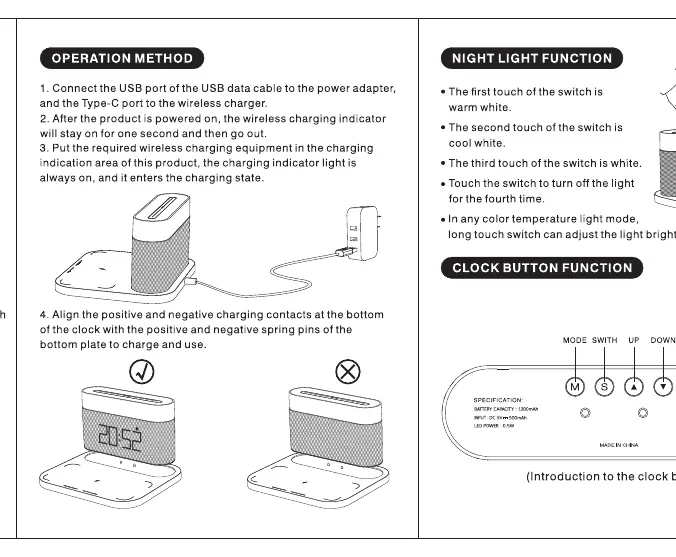
- Connect the USB-C cable to a power adapter and the clock.
- Place your Qi-compatible device on the wireless charging area.
- The wireless charging indicator will light up to confirm charging has started.
Note: Ensure the device is placed correctly in the charging area. Charging distance is within 8mm.
Night Light Operation
The nightlight is controlled via the touch switch on the top:
- First touch: Warm white light.
- Second touch: Cool white light.
- Third touch: White light.
- Fourth touch: Turn off the light.
- Long touch: Adjust the light brightness.
Clock and Alarm Settings
Use the buttons on the back of the clock to configure settings:
- Mode Button: Short press to cycle through Clock setting, 12/24 hour format, Alarm, and Year/Month/Day.
- Switch Button: In clock display mode, short press to toggle 12/24 hour format or Year/Month/Day.
- Up/Down Buttons: Use these to increase or decrease values when setting the clock or alarm.
- Alarm Snooze: When the alarm rings, short press any button to snooze. Long press for 3 seconds to turn off the alarm.
Specifications
- Input: DC 5V 2A, 9V 1.67A, 9V 2A
- Power: 15W Max
- Battery Capacity: 1800mAh
- Charging Efficiency: 75%
- Charging Port: Universal Type-C
- Dimensions: 178x154x101 mm
- Weight: 463g
Safety Warnings
- Do not disassemble or modify the product.
- Keep away from water, high temperatures, and strong magnetic fields.
- Unplug the device before cleaning.
- Do not use with wet hands.
- Operating temperature range: -20 to 45 degrees Celsius.
Practical help
Common problems
Wireless charging not working
Ensure your device is Qi-compatible and placed correctly in the charging area. Verify that your power adapter supports the required input (QC2.0/3.0 or higher).
Alarm not ringing
Check if the alarm is set correctly and ensure the volume is adjusted using the Up/Down buttons.
Before use
- Connect the USB-C cable to a power adapter.
- Ensure the power adapter supports 5V/2A, 9V/1.67A, or 9V/2A.
- Place the clock on a flat, stable surface.
- Verify the device is within 8mm of the charging area for wireless charging.
Specs in practice
- Charging Efficiency
- The device converts 75% of power to wireless charging energy.
- Battery Capacity
- Internal 1800mAh battery for clock backup.
Images and diagrams
- The diagram illustrates the touch switch location on the top, the charging area, and the button layout on the back panel.
Model compatibility
- Supports all Qi-standard wireless charging devices.

Manual page author
David Miller
Documentation analyst
Organizes user manual content into clear summaries, with attention to model details, product context, and everyday usability.