Baby / Baby Monitors
Motorola TLK 100i and TLK 100j Two-Way Radio
Quick reference guide for the Motorola TLK 100i and TLK 100j two-way radios. This guide provides essential instructions for battery installation, antenna setup, SIM card insertion, charging, and basic operation.
Table of contents
Manual images
Click an image to enlargeQuick guide from the manual
This document serves as a quick reference guide for the Motorola TLK 100i and TLK 100j two-way radios. It outlines the physical setup process, including battery installation, antenna attachment, SIM card insertion, and basic device operation.
Battery Installation
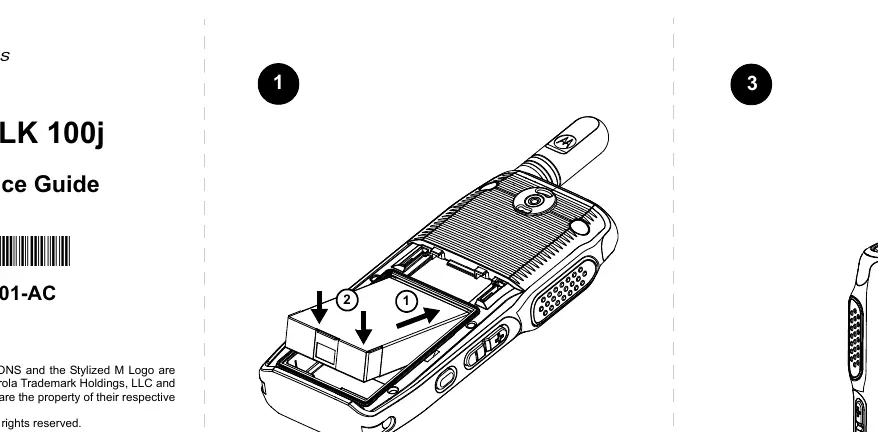
- Insert the battery into the compartment as shown in the diagram.
- Slide the battery cover onto the device until it clicks into place. Ensure the cover is properly aligned.
Antenna Installation

- Align the antenna with the connector on the top of the radio.
- Rotate the antenna clockwise to secure it firmly in place.
SIM Card Installation
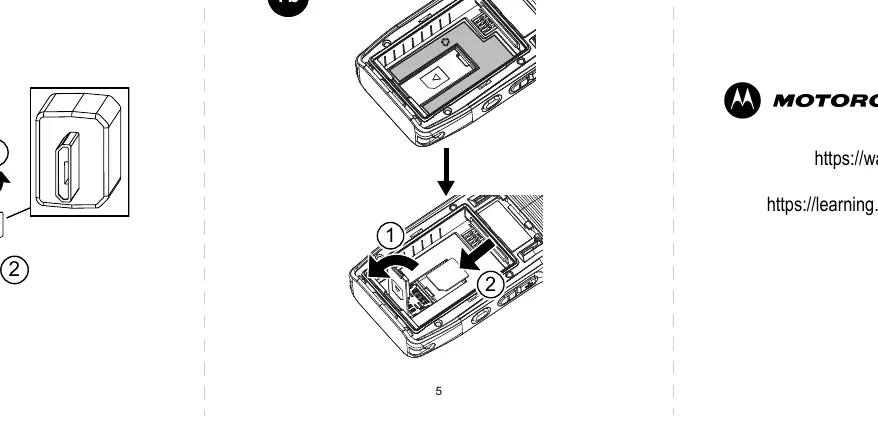
- Open the SIM card cover on the device.
- Insert the SIM card into the slot, ensuring the orientation matches the diagram. Do not force the card into the slot.
Charging and Accessories
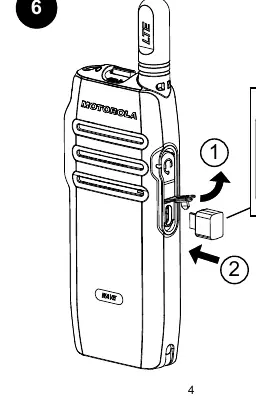
To charge the device, connect the charging cable to the port located on the side of the radio. Ensure the connector is properly aligned before inserting. For audio accessories, connect the accessory plug to the designated port on the side of the radio.
Operation
The device features a power button and channel selection buttons. Use the power button to turn the device on or off. Use the channel buttons (CH+ and CH-) to navigate between available channels.
Support Resources
For further information and learning resources, visit the following websites: waveoncloud.com and learning.motorolasolutions.com.
Official resources from the manual
Manufacturer information
Motorola
Practical help
Common problems
SIM card does not fit
Ensure the SIM card orientation matches the diagram in the manual. Do not force the card into the slot.
Battery cover not closing
Check that the battery is fully seated in the compartment and the cover is aligned correctly before sliding it on.
Before use
- Charge the battery fully before first use.
- Ensure the antenna is securely attached.
- Verify the SIM card is correctly inserted.
- Check that the battery cover is locked in place.
Specs in practice
- Power/Info Button
- Used to power the device on/off and access information.
Images and diagrams
- Step 1-2: Battery and cover installation.
- Step 3: Antenna attachment.
- Step 4: Power and channel control layout.
- Step 5: Audio accessory connection.
- Step 6: Charging port usage.
Model compatibility
- The installation procedures apply to both TLK 100i and TLK 100j models.

Manual page author
Emily Carter
User documentation editor
Prepares concise manual descriptions and highlights the most useful setup, operation, and maintenance information for readers.