Power / Batteries & Chargers
Operating Instructions for myCharge CliqLuxe 10K Power Bank
Quick start guide for the myCharge CliqLuxe 10K power bank. Learn how to recharge the unit, charge your devices wirelessly or via USB-C, and understand safety precautions.
Table of contents
Manual images
Click an image to enlargeQuick Start Guide
The myCharge CliqLuxe 10K is a portable power bank featuring wireless charging and a USB-C port. This guide provides essential instructions for recharging the unit and charging your devices.
Recharging the Power Bank
Connect the included recharging cable to any USB power source. The unit can be recharged via a wall outlet, car charger, or computer. The digital display will show 100% when the unit is fully charged.
Charging Your Devices
You can charge up to two devices simultaneously:
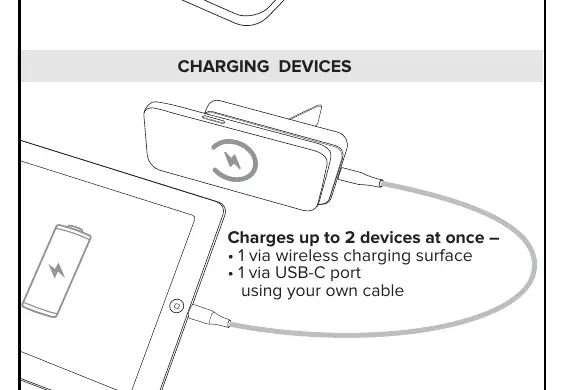
- Wireless Charging: Attach your phone magnetically to the wireless charging surface. Charging should begin automatically. If it does not, press the power button.
- USB-C Charging: Connect your device to the USB-C port using your own cable.
Product Features
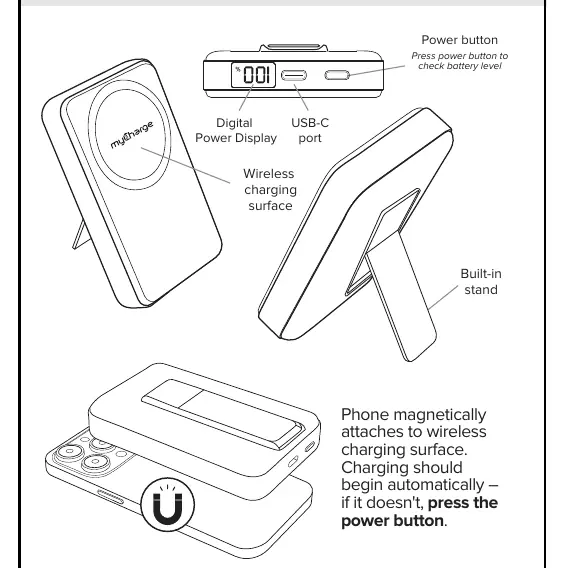
- Digital Power Display: Shows the current battery level.
- Power Button: Press to check the battery level or initiate charging.
- Built-in Stand: Allows the power bank to be propped up during use.
Safety Information
- Do not expose the power bank to heat sources, direct sunlight, or extreme low temperatures.
- Do not drop or subject the unit to impact.
- Do not disassemble or attempt to repair the housing.
- Use only provided connectors for charging the power bank.
- Dispose of batteries at a local recycling center; do not throw in the garbage.
Manufacturer information
myCharge
Practical help
Common problems
Wireless charging does not start automatically
Ensure the phone is magnetically aligned with the charging surface and press the power button.
Before use
- Fully charge the power bank before first use.
- Verify the battery level using the digital display.
- Ensure you have a compatible USB-C cable for wired charging.
Specs in practice
- Digital Power Display
- Indicates the remaining battery percentage of the power bank.
Images and diagrams
- The diagram illustrates the location of the power button, USB-C port, and wireless charging surface.
- The diagram demonstrates how to use the built-in stand.
Model compatibility
- Supports simultaneous charging of two devices (one wireless, one via USB-C).

Manual page author
David Miller
Documentation analyst
Organizes user manual content into clear summaries, with attention to model details, product context, and everyday usability.