Power / Power Conditioning
User Manual for nJoy Royer 16A Voltage Protector
Quick guide for the nJoy Royer 16A voltage protector. Learn how to connect, operate, and understand the display indicators and safety warnings for this 16A device.
Quick answers from the manual
Quick answer
- The nJoy Royer 16A is a voltage protector that guards sensitive equipment against voltage fluctuations. It automatically cuts power when input voltage is outside the safe range (195V-250V) and auto-restarts after a 180-second delay once the voltage stabilizes. p. 2
Key actions
- Connect the device: Plug the protector into the wall, then plug your appliance into the protector, and switch both on. p. 4
First start
- Inspect the unit, ensure the power switch is OFF, plug into the wall, connect your appliance, and switch on. p. 4
Error codes
| Code | Meaning | Action | Pages |
|---|---|---|---|
| H | High voltage protecting | Wait for voltage to return to safe range. | p. 4 |
| L | Low voltage protecting | Wait for voltage to return to safe range. | p. 4 |
Technical specifications
| Parameter | Value | Meaning | Pages |
|---|---|---|---|
| Rated Current | 16A | Maximum current capacity | p. 3 |
| Low Voltage Cut Off | 195V | Voltage level to cut power | p. 3 |
| High Voltage Cut Off | 250V | Voltage level to cut power | p. 3 |
| Delay Time | 180s | Time before restart | p. 3 |
Where to find it in the PDF
- Front Cover p. 1
- Product Overview p. 2
- Specifications p. 3
- Connection and Operation p. 4
Table of contents
Manual images
Click an image to enlargeQuick Guide
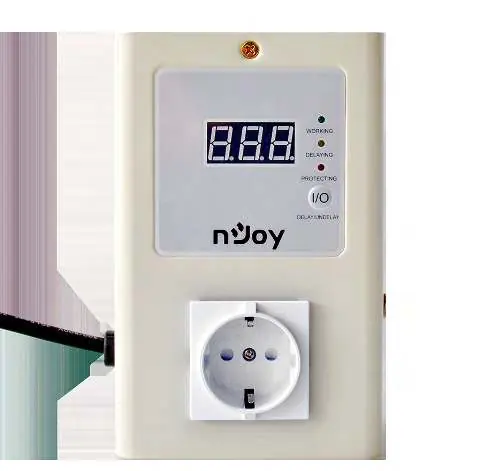
The nJoy Royer 16A is a portable voltage protector designed to guard sensitive equipment against voltage fluctuations from mains power. It is plugged between a wall outlet and your equipment. The device automatically cuts off power when input voltage levels become dangerous and auto-restarts the connected equipment once the voltage returns to a safe range.
Product Overview
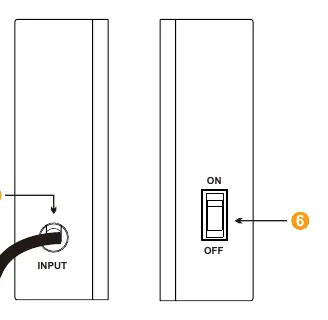
The device features a front panel with a digital display and status LEDs, and a side panel with a power switch and input cable.
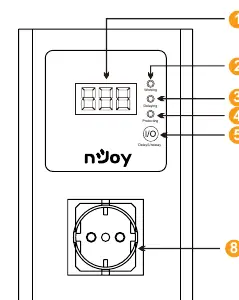
- Working (Green LED): Indicates the device is operating normally.
- Delaying (Yellow LED): Indicates the device is in a countdown phase before providing power.
- Protecting (Red LED): Indicates the device is currently protecting against voltage issues.
- I/O Button: Used to cancel the delay or display voltage status.
- On/Off Power Switch: Located on the side of the unit.
Connection and Operation
- Inspect the unit for any damage from transportation.
- Ensure the power switch on the voltage protector is in the OFF position.
- Plug the voltage protector into the wall socket.
- Ensure the appliance you wish to connect is switched OFF.
- Plug the appliance into the output socket of the voltage protector.
- Switch on the voltage protector.
- Switch on the appliance.
I/O Button Functions: Press once to cancel the delaying countdown. Press to show the voltage when the device is in a high or low voltage protecting status.
Display Indicators
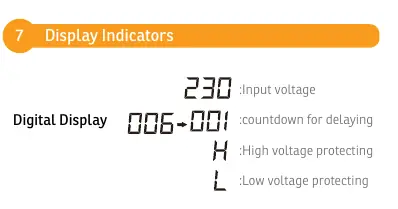
- Input voltage: Displays current voltage.
- Countdown for delaying: Shows remaining time.
- H: High voltage protecting.
- L: Low voltage protecting.
Specifications
- Rated Current: 16A
- Low Voltage Cut Off: 195V
- Low Voltage Reconnect: 205V
- High Voltage Cut Off: 250V
- High Voltage Reconnect: 245V
- Delay Time: 180s
- IP Level: IP20
Safety Warnings
- Do not connect the unit to environments with direct current or simulated sine wave.
- Install the device in a temperature and humidity-controlled indoor area free of conductive contaminants.
- Ensure the earth cable is chosen according to the current capacity. Using an improper earth connection is dangerous for user health and can cause electronic circuit board faults.
Practical help
Common problems
Device does not provide power
Check if the power switch is in the ON position and the input cable is securely connected to the wall outlet.
Device is not restarting immediately after power fluctuation
The device has a built-in 180s delay time to ensure voltage stability before restarting.
Display shows H or L
This indicates high (H) or low (L) voltage protection is active. The device will auto-restart once the voltage returns to the safe range.
Before use
- Inspect the unit for transport damage.
- Ensure the voltage protector power switch is OFF.
- Plug the protector into the wall socket.
- Ensure the appliance to be connected is switched OFF.
- Plug the appliance into the protector's output socket.
Specs in practice
- Rated Current
- 16A - The maximum current the device can handle.
- Low Voltage Cut Off
- 195V - Power is cut if voltage drops below this level.
- High Voltage Cut Off
- 250V - Power is cut if voltage exceeds this level.
Images and diagrams
- Front view: Shows the digital display, status LEDs (Working, Delaying, Protecting), and the I/O button.
- Side view: Shows the AC input cable and the On/Off power switch.
Model compatibility
- Do not use with direct current (DC) or simulated sine wave sources.
- Requires a proper earth connection for safety and to prevent circuit faults.

Manual page author
David Miller
Documentation analyst
Organizes user manual content into clear summaries, with attention to model details, product context, and everyday usability.