Power / Uninterruptible Power Supplies
Xmart FUTURA-1000 Voltage Regulator
Quick guide for the Xmart FUTURA-1000 voltage regulator. Learn about installation, outlet configuration, restart delay settings, and troubleshooting steps.
Table of contents
Manual images
Click an image to enlargeQuick Guide
The Xmart FUTURA-1000 is a voltage regulator designed to protect electronic equipment from power failures, spikes, and voltage fluctuations. Before using the device, ensure the installation site is free from heat sources and humidity. The unit features a configurable restart delay (2 or 10 seconds) to protect equipment from rapid power cycling.
Product Description
The unit is equipped with 8 power outlets divided into two groups:
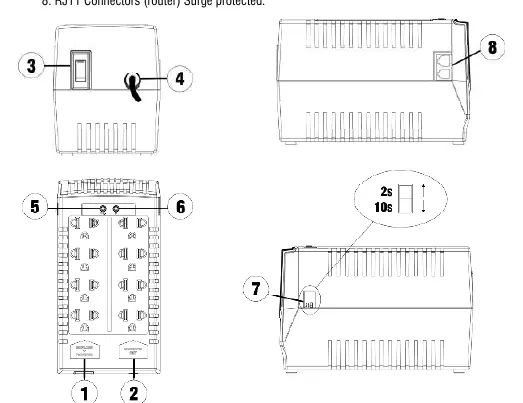
- Regulated + Protected: 4 outlets providing both voltage stabilization and surge suppression.
- Protected Only: 4 outlets providing surge suppression only, without voltage regulation.
The unit also includes RJ11 connectors for router telephone line protection, a power switch with an integrated input breaker, and LED indicators (Green for power, Orange for input voltage issues).
Installation
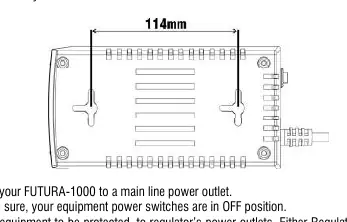
- Ensure the installation site complies with technical specifications and is not exposed to direct sunlight, heat, or humidity.
- The unit can be installed on a horizontal surface or mounted on a wall (horizontally or vertically).
- Plug the FUTURA-1000 into a main power outlet.
- Ensure all equipment to be connected is switched OFF.
- Connect your equipment to the appropriate outlets (Regulated+Protected or Protected Only) based on priority.
- Connect telephone lines to the RJ11 connectors if protecting a router.
- Push the Power Switch to turn the unit on. The Green LED will light up.
- Wait for the protection time to elapse (10 seconds default) before switching on your connected equipment.
Operation and Settings
Restart Delay: The unit includes a switch on the side to configure the restart delay. This prevents immediate power-on after a power failure, allowing the main line to stabilize. The delay can be set to 2 seconds or 10 seconds. It is recommended to use the 10-second delay for computer equipment.
Troubleshooting
If the unit does not work, check the input breaker located on the rear panel power switch. If it has tripped, push the button to reset it. Before resetting, ensure the total power consumption of connected equipment does not exceed the regulator's capacity.
Technical Specifications
- Capacity: 1000VA Total
- Input Voltage: 115Vac or 220Vac models available
- Protection: Metal Oxide Varistor (MOV) for AC lines and RJ11
- Efficiency: 97% at full load
- Operating Temperature: 0-40°C
- Humidity:< 90% (non-condensing)
Practical help
Common problems
Unit does not power on or provide output
Check the input breaker on the rear panel power switch. If tripped, press the button to reset. Ensure connected equipment does not exceed the 1000VA capacity.
Before use
- Verify the voltage model (115Vac or 220Vac) matches your local power supply.
- Ensure the installation area is dry and away from heat sources.
- Turn off all equipment before connecting to the regulator.
- Decide if equipment needs voltage regulation (use Regulated+Protected outlets) or just surge protection (use Protected Only outlets).
Specs in practice
- Restart Delay
- Configurable 2s or 10s delay to protect equipment from rapid power cycling after an outage.
Images and diagrams
- The rear panel contains the power switch/breaker and the time delay selection switch.
- The top panel contains the 8 power outlets, RJ11 ports, and status LEDs.
Model compatibility
- Suitable for computers, monitors, modems, routers, and external hard drives.
- Not suitable for loads exceeding 1000VA total.

Manual page author
David Miller
Documentation analyst
Organizes user manual content into clear summaries, with attention to model details, product context, and everyday usability.