Music / Instruments
Origin Effects MAGMA57 Amp Vibrato and Drive Pedal Owner's Manual
Quick guide for the Origin Effects MAGMA57 pedal, covering setup, control functions, Post-Drive EQ settings, and troubleshooting.
Table of contents
Quick guide from the manual
The MAGMA57 is an all-analogue effects pedal that recreates the legendary pitch-shifting vibrato and valve-style overdrive found in vintage Magnatone amplifiers. This document provides essential information for connecting the pedal, configuring the Post-Drive EQ for different amplifiers, and understanding the modulation controls.
Connecting the MAGMA57
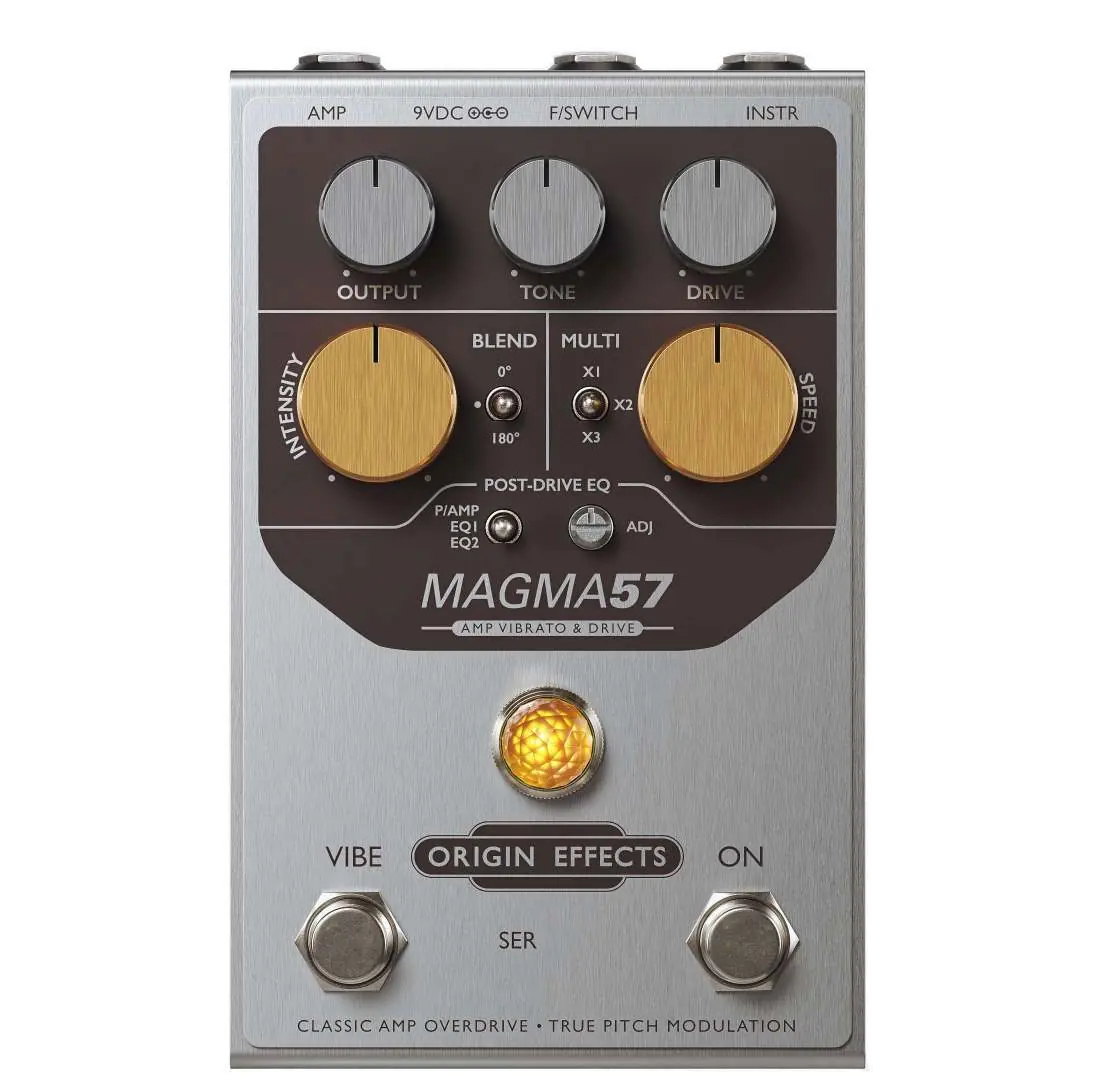
- INSTR: Connect your guitar or instrument signal source here.
- AMP: Connect to your amplifier, power amp, mixer, or recording interface. If using non-guitar speakers (e.g., studio monitors, PA), a speaker simulator is recommended.
- 9VDC: Use a 9V DC, 2.1mm centre-negative power supply (minimum 100mA).
- F/SWITCH: Connect an external footswitch or effects switcher (e.g., Boss ES-8, TheGigRig G2) for remote tap tempo and Vibe on/off control.
Main Controls
- ON footswitch: Toggles between bypass and effect modes.
- VIBE footswitch: Switches the modulation effect on/off.
- DRIVE: Adjusts the overdrive level, similar to a non-master-volume amp.
- TONE: Partially passive/active control; turn clockwise to boost treble, counter-clockwise to cut.
- OUTPUT: Sets the overall volume level after the simulated valve circuitry.
- SPEED: Sets the modulation rate, influenced by the MULTI switch.
- MULTI: Applies a multiplier (X1, X2, X3) to the speed for rhythmic subdivisions.
- INTENSITY: Controls the depth of the modulation effect.
- BLEND: Selects modulation flavor: Off (pure vibrato), 0° (phaser/chorus), or 180° (unique chorus).
Post-Drive EQ
The Post-Drive EQ ensures the pedal sounds great with any amplifier. Set the mode switch based on your setup:
- P/AMP: For flat-response power amps, mixers, or recording interfaces.
- EQ1: For bright-voiced guitar amps (e.g., Blackface Fender-style).
- EQ2: For fuller, mid-rich amps (e.g., Marshall-style).
Use the ADJ knob to fine-tune: turn clockwise if the tone is too bright/thin, or counter-clockwise if it is too dark/woolly.
Safety and Maintenance
Do not expose the device to water or heat sources. Clean only with a dry cloth. The pedal contains no user-serviceable parts; refer all repairs to qualified personnel. Be aware that the rubber feet may react with certain floor coatings; use a mat if necessary.
Practical help
Common problems
Tone sounds too bright or thin
Turn the ADJ control clockwise (only active in EQ1 or EQ2 modes).
Tone sounds too dark or woolly
Turn the ADJ control counter-clockwise (only active in EQ1 or EQ2 modes).
Pedal not powering on or potential damage
Ensure you are using a 9V DC, 2.1mm centre-negative power supply with at least 100mA.
Before use
- Verify power supply is 9V DC, 2.1mm centre-negative, >100mA.
- Set the POST-DRIVE EQ switch according to your amplifier type (P/AMP, EQ1, or EQ2).
- Ensure all audio cables are securely connected to INSTR and AMP jacks.
- If using an external switcher, ensure the TRS cable is configured correctly (Tip=Tap, Ring=Vibe, Sleeve=Ground).
Specs in practice
- Input Impedance
- 1M Ω (standard for guitar instruments).
- Output Impedance
- 1k Ω (low impedance for driving long cables or various inputs).
- Current Draw
- 100mA (minimum power supply requirement).
Images and diagrams
- The pedal features a top-mounted interface with dedicated knobs for Output, Tone, Drive, Intensity, and Speed.
- The Post-Drive EQ section includes a 3-way mode switch and an ADJ knob for fine-tuning output response.
- The F/SWITCH jack allows for remote control of tap tempo and vibrato switching.
Model compatibility
- Recommended to use a speaker simulator when connecting to PA speakers, studio monitors, or headphones.
- EQ1 is optimized for Blackface Fender-style amps.
- EQ2 is optimized for Marshall-style amps.

Manual page author
David Miller
Documentation analyst
Organizes user manual content into clear summaries, with attention to model details, product context, and everyday usability.