Power / USB Chargers
User Guide for Ororo 5V/3A Charger
Quick guide for the Ororo 5V/3A Charger. Learn how to use the folding plug, charge your battery, understand LED indicators, and follow safety guidelines.
Quick answers from the manual
Quick answer
- To use the Ororo 5V/3A charger, attach the appropriate regional plug (UK or EU), connect it to a wall outlet, and use the USB-C cable to connect to your battery. The battery is fully charged when all 4 LED lights on the battery remain solid. p. 1
Key actions
- Attach regional plug p. 1
- Connect to battery p. 1
Technical specifications
| Parameter | Value | Meaning | Pages |
|---|---|---|---|
| Input | 100V-240V, AC 50/60 Hz | Universal voltage input | p. 1 |
| Output | 5V / 3A | Charging power | p. 1 |
Show 1 more answers Show less
Where to find it in the PDF
- Product Overview and Instructions p. 1
Table of contents
Manual images
Click an image to enlargeQuick Guide
The Ororo 5V/3A Charger is designed to charge Ororo batteries. To begin, ensure the correct regional plug (UK or EU) is attached and fully unfolded. Connect the charger to a wall outlet, then use the provided USB-C cable to connect the charger to your battery. The LED indicator will show the charging status.
Product Overview
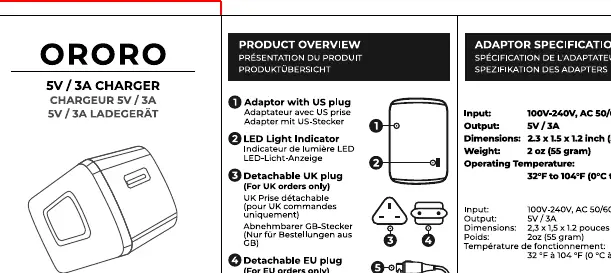
- 1. Plug with adapter: Main power plug assembly.
- 2. LED Light Indicator: Shows charging status.
- 3. Detachable UK plug: For UK use only.
- 4. Detachable EU plug: For EU use only.
- 5. USB Type-C to USB Type-A cable: For connecting the charger to the battery.
Specifications
- Input: 100V-240V, AC 50/60 Hz
- Output: 5V / 3A
- Dimensions: 2.3 x 1.5 x 1.2 inch (58 x 38 x 31 mm)
- Weight: 2 oz (55 gram)
- Operating Temperature: 32°F to 104°F (0°C to 40°C)
Instructions
Folding and Unfolding Plugs:
- UK/EU: Fold the US plug. Slide the UK or EU plug into the adapter until it clicks into place.
Charging the Battery:
- Plug the charger into a wall outlet.
- Connect the USB-C cable to the charger and the battery.
- The LED light on the battery will flash during charging.
- The battery is fully charged when all 4 LED lights remain solid.
Safety and Warnings
- Do not expose the charger to liquid.
- Do not use the charger if the cable or plug is damaged.
- Keep the charger away from extreme heat, humidity, or dusty areas.
- Do not touch the charger with wet hands.
- Always remove the charger from the wall outlet after charging is complete.
- Do not attempt to charge devices other than the intended Ororo battery.
Warranty and Support
Ororo provides a 1-year limited warranty covering defects in materials and workmanship. This warranty is non-transferable and requires proof of purchase. For support, contact [email protected] or visit the website at www.ororowear.com.
Official resources from the manual
Practical help
Common problems
Charger not working
Ensure the plug is fully unfolded and securely connected to the wall outlet.
Battery not charging
Verify the USB-C cable is firmly connected to both the charger and the battery.
Before use
- Check for physical damage to the charger or cable.
- Ensure the correct regional plug (UK/EU) is attached and unfolded.
- Verify the wall outlet is functional.
- Ensure the operating environment is between 32°F and 104°F (0°C to 40°C).
Show more Show less
Specs in practice
- Operating Temperature
- 32°F to 104°F (0°C to 40°C); do not use outside this range to prevent damage.
Images and diagrams
- The diagram shows the detachable plug mechanism for UK and EU regions.
- The LED indicator on the battery confirms charging status (flashing = charging, solid = full).
Model compatibility
- Designed specifically for Ororo batteries.
- Includes detachable UK and EU plugs.

Manual page author
Emily Carter
User documentation editor