Power / USB Chargers
User Manual for Traxxas USB-C 20W LiPo Battery Charger
Quick guide for the Traxxas USB-C 20W LiPo battery charger (Model 2920). Learn how to connect, charge, interpret LED status indicators, and troubleshoot common charging errors.
Quick answers from the manual
Quick answer
- Connect the charger to a USB-C power source (min 10W) first, then connect your Traxxas iD 2S LiPo battery. The LED will blink green during charging and turn solid green when complete. p. 2
Key actions
- Connect power source before battery p. 2
First start
- Connect USB-C cable to power source, then connect the 2S LiPo battery. p. 2
Problems and fixes
6 red blinks
Battery connected before power. Disconnect both, connect power first.
p. 2Error codes
| Code | Meaning | Action | Pages |
|---|---|---|---|
| 1 blink red | Power error | Check source compatibility | p. 2 |
| 4 blinks red | Internal temperature too high | Disconnect and let cool | p. 2 |
Technical specifications
| Parameter | Value | Meaning | Pages |
|---|---|---|---|
| Power Requirement | 10W min (20W recommended) | Minimum power for operation; 20W+ QC 3.0 for full speed. | p. 2 |
Where to find it in the PDF
- Safety and Accessories p. 1
- Operation and Troubleshooting p. 2
Table of contents
Quick Start Guide
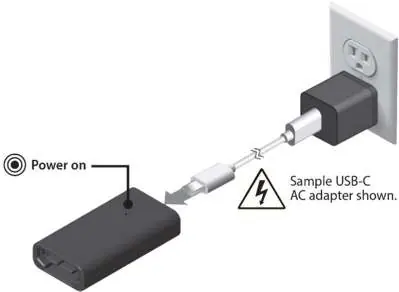
To charge your battery, first connect the USB-C cable to a power source (minimum 10W, 20W recommended). Once the charger is powered, connect your Traxxas iD 2S LiPo battery. The LED will blink green to indicate charging progress and turn solid green when the battery is fully charged.
Safety Warnings
- This product is not a toy and is not suitable for children under 14 years of age.
- Never leave the charger and battery unattended during use.
- Do not charge damaged or wet batteries.
- Do not charge in extreme heat, cold, or direct sunlight.
- Do not disassemble the charger.
- Always charge on a heat-resistant surface.
- If the battery becomes hot or swells during charging, stop immediately.
- Ensure the charger settings are appropriate for the battery being charged.
Operation
- Connect the USB-C cable to a USB-C power source. A red LED will light up, indicating power is connected.
- Connect the Traxxas iD 2S LiPo battery to the charger to begin the charging process.
- The LED will blink green during charging. The number of blinks indicates the charge level.
- When the LED turns solid green, the charging process is complete.
Important: The charger must be connected to the USB-C power source before connecting the battery. If the battery is connected first, the charger will display an error (red LED blinks 6 times).
LED Status Indicators
- Solid Red: Ready for charging.
- Slow Blinking Green: Charging in progress.
- Solid Green: Battery fully charged.
- Blinking Red: Charger error.
Charging Progress (Green Blinks):
- 1 blink: 0-25%
- 2 blinks: 25-50%
- 3 blinks: 50-75%
- 4 blinks: 75% or more
Troubleshooting
If the LED blinks red, refer to the error codes below:
- 1 blink: Power error. Check the USB-C source for compatibility.
- 2 blinks: Battery voltage too high or too low. Discontinue use of the battery.
- 3 blinks: Charging timeout. Disconnect the battery. If hot, stop using. If not hot, reconnect.
- 4 blinks: Internal charger temperature too high. Disconnect and let cool.
- 5 blinks: Battery does not match charger specifications.
- 6 blinks: Battery connected before power. Disconnect both, then connect power first.
- Blinking Red and Green: Internal charger error. Disconnect and stop using.
Technical Requirements
- Power Source: Requires at least 10W. For maximum speed, use a 20W+ power source compatible with Quick Charge 3.0 (QC 3.0).
- Compatibility: Designed for Traxxas iD 2S LiPo batteries.
Practical help
Common problems
Charger blinks red
Identify the error code by the number of blinks and follow the specific troubleshooting steps (e.g., check power source, let cool, or disconnect battery).
Battery not charging / 6 red blinks
You connected the battery before the power source. Disconnect both, connect the charger to the USB-C power source first, then connect the battery.
Slow charging
Ensure your USB-C power adapter provides at least 20W and supports Quick Charge 3.0 (QC 3.0).
Before use
- Ensure the battery is not damaged, wet, or swollen.
- Place the charger on a heat-resistant surface.
- Verify your USB-C power adapter provides at least 10W.
- Connect the charger to the power source before connecting the battery.
Specs in practice
- Compatibility
- Specifically designed for Traxxas iD 2S LiPo batteries.
Images and diagrams
- Step 1: Connect USB-C cable to power source.
- Step 2: Connect the 2S LiPo battery to the charger.
- Step 3: Monitor LED status for charging progress.
Model compatibility
- Compatible with Traxxas iD 2S LiPo batteries.
- Requires USB-C power source (min 10W).

Manual page author
Emily Carter
User documentation editor
Prepares concise manual descriptions and highlights the most useful setup, operation, and maintenance information for readers.