Home Appliances / Small Kitchen Appliances
User Manual for OXO Good Grips 11 lb Glass Scale with Pull-Out Display
Quick guide for the OXO Good Grips 11 lb Glass Scale. Learn how to use the pull-out display, zero/tare function, change units, and maintain your scale for accurate measurements.
Table of contents
Manual images
Click an image to enlargeQuick guide from the manual
The OXO Good Grips 11 lb Glass Scale is designed for precise kitchen measurements. It features a unique pull-out display for better visibility when using large containers, unit conversion, and a zero/tare function for adding multiple ingredients. The scale automatically turns on when the display is pulled out and has an auto-shutoff feature to preserve battery life.
Battery Installation
The scale requires four AAA batteries. To install:
- Locate the battery compartment on the bottom of the scale.
- Push the tab in to remove the battery door.
- Insert four AAA batteries, ensuring the +/- ends align with the symbols in the compartment.
- Replace the battery door.
Using the Scale
Pull-Out Display: For large containers, pull the display unit away from the base. The scale will automatically turn on. To retract, slide the display back into the base where magnets will secure it.
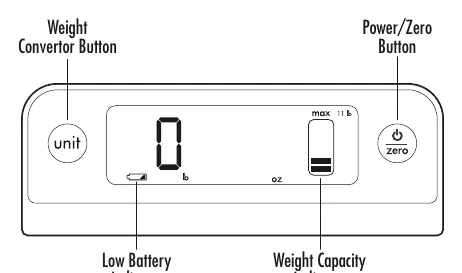
Unit Conversion: Press the Unit button to cycle through measuring in ounces, ounces and pounds, grams, or grams and kilograms.
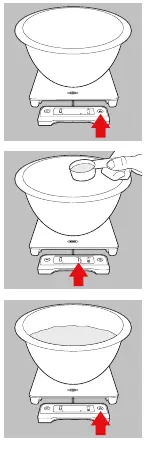
Zeroing and Add & Weigh: To weigh ingredients in a container, place the empty container on the scale and press the Zero button to reset the display to zero. You can then add ingredients. To weigh multiple ingredients, press the Zero button again after adding each ingredient to reset the scale to zero.
Care and Maintenance
- Wipe the glass platform clean with a damp cloth.
- Do not submerge the scale in water.
- Do not place the scale in the dishwasher.
- Do not place heavy objects on the scale during storage to maintain accuracy.
Troubleshooting and Indicators
- Err: Maximum capacity (11 lbs or 5 kg) has been reached. Remove excess weight immediately.
- Low Battery Indicator: Appears in the lower-left corner when batteries need replacement.
- Negative Number: Appears after a container is removed. Press the Zero button to reset for a new measurement.
Practical help
Common problems
Err displayed on screen
Maximum capacity (11 lbs / 5 kg) has been reached. Remove excess weight immediately.
Negative number on display
This occurs after removing a container. Press the Zero button to reset the scale for a new measurement.
Scale does not turn on
Check that the four AAA batteries are installed correctly and are not depleted.
Before use
- Install four AAA batteries in the bottom compartment.
- Place the scale on a flat, stable surface.
- Pull out the display unit if using a large container that obscures the screen.
- Ensure the glass platform is clean and dry.
Specs in practice
- Standby Mode
- Activates after 5 minutes of inactivity; memory is retained.
- Auto Shut Off
- Turns the scale off completely after 45 minutes of inactivity to save battery.
Images and diagrams
- Pull-out display: Can be detached from the base for better visibility when using large bowls.
- Zero/Tare button: Used to offset the weight of a container or to weigh multiple ingredients consecutively.
Model compatibility
- Supports units: ounces, pounds, grams, and kilograms.

Manual page author
Emily Carter
User documentation editor
Prepares concise manual descriptions and highlights the most useful setup, operation, and maintenance information for readers.