Home Appliances / Small Kitchen Appliances
User Manual for OXO Barista Brain 12-Cup Coffee Brewing System
Quick guide for the OXO Barista Brain 12-Cup Coffee Brewing System. Learn how to brew coffee, heat water, set the wake-up timer, descale, and troubleshoot common issues.
Table of contents
Manual images
Click an image to enlargeQuick Start Guide
Before using your coffee brewing system for the first time, follow these steps:
- Remove all stickers, labels, and packing materials.
- Wash the kettle, carafe, brew basket, silicone internal mixing tube, and scoop with soap and water.
- Install the silicone internal mixing tube into the lid of the stainless steel carafe.
- Plug the unit into a 110V outlet.
- Twist the dial and press the OXO button to set the clock and select your temperature scale (Fahrenheit or Celsius).
- Set the boiling point based on your altitude (default is 212°F / 100°C).
- Run one 'Brew Coffee' cycle with water only (no coffee grounds) to clean the system.
Meet Your Brewing System
The system features an intelligent microprocessor that monitors time, temperature, and volume. Key components include:
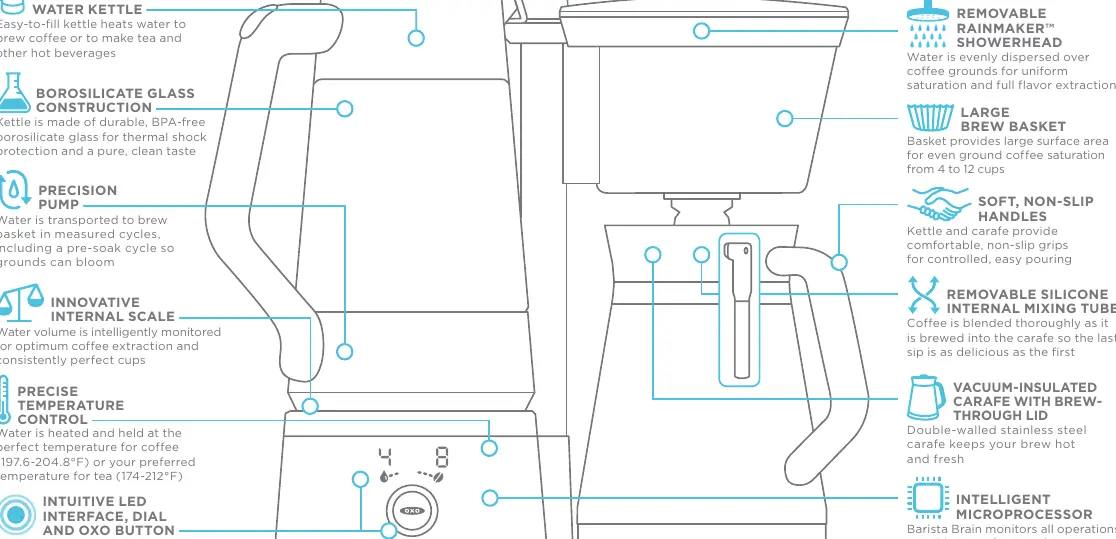
- Removable Water Kettle: Heats water for coffee or tea.
- Rainmaker Showerhead: Evenly disperses water over grounds.
- Internal Scale: Monitors water volume for precise extraction.
- Vacuum-Insulated Carafe: Keeps coffee hot and fresh.
- LED Interface: Allows for cup selection, programming, and timer settings.
Brewing Coffee
- Fill the removable glass kettle with cold water between the 'MIN' and 'MAX' markings.
- Place the kettle on the base and rotate it until the spout engages with the connector.
- Place a paper filter in the brew basket and add medium-ground coffee.
- Press the OXO button to enter the cup setting menu.
- Twist the dial to select the number of cups (4-12) and press the OXO button to start brewing.
Heating Water
- Fill the kettle with water between 'MIN' and 'MAX'.
- Place the kettle on the base. Do not engage the spout with the connector.
- Press the OXO button to enter the water temperature menu.
- Twist the dial to select the desired temperature and press the OXO button to start heating.
Setting Time and Boiling Point
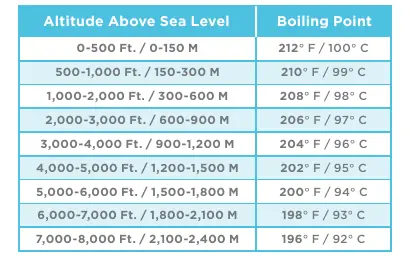
To set the time, hold the OXO button until '12H' blinks. Use the dial to switch between 12/24-hour formats and set the time. To set the boiling point, navigate through the time settings until you reach the boiling point menu. Adjust the temperature using the dial to match your altitude according to the chart in the manual.
Wake-up Timer
To set the wake-up timer, hold the OXO button until the time flashes and the timer icon appears. Use the dial to set the desired time and number of cups. Press the OXO button to confirm. Ensure the kettle is filled and the carafe is in place.
Cleaning and Descaling
Regular descaling is required to maintain performance. When the descaling icon appears:
- Fill the kettle with descaling solution and water to the '10 CUP' line.
- Ensure the carafe is in place and the spout is engaged.
- Press the OXO button to enter the menu and select the descaling cycle.
- Repeat until the icon turns off, then run a cycle with clean water.
Troubleshooting
If you encounter issues, check the following:
- No lights: Ensure the unit is plugged in.
- Button light on but not working: Ensure the carafe is in place, water is in the kettle, or the unit may need descaling.
- Brew basket overflowing: Check for coffee ground too finely, using multiple filters, or a blocked drain hole.
Practical help
Common problems
None of the lights are illuminating
Check to ensure that your Coffee Brewing System is plugged into an outlet.
OXO button light is on, but the coffee maker is not working
Ensure the stainless steel carafe is properly in place, water is in the kettle, or perform descaling.
Brew basket is overflowing
Avoid using coffee ground too finely, do not use two or more paper filters, and check for blockages in the brew basket drain.
Before use
- Remove all stickers and packing materials.
- Wash kettle, carafe, brew basket, and mixing tube.
- Install silicone internal mixing tube in carafe lid.
- Set clock and boiling point (if at high altitude).
- Run one 'Brew Coffee' cycle without coffee grounds.
Specs in practice
- 197.6-204.8°F
- Optimal coffee brewing temperature range.
Images and diagrams
- The control panel uses a dial and OXO button to select settings.
- The kettle must be rotated to engage the spout with the connector for brewing coffee.
Model compatibility
- Use only with 110V AC outlet.
- Do not use with high-wattage appliances on the same circuit.
- Not for outdoor use.

Manual page author
Michael Turner
Technical manual editor
Reviews PDF manuals for structure, safety notes, and practical product details so readers can find the right information quickly.