Furniture / Home Furnishing
Proaim 12FT Camera Crane Jib with Stand Assembly Guide
A comprehensive assembly and setup guide for the Proaim 12FT Camera Crane Jib with Stand. Includes step-by-step instructions for jib arm assembly, pan-tilt head integration, and joystick controller configuration.
Table of contents
Manual images
Jump to the sectionQuick guide from the manual
This document provides assembly instructions for the Proaim 12FT Camera Crane Jib with Stand (P-12-JS). It covers the physical assembly of the jib arm, integration of the pan-tilt head, and the setup of the joystick controller. Ensure all components listed in the box contents are present before beginning assembly.
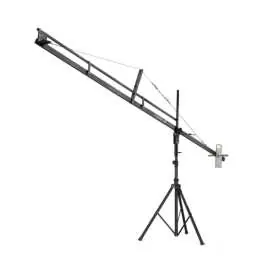
Jib Stand Setup
Start by loosening the lower knob on the Jib Stand. Extend the legs to their widest position to ensure maximum stability, then re-tighten the knob securely.
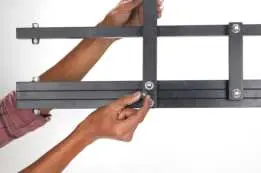
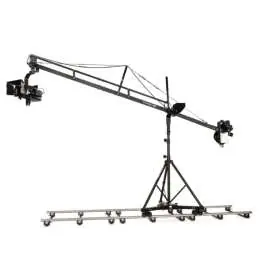
Assembling The Jib Arm
Insert the Center Post of the jib onto the stand and secure it using the provided pins. Tighten the attachment knobs to ensure the post is firmly fixed. Connect the subsequent jib sections (Middle, Front, and End sections) by aligning the holes and securing them with the provided bolts, nuts, and washers. Use the included spanners and Allen keys for all tightening procedures.
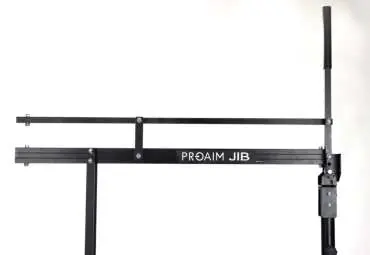
Pan Tilt Head Setup
Attach the Jr. Pan-Tilt Head to the head plate on the Front Section. Insert the screws into the threaded holes and tighten them securely. Connect the 4-pin male cable connector from the head to the corresponding female connector for panning and tilting functionality.

Attaching Joystick Controller
Unwrap the Velcro strap from the 12V joystick controller and remove the protective cap. Loosen the knob at the back of the controller to mount it onto the weight rod, then tighten both knobs to secure it. Connect the 4-pin power cable to the controller and attach the 12V adapter cable, plugging it into a universal power source.
Joystick Controlled Movement Functions
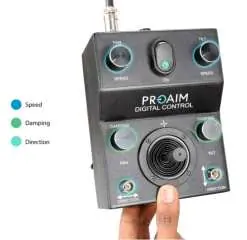
- Speed Controller: Adjusts the pan and tilt speed to match your shot requirements.
- Damping Control: Prevents the head from stopping abruptly, allowing for smooth, jerk-free endings.
- Pan-Tilt Direction: Allows you to reverse the panning and tilting directions as needed.
If the joystick control movement is opposite to your input, disconnect the motor cables, rotate them 180 degrees, and reconnect them.
Manufacturer information
Proaim
Practical help
Common problems
Joystick control movement is reversed
Undo the motor connectors, rotate them 180 degrees, and re-install.
Head stops with a jerk
Adjust the Damping Control on the joystick controller to achieve smoother stops.
Before use
- Inspect all package contents against the list in the manual.
- Ensure the Jib Stand legs are fully extended and the lower knob is tightened.
- Verify all bolts and nuts are securely tightened using the provided spanners and Allen keys.
- Check that the 4-pin cables are firmly connected to the head and joystick controller.
- Ensure the camera is properly balanced and attached to the head plate using the check nut.
Specs in practice
- 12V Joystick Controller
- The primary control unit for managing pan, tilt, speed, and damping.
- 4-pin Connector
- Standard interface for connecting the pan-tilt head to the joystick controller.
Images and diagrams
- The manual includes detailed images for each assembly step, showing the correct alignment of sections and the use of tools.
- The joystick controller diagram highlights the specific knobs for Speed, Damping, and Direction control.
Model compatibility
- The Jr. Pan-Tilt Head is not included with the base Jib kit.
- The system is designed for use with compatible Proaim Jr. Pan-Tilt heads.

Manual page author
Michael Turner
Technical manual editor
Reviews PDF manuals for structure, safety notes, and practical product details so readers can find the right information quickly.