Tools / Battery Testers
User Manual for Protech 12VDC Lithium & Lead Acid Battery Tester QP2262
Quick guide for the Protech 12VDC Lithium & Lead Acid Battery Tester (QP2262). Learn how to perform battery, cranking, and charging system tests, interpret results, and use the PC software for data printing.
Table of contents
Manual images
Click an image to enlargeQuick guide from the manual
This device is designed to test 12V lead-acid and lithium batteries, as well as 12V/24V cranking and charging systems. Safety Warning: Do not smoke, strike a match, or cause sparks near the vehicle during testing. Keep the device away from fuel and fuel vapors. Ensure alligator clips are securely attached and removed only after testing is complete.
Product Description
The QP2262 uses conductance test technology to measure cold cranking current capacity and battery health. It features a backlit LCD, navigation keys (Up, Down, Enter, Exit), and a mini-USB port for data transfer to a computer.
System Setup
Access the System Setup menu to configure the following:
- Language: Select from available languages (Deutsch, English, Español, Français, Italiano, Nederlands).
- Fn Setup: Configure the one-click function (Voltage or Quick Test Mode).
- Contrast: Adjust the LCD screen visibility.
- Tool Information: View current software and hardware versions.
Battery Testing Procedure
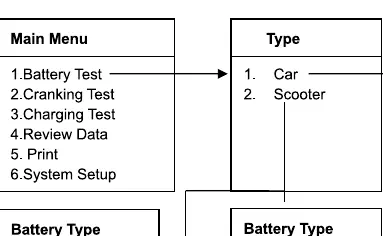
- Connect the tester to the vehicle battery.
- Select Battery Test from the Main Menu.
- Select the vehicle type (Car or Scooter).
- Select the specific battery type (e.g., Regular Flooded, Lithium Ion, AGM, EFB).
- Select the battery standard (e.g., CCA, BCI, CA, MCA, JIS, DIN, IEC, EN, SAE, GB) and input the rated value marked on the battery.
- The device will display the result in approximately 5 seconds (e.g., Good Battery, Replace, Good & Recharge, Bad Cell).
Cranking and Charging Tests
Cranking Test: Select Cranking Test from the menu. Choose 12V or 24V system. Start the engine as prompted. The device will display the actual cranking voltage and time.
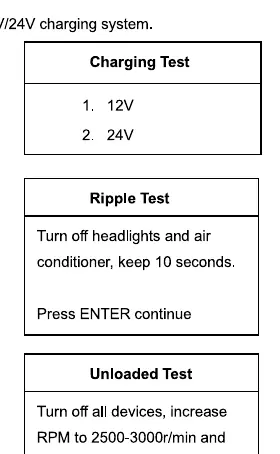
Charging Test: Select Charging Test. Follow the on-screen prompts to perform the Ripple Test, Unloaded Test, and Loaded Test. Ensure you follow the instructions to turn off/on headlights and air conditioning as requested by the device.
Data Management
Review Data: Access the history of previous battery test results directly on the device.
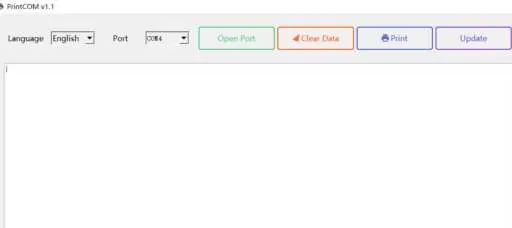
Print Data: To print results, connect the device to a PC via the included USB cable. Install the USB driver and Print Software from the provided CD. Ensure you click Open Port in the software to enable data transfer before selecting the Print function on the tester.
Practical help
Common problems
Device shows 'NO OUTPUT' during charging test
The charging system has no output. Check the alternator or contact a maintenance service center immediately.
Print software not outputting results
Ensure the 'Open Port' button is clicked in the PC software. If not clicked, the software will not receive data.
Abnormal noise or smoke during use
Stop using the device immediately and contact the supplier.
Before use
- Ensure the vehicle engine is turned off before connecting the tester.
- Keep sparks, flames, and cigarettes away from the battery area.
- Ensure alligator clips are securely attached to the battery terminals.
- Verify the battery type (Lithium, Lead-acid, etc.) matches the selection on the device.
- Check that the battery rating (CCA, etc.) matches the label on the battery.
Specs in practice
- CCA (Cold Cranking Amps)
- Measures the battery's ability to start an engine in cold temperatures.
- Internal R (Resistance)
- Indicates battery health; lower values generally suggest a healthier battery.
- Charging Test
- Evaluates the alternator's performance under load and no-load conditions.
Images and diagrams
- The device features a backlit LCD screen, navigation keys (Up/Down/Enter/Exit), and a mini-USB port for PC connectivity.
Model compatibility
- Supports 12V batteries (Lead-acid and Lithium).
- Supports 12V/24V cranking and charging systems.
- Lithium Ion battery testing is only available for Scooter battery types.

Manual page author
David Miller
Documentation analyst
Organizes user manual content into clear summaries, with attention to model details, product context, and everyday usability.