Tools / Battery Testers
User Manual for TOPDON BT MOBILE lite Battery Tester
Quick guide for the TOPDON BT MOBILE lite 12V wireless battery and system tester. Includes app setup, testing procedures for battery health, cranking, and charging systems, compatibility details, and technical specifications.
Table of contents
Manual images
Click an image to enlargeQuick Start Guide
To begin using your TOPDON BT MOBILE lite, follow these essential steps:
- Download and install the BT MOBILE app from the Apple Store or Google Play.
- Ensure your mobile device meets the requirements (iOS 8.0+ or Android 4.3+).
- Clean the battery terminals using a wire brush to ensure accurate readings.
- Connect the red (+) clamp to the positive terminal and the black (-) clamp to the negative terminal.
- Open the app, enable Bluetooth, and follow the on-screen instructions to connect to the device.
About the Device
The BT MOBILE lite is a 12V wireless battery and system tester. It utilizes advanced conductance detection and reverse polarity protection to provide detailed information on battery health, cranking voltage, and charging system performance.
Compatibility
The device supports the following 12V battery types:
- Regular Flooded
- AGM Flat plate
- AGM Spiral
- GEL
- EFB
Note: If your battery type is unknown, select AGM to conduct the test; the error margin is within 10%.
App Installation & Setup
Download the BT MOBILE app. Upon first launch, you can register with your email or skip the login process. Ensure Bluetooth is enabled on your smartphone to establish a connection with the tester.
Operation
Before Testing
Before testing a battery in a vehicle, turn off the ignition, all accessories, and loads. Close all vehicle doors and the trunk lid. Ensure battery terminals are clean. Corrosion between the tester clamps and battery posts will degrade efficiency.
Battery Test
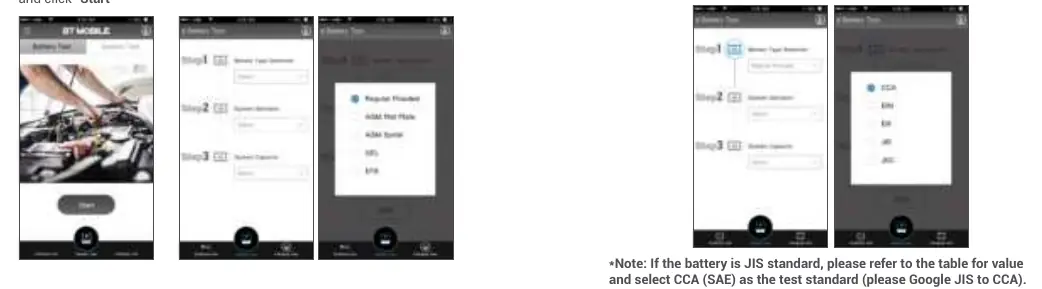
- Open the app and log in.
- Click the flashing Bluetooth logo in the upper right corner to connect.
- Select Battery Test on the home screen and click Start.
- Select the battery type and standard (CCA, etc.) as marked on the battery label.
- Click Next to view the results (SOH, SOC, Voltage, etc.).
Cranking Test
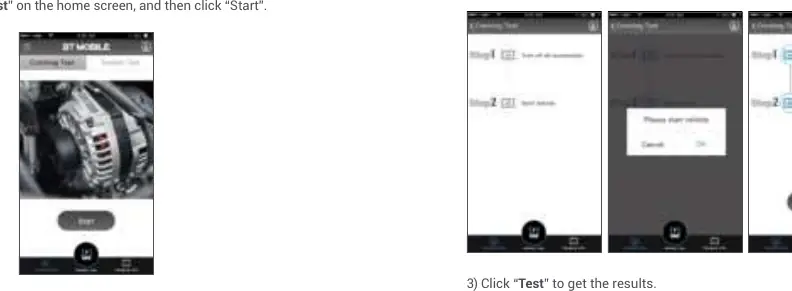
- Select Cranking Test on the home screen and click Start.
- Follow the on-screen prompts to start the vehicle.
- Click Test to analyze the cranking voltage and time.
Charging Test
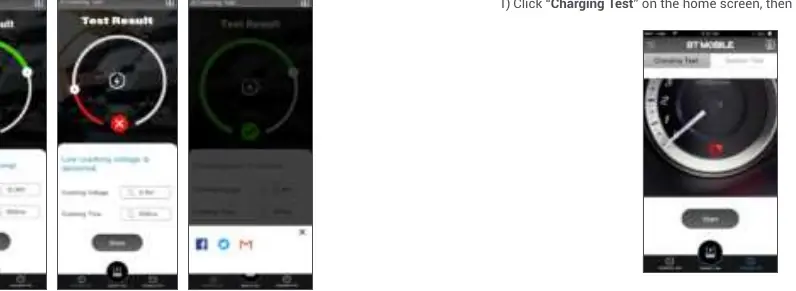
- Select Charging Test on the home screen and click Start.
- The engine must be ON during this test.
- Follow the prompts, step on the accelerator to increase RPM to 2500, and hold for 5 seconds.
- Click Next to view the charging system results.
System Test
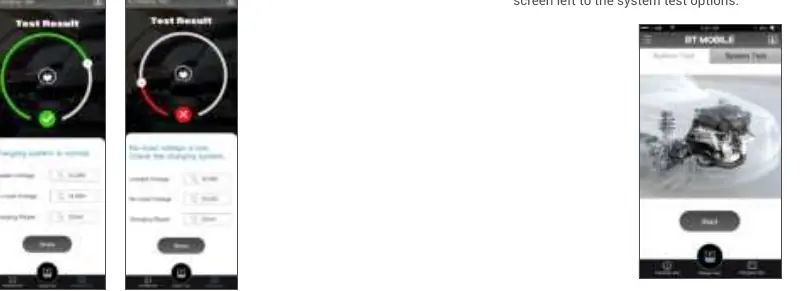
This provides an overall test for the battery. Select System Test from the home screen to run all tests (Battery, Cranking, and Charging) sequentially and view a comprehensive report.
Technical Specifications
- Working Temperature: -20°C to 65°C (-4°F to 140°F)
- Storage Temperature: -20°C to 70°C (-4°F to 158°F)
- Dimensions: 81 x 68 x 27 mm (3.19 x 2.68 x 1.06 inches)
- Weight: 250 g (8.81 oz)
Safety & Warnings
- Do not place the tester near the engine or exhaust pipe to avoid high-temperature damage.
- Do not smoke, cause sparks, or strike matches near the battery during testing.
- Do not remove battery clamps while testing.
- Do not expose the tester to highly humid or dusty environments.
- Do not disassemble the tester.
Troubleshooting (FAQ)
- Can it test alternators? Yes.
- Can it test motorcycle batteries? Yes, if they are 12V and between 100 and 2000 CCA.
- Can it test deep cycle or marine batteries? Yes.
- What do SOH, SOC, and BAT mean? SOH is State of Health, SOC is State of Charge, and BAT is the Resistance Value.
Practical help
Common problems
Bluetooth connection fails
Ensure Bluetooth is enabled on your phone and the device is within range.
Inaccurate test results
Ensure battery terminals are clean and free of grease or corrosion; use a wire brush if necessary.
Unknown battery type
If the battery type is not listed, select 'AGM' to conduct the test; the error margin is within 10%.
Before use
- Turn off the vehicle ignition, accessories, and all electrical loads.
- Close all vehicle doors and the trunk lid.
- Clean battery terminals with a wire brush.
- Ensure battery clamps are securely attached to the correct terminals (Red to +, Black to -).
- Download and install the 'BT MOBILE' app.
Specs in practice
- Working Temperature
- -20°C to 65°C (-4°F to 140°F)
Images and diagrams
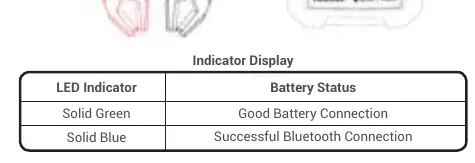
- LED Indicators: Solid Green indicates a good battery connection; Solid Blue indicates a successful Bluetooth connection.
Model compatibility
- Supports 12V batteries only.
- Compatible with Regular Flooded, AGM Flat plate, AGM Spiral, GEL, and EFB batteries.

Manual page author
Emily Carter
User documentation editor
Prepares concise manual descriptions and highlights the most useful setup, operation, and maintenance information for readers.