Tools / Battery Testers
Application Note: Battery Test and Simulation with KickStart Software
A comprehensive guide to using Tektronix SMUs and KickStart Software for battery characterization, simulation, and cycle testing, including setup instructions and instrument comparisons.
Quick answers from the manual
Quick answer
- Use the KickStart Software Battery Simulator App (v2.11.0+) with compatible Tektronix SMUs (2400/2600B series) to perform battery model generation, simulation, and cycle testing. Connect the SMU using a 4-wire sense configuration for accurate results. p. 3, 6, 8, 10
Key actions
- Generate a battery discharge model p. 6
- Simulate a battery p. 8
- Perform a battery cycle test p. 10
Problems and fixes
Battery pack anti-tamper protection
Use a wired device or bypass the protection if the battery pack fails after reassembly.
p. 8Technical specifications
| Parameter | Value | Meaning | Pages |
|---|---|---|---|
| 2461 Graphical SMU Sourcing | 100 V; 7 A (10 A Pulse) | Maximum voltage and current sourcing capability. | p. 5 |
| 2281S Battery Simulator Sourcing | 20 V; 6 A | Maximum voltage and current sourcing capability. | p. 4 |
Where to find it in the PDF
- Introduction p. 2
- Battery Model Generation p. 6
- Battery Simulation p. 8
- Battery Cycle Testing p. 10
Table of contents
Manual images
Click an image to enlargeQuick guide from the manual
This application note provides instructions for using the KickStart Software Battery Simulator App (version 2.11.0 or later) with Tektronix Source Measure Units (SMUs) to characterize, optimize, and exercise batteries. It covers the setup for battery model generation, battery simulation, and long-term battery cycle testing.
Battery model generation
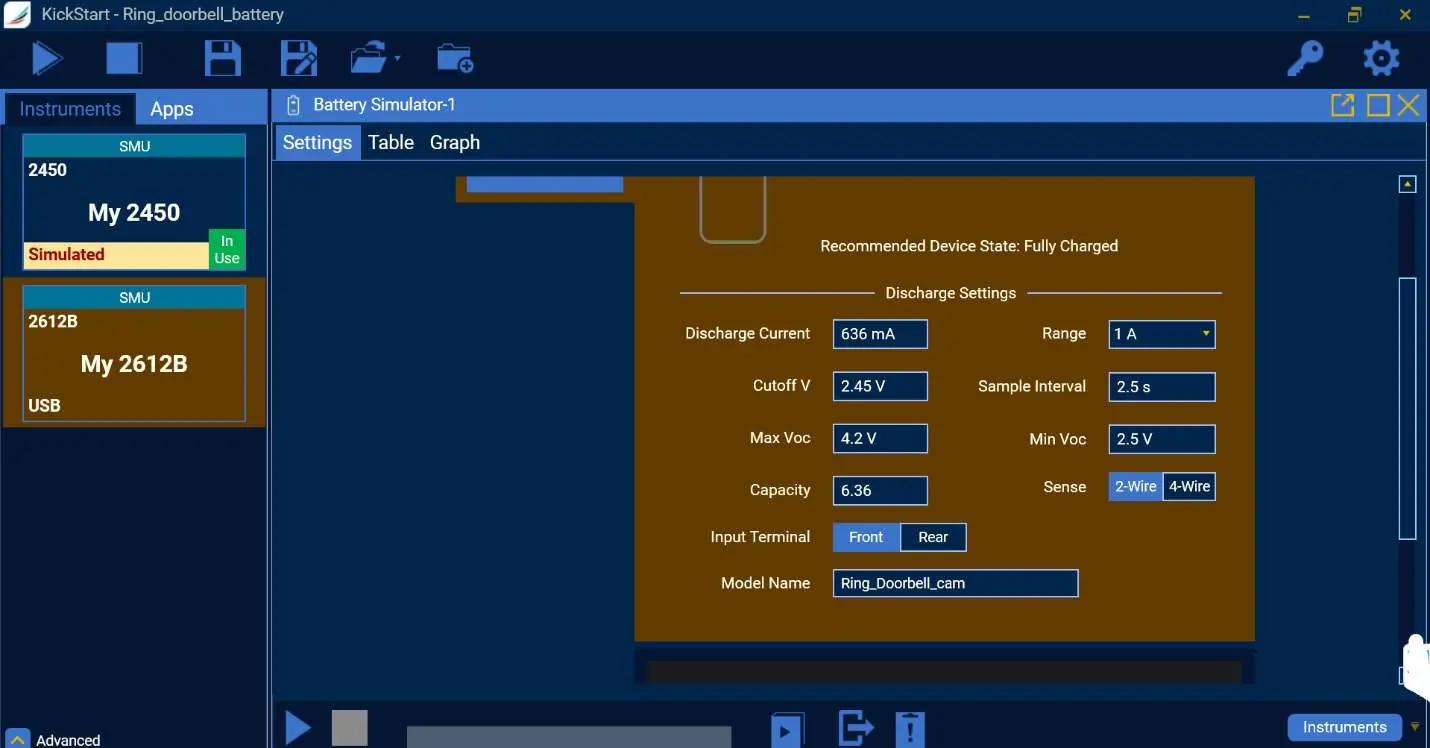
To generate a battery discharge model:
- Connect the SMU to the battery using a four-wire sense connection.
- Open the Battery Simulator App in KickStart.
- Select the "Generate Discharge Model" tab.
- Enter battery parameters: Discharge Current, Cutoff Voltage, Max/Min Voltage, and Capacity.
- Click "Run" to begin the discharge and model generation.
Battery simulation
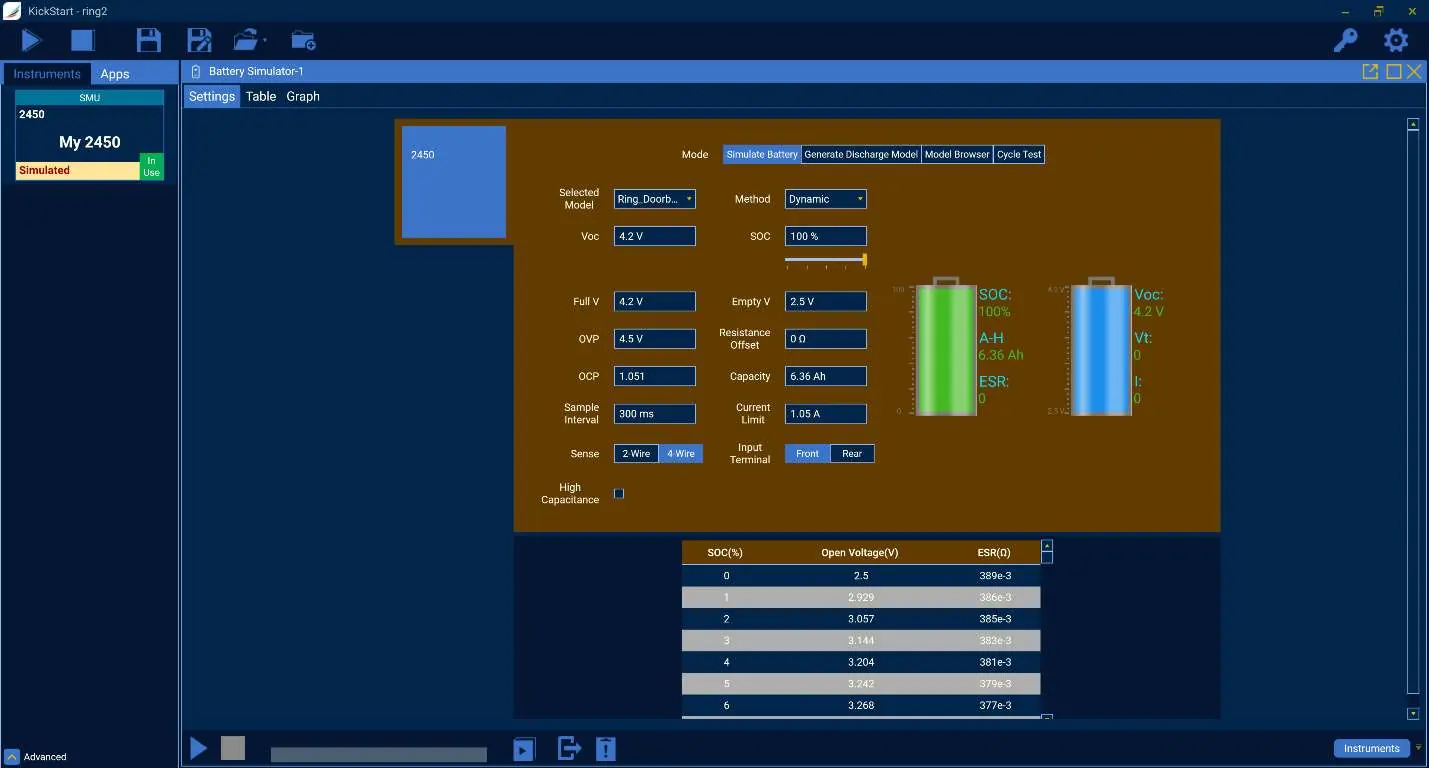
Once a model is generated or imported:
- Select the "Simulate Battery" tab.
- Choose the desired battery model file.
- Configure settings such as Voltage Empty, Voltage Full, and Current Limit.
- Click "Run" to have the SMU act as the battery to power the device under test (DUT).
Battery cycle testing
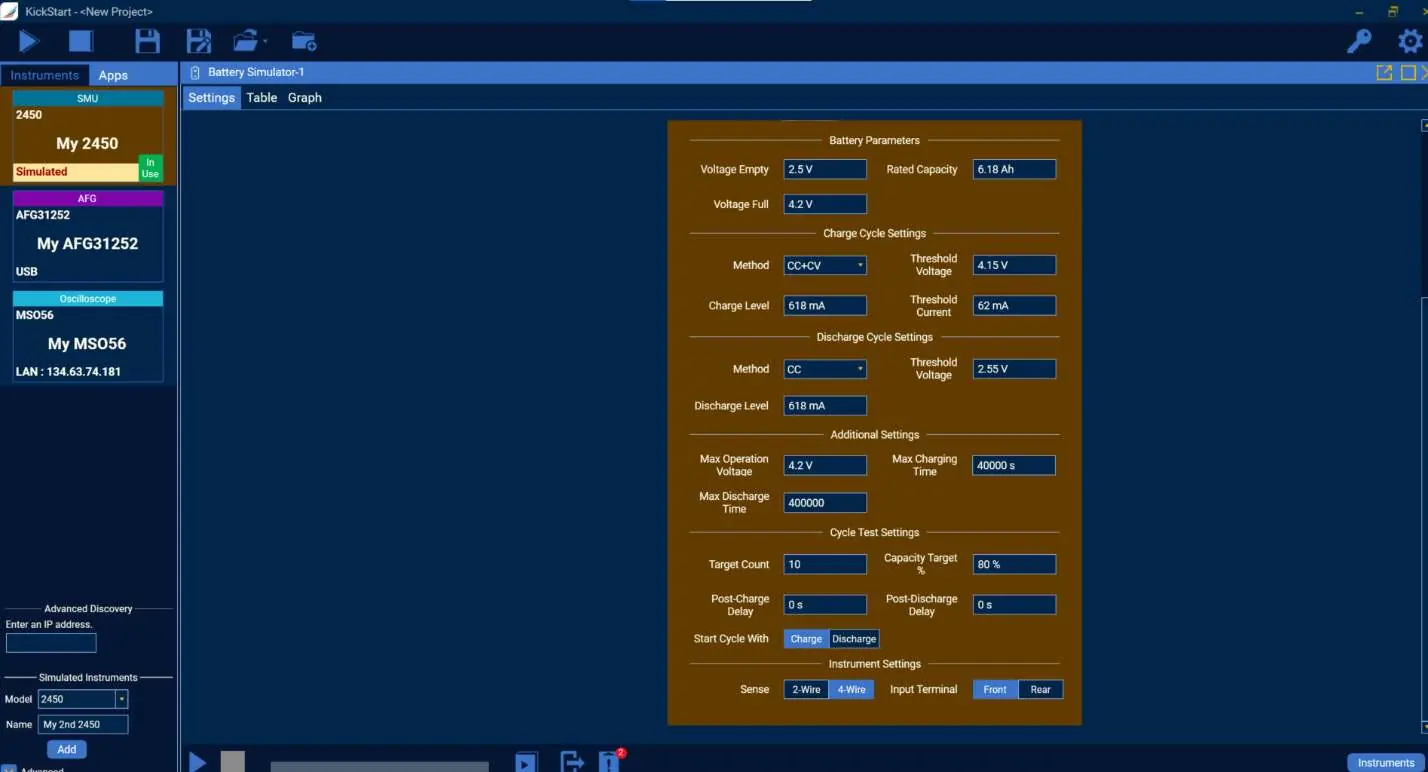
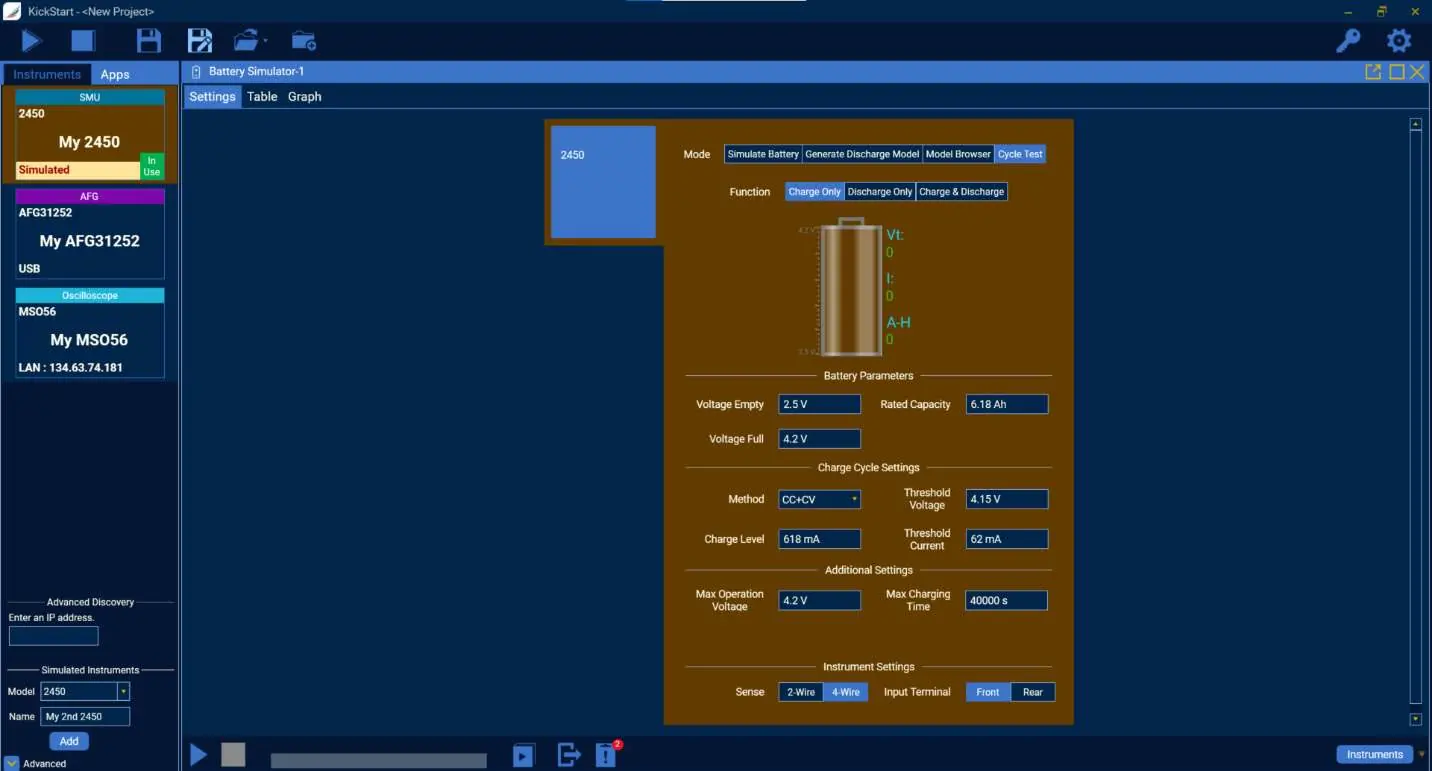
To test battery lifespan over multiple cycles:
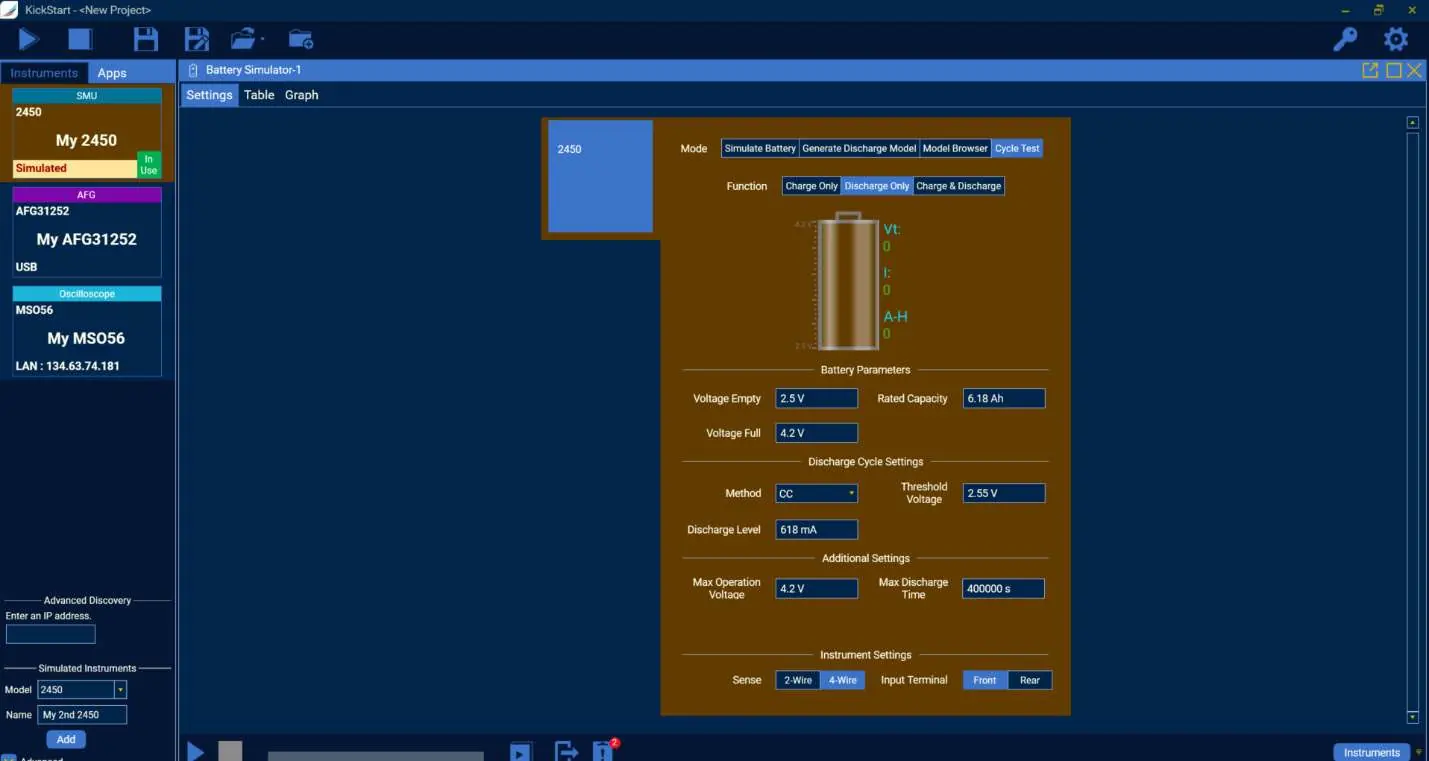
- Navigate to the "Cycle Test" tab.
- Set Charge and Discharge parameters (Method, Level, Threshold Voltage).
- Define cycle limits such as Target Count and Capacity Target %.
- The test will automatically charge and discharge the battery to determine capacity degradation.
Instrument compatibility
Different instruments offer varying capabilities for battery testing:
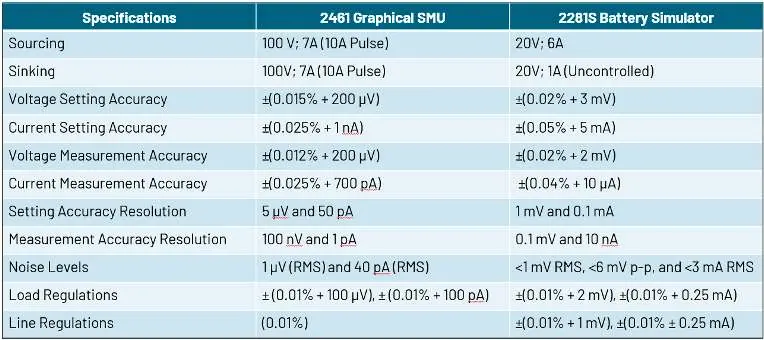
- 2400 Graphical Series SMUs: Suitable for model generation and simulation.
- 2600B Series SMUs: Suitable for model generation, simulation, and cycle testing.
- 2281S Battery Simulator: Specialized for battery simulation.
- 2380 Electronic Load: Primarily for discharge model generation.
Practical help
Common problems
Battery pack anti-tamper protection
Some consumer battery packs have internal protection that prevents operation after disassembly. If the pack fails to work after reassembly, use a device powered by external wires or bypass the protection if possible.
Test failure due to time limits
If a charge/discharge cycle does not complete before the Max Charging Time or Max Discharging Time parameters are met, the test will end with a failure message.
Inaccurate capacity measurements
Ensure a four-wire sense connection is used to eliminate lead resistance errors, especially when dealing with low-voltage or high-current battery testing.
Before use
- Verify KickStart Software version 2.11.0 or higher is installed.
- Confirm SMU compatibility (2400/2600B series) for the intended test type.
- Identify battery chemistry and rated capacity.
- Set up 4-wire sense connection for accurate measurements.
- Ensure the DUT (Device Under Test) is properly isolated from its original power source.
Specs in practice
- Compliance Mode
- The state where the SMU limits the output voltage or current to prevent damage.
Images and diagrams
- Figure 3: Shows a 2281S SMU connected to a battery in a 4-wire sense configuration.
- Figure 12: Illustrates the settings panel for generating a discharge model.
- Figure 18: Illustrates the settings panel for configuring a battery cycle test.
Model compatibility
- 2450 SMU is suitable for model generation and simulation but not cycle testing.
- 2600B Series SMUs support model generation, simulation, and cycle testing.
- 2380 Electronic Load is limited to battery discharge model generation.

Manual page author
David Miller
Documentation analyst
Organizes user manual content into clear summaries, with attention to model details, product context, and everyday usability.