Tools / Battery Testers
User Manual for TOPDON BTMOBILE PROS 12V Wireless Battery and System Tester
Quick guide for the TOPDON BTMOBILE PROS 12V Wireless Battery and System Tester. Learn how to install the app, perform battery, cranking, and charging tests, and understand LED indicators.
Table of contents
Manual images
Click an image to enlargeQuick guide from the manual
The TOPDON BTMOBILE PROS is a wireless 12V battery and system tester. To begin, download the app by scanning the QR code or visiting the official website. Ensure your mobile device has Bluetooth enabled. Before testing, turn off the vehicle ignition, all accessories, and loads, and close all doors. Clean the battery terminals with a wire brush for the most accurate results.
Package List
- TOPDON BTMOBILE PROS
- User Manual
- EVA Carrying Case
Compatibility
The tester works with 12V batteries, including:
- Regular Flooded
- AGM Flat plate
- AGM Spiral
- GEL
- EFB
If your battery type is unknown, select AGM; the error margin is within 10%.
LED Indicator Guide
- Green Light: Successful Battery Connection
- Blue Light: Successful Bluetooth Connection
- Red Light: Error (Over temperature or over voltage)
Operation Introduction
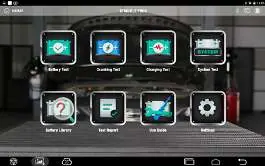
Battery Test
Displays State of Health (SOH), State of Charge (SOC), Voltage, Test Value, and Internal Resistance.
Cranking Test
Analyzes actual cranking voltage and time to determine the state of the starting system. Ensure engine and accessory loads are OFF.
Charging Test
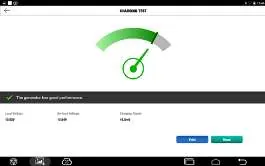
Tests the charging system, including the generator, rectifier, and rectifier diode. Ensure the engine is ON and increase RPM to 2500 for 5 seconds during the test.
System Test
Performs an overall test by combining the Battery, Cranking, and Charging tests.
Battery Library
Access the Battery Library on the home screen to look up battery information by selecting vehicle type, make, model, year, and CC.
Technical Specifications
- Operating Voltage: 8V to 16V
- Working Temperature: -10°C to 45°C (14°F to 113°F)
- Storage Temperature: -20°C to 75°C (-4°F to 167°F)
- Clamp Line Length: 556mm (21.89 inch)
- Safety Protection: Reverse Polarity Protection
Warnings and Cautions
- Do not place the tester near the engine or exhaust pipe.
- Do not smoke, cause sparks, or strike matches near the battery.
- Do not remove battery clamps while testing.
- Wear eye protection when working around batteries.
- Test in a well-ventilated area to avoid carbon monoxide.
Practical help
Common problems
Red LED light
Indicates an error due to over temperature or over voltage.
Inaccurate test results
Ensure battery terminals are clean and free of grease or dust. Use a wire brush if necessary.
Unknown battery type
If the battery type is not listed or unknown, select AGM to conduct the test.
Before use
- Turn off the ignition, all accessories, and loads.
- Close all vehicle doors and the trunk lid.
- Ensure battery terminals are clean.
- Connect the RED (+) clamp to the positive terminal.
- Connect the BLACK (-) clamp to the negative terminal.
- Enable Bluetooth on your mobile device or tablet.
Specs in practice
- Operating Voltage
- 8V to 16V
- Working Temperature
- -10°C to 45°C (14°F to 113°F)
- Clamp Line Length
- 556mm (21.89 inch)
Images and diagrams
- The LED indicator table shows connection status (Green for battery, Blue for Bluetooth, Red for error).
- The app home screen provides access to Battery Test, Cranking Test, Charging Test, and System Test.
- Battery test requires selecting the battery type, standard, and capacity.
Model compatibility
- Compatible with 12V batteries.
- Supports CCA range between 100 and 2000.
- Compatible with Regular Flooded, AGM Flat plate, AGM Spiral, GEL, and EFB batteries.

Manual page author
David Miller
Documentation analyst
Organizes user manual content into clear summaries, with attention to model details, product context, and everyday usability.