Industrial / Control Panels
Installation Guide for Raychem Touch 1500-EX User Interface Terminal
A comprehensive installation and configuration guide for the Raychem Touch 1500-EX industrial user interface terminal. This guide covers panel mounting, electrical wiring, RS-485 communication settings, and technical specifications.
Table of contents
Manual images
Click an image to enlargeQuick Guide for Installation
The Raychem Touch 1500-EX is a panel-mounted display designed for industrial environments. Installation requires precise cutting of the panel door and secure mounting using the provided hardware. Ensure the environment meets IP54/Type 4 requirements for hazardous locations. All electrical connections, including power and communication, must be performed by qualified personnel.
Product Description
The Touch 1500-EX is a 15-inch color XGA display with a 5-wire resistive touch screen. It is rated IP65 (Type 4X) on the front panel and is suitable for both indoor and outdoor use in non-hazardous and Class I Div. 2 / Zone 2 hazardous locations.
Installation and Mounting
Panel Preparation:
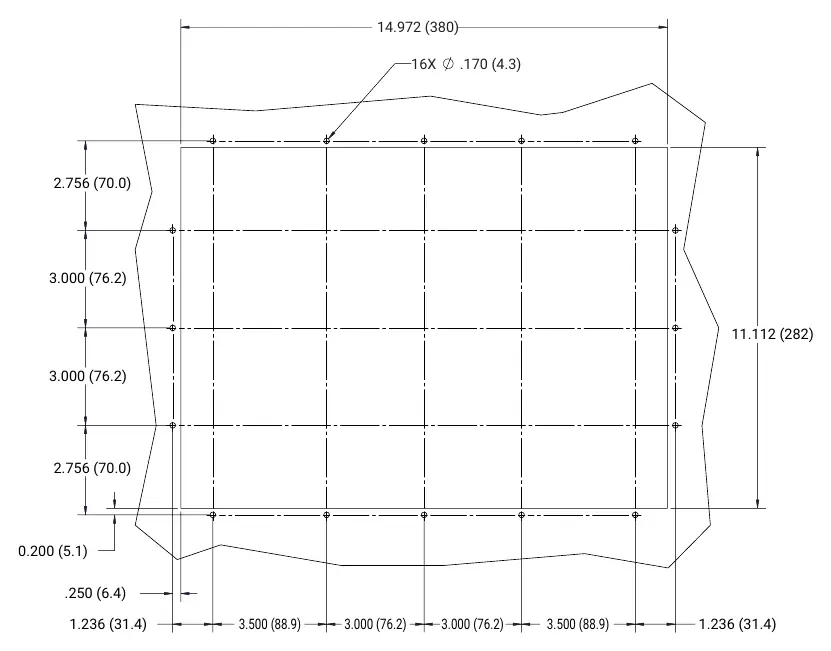
- Locate the unit on the front of the panel at eye level.
- Use the provided cutout dimensions to mark the opening.
- Apply masking tape around the perimeter to prevent scratching the panel surface.
- Cut the opening using a jigsaw with a 24 TPI blade.
- Drill 16 mounting holes using a 3/16 inch (5 mm) drill bit.
Mounting Procedure:
- Place the assembly into the cutout.
- Secure the unit using the 16 supplied 6/32 in Kep nuts.
- Tighten the nuts in the specified sequence to ensure a proper seal.
- Use an in-line torque wrench to tighten nuts to 0.62 Nm (5.5 in/lb). Do not overtighten.
Electrical Connections
Power Supply:
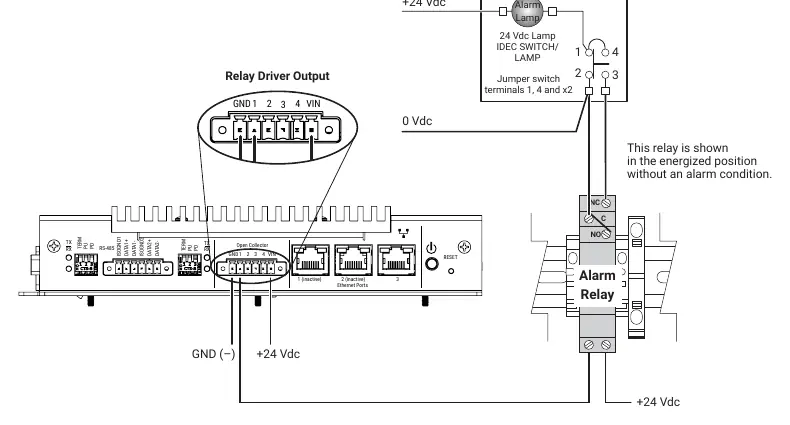
- Connect 12-27 VDC to the power fitting on the left side of the unit.
- Ensure the grounding terminal is connected.
- Route cables through the cable clamp.
Alarm Outputs:
- The unit features transistor open collector outputs (5-30 Vdc, max sink current 500 mA) to drive external relays.
- Mount alarm relays on a DIN rail inside the panel.
Communication and Configuration
Ports:
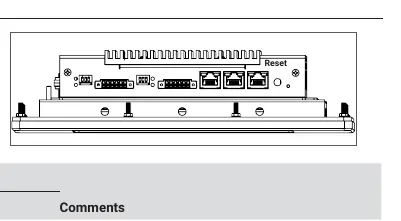
- RS-232: Local host port (9-pin D sub male).
- RS-485: Two isolated ports (Field Side and Remote).
- Ethernet: 10/100 Base-T port (Port 3 active).
RS-485 Configuration Switches:
Located on the bottom of the unit, these switches control network behavior:
- Pull-down (PD): Forces "-" signal to a determinate state when idle.
- Pull-up (PU): Forces "+" signal to a determinate state when idle.
- Termination (TERM): Terminates the network with a 120-ohm resistor.
Maintenance and Troubleshooting
Cleaning:
- Clean the touch screen area with a damp cloth.
- Use typical window cleaning agents if necessary.
- Do not use abrasive cleaners.
Reset:
- A reset switch is located on the bottom of the unit. Use a pointed object to press it and restart the software.
Servicing:
- The unit contains no user-serviceable parts. Contact a Chemelex representative for service.
Practical help
Common problems
Display not responding
Check power supply (12-27VDC) and ensure the grounding terminal is properly connected.
Communication failure on RS-485
Verify wiring and check the configuration switch settings (Termination, Pull-up, Pull-down) on the bottom of the unit.
Panel door damage during installation
Use masking tape around the cutting area to prevent scratches and use a 24 TPI jigsaw blade for a clean cut.
Before use
- Verify panel enclosure meets IP54/Type 4 requirements.
- Ensure ambient temperature is within -40°C to 60°C.
- Prepare 16 mounting holes using a 3/16 inch (5 mm) drill bit.
- Have a 5/16 inch (8 mm) in-line torque wrench ready.
- Ensure power supply is 12-27VDC.
Specs in practice
- Supply Voltage
- 12-27VDC, 4A-1.5A (40W max).
- Operating Temperature
- -40°C to 60°C. Enclosure heater recommended below 0°C.
- RS-485 Max Cable Length
- 1200 m (4000 ft) at 9600 baud.
Images and diagrams
- Panel cutout dimensions are provided on page 5.
- Wiring diagram for power and alarm relays is on page 7.
- RS-485 configuration switches are located on the bottom of the unit.
Model compatibility
- Compatible with Raychem NGC-40 Bridge Module, Elexant 4010i, 4020i, 3500i, RMM2, and RMM3.

Manual page author
Michael Turner
Technical manual editor
Reviews PDF manuals for structure, safety notes, and practical product details so readers can find the right information quickly.