Electronics / Speakers & Soundbars
User Manual for RCF NXL 14-A Accessories
Quick guide for installing RCF NXL 14-A accessories, including horizontal and vertical brackets and pole mount kits. Learn safe mounting procedures, configuration warnings, and installation steps.
Table of contents
Manual images
Click an image to enlargeImportant Information
This manual provides installation instructions for RCF NXL 14-A accessories, including horizontal brackets, vertical brackets, and pole mount kits. These accessories are designed specifically for the RCF NXL 14-A speaker. All installations should be performed by qualified professional installers to ensure safety and compliance with local regulations.
Safety Precautions
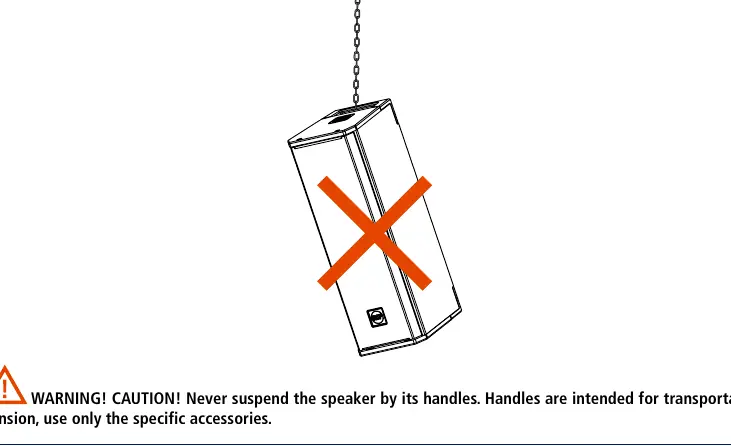
- Qualified Personnel Only: Installation must be performed by professional, qualified installers.
- Suspension Safety: Never suspend the speaker by its handles; handles are for transportation only. Use only specified accessories for suspension.
- Configuration: Always verify allowed configurations on the official RCF website before installation.
- Stability: Ensure that any subwoofer or stand holding the speaker is placed on a flat, horizontal floor without inclinations.
- Inspection: Inspect the system at least once a year for signs of weakness or damage.
Horizontal Bracket Installation
The Horizontal Bracket (HBR60683/HBR60684) is designed for wall mounting or hanging.
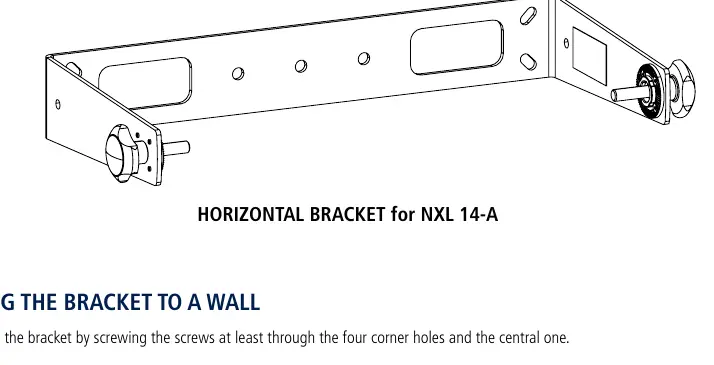
- Wall Mounting: Secure the bracket to the wall using screws through the four corner holes and the central hole.
- Hanging: When hanging, always use the central hole. Additional holes may be used if necessary.
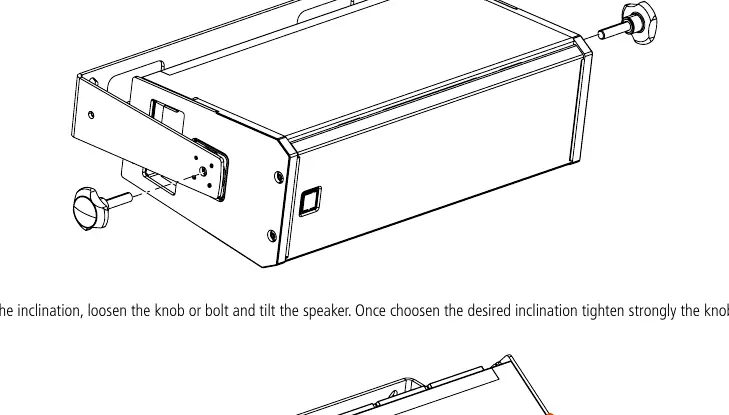
- Speaker Mounting: Place the bracket on the speaker and secure it using the two provided knobs or bolts.
- Inclination: To adjust the angle, loosen the knobs/bolts, tilt the speaker to the desired position, and tighten the knobs/bolts securely.
Vertical Bracket Installation
The Vertical Bracket (VBR60681/VBR60682) is designed for wall mounting or hanging.
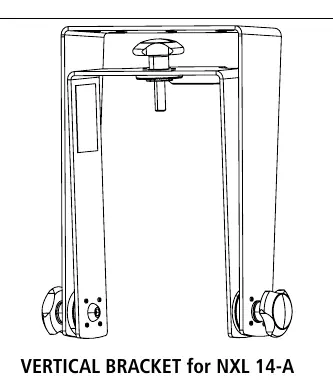
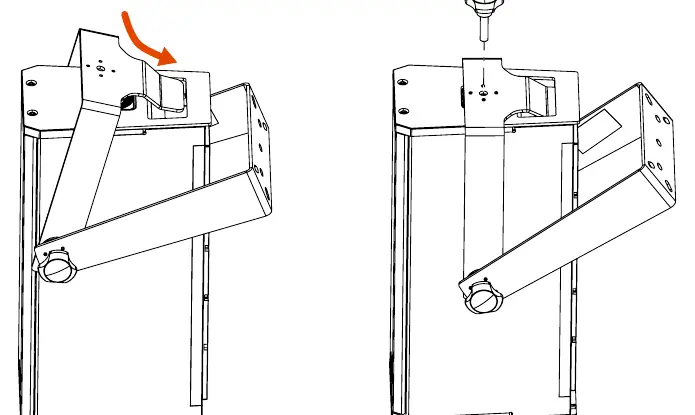
- Wall Mounting: Secure the bracket to the wall using screws through the four corner holes and the central hole.
- Hanging: Always use the central hole for hanging.
- Speaker Mounting: Insert the bracket into the speaker handle. Align the bracket hole with the speaker top hole and secure it with the provided knob or bolt.
- Inclination: Loosen the two side knobs/bolts to adjust the tilt, then tighten them firmly once the desired angle is set.
Pole Mount Kit Installation
The Pole Mount Kit (PMK60678/PMK60679) allows for mounting the speaker on a stand or subwoofer.
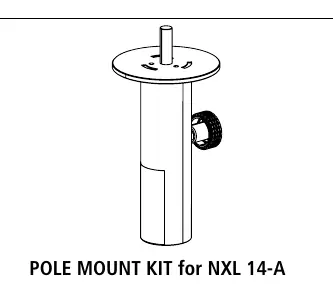
- Attachment: Screw the pole mount kit into the top or bottom hole of the speaker.
- Mounting: Once securely tightened to the speaker, the assembly can be mounted onto a speaker stand or over a subwoofer.
Practical help
Common problems
Speaker tilt adjustment is difficult or loose
Ensure the side knobs or bolts are fully loosened before adjusting, and tighten them strongly after setting the desired inclination.
Unstable speaker mounting on subwoofer or stand
Verify that the subwoofer or stand is placed on a flat, horizontal floor. Do not install on inclined surfaces.
Suspension safety concerns
Never use the speaker handles for suspension. Use only the specific RCF brackets designed for this purpose.
Before use
- Verify that all accessories are original RCF parts (HBR, VBR, or PMK series).
- Ensure the installer is a qualified professional.
- Check that the mounting surface is capable of supporting the system weight.
- Verify the allowed configuration on the RCF website.
- Ensure all screws and bolts are tightened securely.
Specs in practice
- HBR60683 / HBR60684
- Horizontal brackets specifically for NXL 14-A.
- VBR60681 / VBR60682
- Vertical brackets specifically for NXL 14-A.
- PMK60678 / PMK60679
- Pole mount kits specifically for NXL 14-A.
Images and diagrams
- Horizontal Bracket: Wall mounting requires screws in all four corners and the center hole.
- Vertical Bracket: Attaches by inserting into the speaker handle and securing through the top hole.
- Pole Mount: Screws directly into the top or bottom of the speaker cabinet.
Model compatibility
- All accessories listed are exclusively designed for the RCF NXL 14-A speaker.
- Do not use third-party hardware for suspension.

Manual page author
Emily Carter
User documentation editor
Prepares concise manual descriptions and highlights the most useful setup, operation, and maintenance information for readers.