Electronics / Streaming Encoders
User Manual for RGBlink TAO 1mini-HN Streaming Encoder
Quick start guide for the RGBlink TAO 1mini-HN streaming encoder. Learn how to connect, configure inputs and outputs, set up streaming, and manage device settings.
Quick answers from the manual
Quick answer
- The TAO 1mini-HN is a compact streaming encoder/decoder supporting NDI and RTMP. It features a touch screen for control, USB-C/PoE power, and supports recording to USB drives. p. 1, 3
Key actions
- Powering on p. 7
- Streaming p. 12, 18
- Recording p. 10, 18
Problems and fixes
Bluetooth pairing
Make sure the distance between TAO 1mini-HN and mobile phone is within 2m. Pair TAO 1mini-HN with TAO APP within 300s.
p. 16Maintenance and reset
- Factory Reset p. 17
Technical specifications
| Parameter | Value | Meaning | Pages |
|---|---|---|---|
| Resolution | 2K@60 | Maximum output resolution | p. 1 |
| Storage | Up to 2T | Maximum supported hard disk capacity | p. 5 |
Where to find it in the PDF
- Overview p. 3
- Connectors p. 5
- Settings p. 13
Table of contents
Manual images
Click an image to enlargeQuick Guide
The RGBlink TAO 1mini-HN is a compact streaming encoder and decoder. It supports NDI, RTMP, RTMPS, RTSP, and SRT protocols. The device features a 2.1-inch TFT touch screen for real-time monitoring and control, and can be powered via USB-C or PoE.
System Connection
The device acts as a central hub for video streaming. Connect your video sources (Camera, Laptop, Microphone) to the input ports. Connect your output monitor to the HDMI-OUT port. The device can stream to multiple platforms simultaneously and record to an external USB drive.
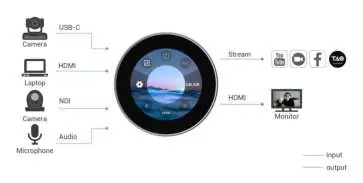
Device Overview
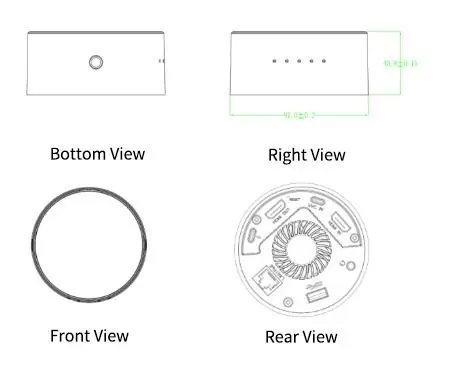
The front of the device features a 2.1-inch TFT touch screen for menu operations and signal monitoring. The rear panel contains the following connectors:
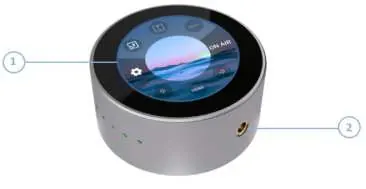
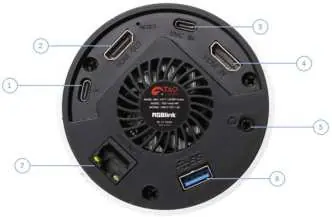
- USB-C (1): Power supply (supports PD protocol).
- HDMI-OUT (2): Connect to an external monitor.
- USB-C (3): Video input from phone or USB camera (UVC capture).
- HDMI-IN (4): Video input.
- 3.5mm Audio Socket (5): Analog audio input/output.
- USB 3.0 (6): Connect hard disk for recording (up to 2T).
- LAN (7): Gigabit network port with PoE support.
Input Configuration
Access the Input Area to manage signal sources. You can select between HDMI or UVC inputs. For UVC inputs, you can long-press the icon to adjust brightness (0-14) and mirror settings (ON/OFF). The device also supports NDI Decoding and RTMP Pull functions, which can be configured via the touch interface.
Output Configuration
Access the Output Area to configure streaming and encoding settings:
- RTMP Push: Check stream address and modify settings using the TAO APP.
- NDI Encoding: Turn on NDI encoding, select format (NDI/HX), and set resolution/bitrate.
Settings
The Settings menu allows you to manage:
- Network: Configure DHCP or manual IP settings.
- Bluetooth: Pair with mobile devices for TAO APP connectivity.
- Fan Control: Adjust fan speed for heat dissipation.
- Display: Adjust brightness and display mode.
- Device Info: Check system info, change language, upgrade firmware, or perform a factory reset.
Streaming and Recording
Once RTMP settings are configured, click ON AIR on the main interface to start streaming. If a USB flash drive is connected to the USB 3.0 port, the device will automatically start recording when streaming begins.
Practical help
Common problems
Device not streaming
Verify RTMP stream address and network connection in the Output Area.
No video input
Ensure the correct input source (HDMI/UVC) is selected in the Input Area.
Bluetooth pairing fails
Ensure the device is within 2m of the phone and pair within 300 seconds.
Before use
- Connect power via USB-C or PoE.
- Connect video source (HDMI/UVC/NDI).
- Connect output monitor (optional).
- Insert USB drive into USB 3.0 port for recording (optional).
Images and diagrams
- System connection diagram illustrates inputs (Camera, Laptop, Microphone) and outputs (Stream, Monitor).
Model compatibility
- Supports RTMP/RTMPS/RTSP/SRT/FULL NDI/NDI HX3/NDI HX2/NDI HX.

Manual page author
Emily Carter
User documentation editor
Prepares concise manual descriptions and highlights the most useful setup, operation, and maintenance information for readers.