Electronics / AV Converters
RGBlink TAO 1tiny Converter User Guide
Quick guide for the RGBlink TAO 1tiny USB-C to HDMI converter. Learn about setup, power requirements, firmware updates, and device compatibility.
Quick answers from the manual
Quick answer
- The TAO 1tiny is an inline converter that enables USB-C UVC cameras to connect to HDMI devices, supporting resolutions up to 4K. p. 2
Key actions
- Connect power to the Type C Power Port p. 3
- Connect USB camera to the USB-C Input Port p. 3
- Connect monitor to the HDMI 2.0 Output Port p. 3
First start
- Connect power, then the camera, then the monitor. p. 3
Problems and fixes
Device not recognized
Wait more than 30 seconds between reboots.
p. 3Technical specifications
| Parameter | Value | Meaning | Pages |
|---|---|---|---|
| Power Requirement | 5V/2A/10W | Minimum power required for operation | p. 2 |
Where to find it in the PDF
- Overview and Parts p. 2
- Installation p. 3
- Firmware and Compatibility p. 4
Table of contents
Manual images
Click an image to enlargeQuick guide from the manual
The TAO 1tiny is a compact inline converter designed to bridge USB-C UVC cameras with HDMI displays. It supports resolutions up to 4K. Always ensure the device is powered with a dedicated adapter (5V/2A/10W) and not a computer USB port. When rebooting, wait at least 30 seconds for the device to be recognized.
Overview
This device enables compact webcams and ePTZ cameras to function as HDMI native devices. It provides uncompressed video transcoding for superior visual performance.
Parts Info
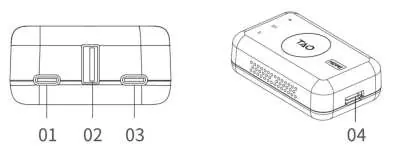
- 01: Type C Power Port
- 02: USB 2.0 COM Port
- 03: USB Type C Input Port
- 04: HDMI 2.0 Output Port
Installation
Connecting with USB Camera:
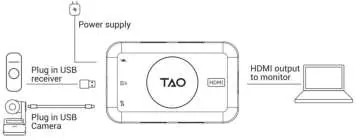
- Connect the power supply to the Type C Power Port.
- Connect the USB camera to the USB-C Input Port using a USB-C cable. The device can supply 5V/1A power to the camera.
- Connect the monitor to the HDMI 2.0 Output Port using an HDMI cable.
- If using a remote control, plug the USB receiver into the USB 2.0 Port.
Connecting with Mini Series:
- Connect the power supply to the TAO 1tiny Power Port.
- Connect the mini-pro to the USB-C Input Port using a USB 3.0 to USB-C cable.
- Connect the monitor to the HDMI 2.0 Output Port using an HDMI cable.
Firmware Upgrade
The device can be upgraded via a USB disk. Plug a USB disk containing the latest firmware into the USB 2.0 port. The device will auto-upgrade and restart. Do not disconnect power during this process.
Compatibility
The device is compatible with various products from brands including RGBlink, Blackmagic Design, OBSBOT, Insta360, Logitech, DJI, and Yealink.
Practical help
Common problems
Device not recognized
Ensure the reboot interval is greater than 30 seconds.
Insufficient power
Use a power adapter with at least 5V/2A/10W. Do not use a computer USB port for power.
Before use
- Ensure power adapter meets 5V/2A/10W specification
- Have a USB-C cable for camera connection
- Have an HDMI cable for monitor connection
- Ensure firmware is up to date if necessary
Images and diagrams
- 01: Type C Power Port
- 02: USB 2.0 COM Port
- 03: USB Type C Input Port
- 04: HDMI 2.0 Output Port
Model compatibility
- Compatible with various USB cameras and mini series switchers
- Supports VESA standard resolutions up to 4K

Manual page author
Emily Carter
User documentation editor
Prepares concise manual descriptions and highlights the most useful setup, operation, and maintenance information for readers.