Electronics / Monitors
Quick Start Guide for Ricoh Portable Monitor 150/150BW
Quick setup guide for the Ricoh Portable Monitor 150 and 150BW. Includes instructions for cable connection, stand adjustment, wireless setup for the 150BW model, and power requirements.
Table of contents
Manual images
Click an image to enlargeQuick Start Guide
This guide covers the setup and operation of the Ricoh Portable Monitor 150 and 150BW. Ensure you have all components before beginning.
Unboxing and Stand Adjustment
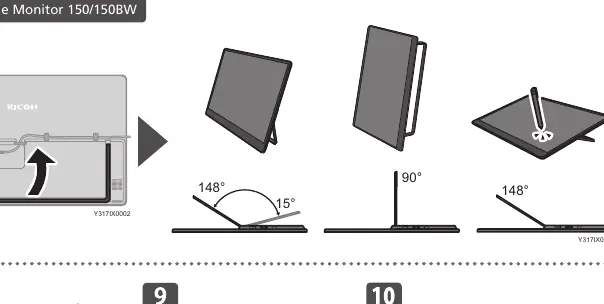
The monitor includes a built-in stand. You can adjust the viewing angle to 15°, 90°, or 148° depending on your needs. Do not force the stand beyond these positions or press on the screen surface.
Wired Connection
To connect the monitor to your device:
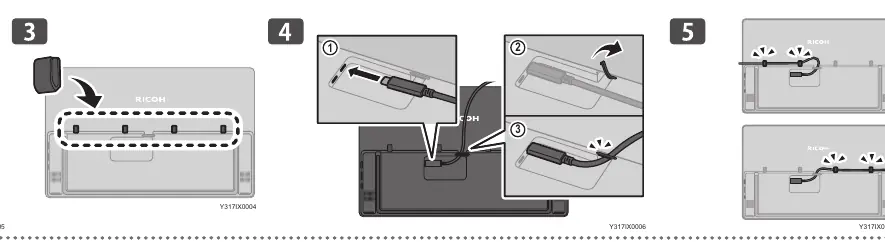
- Insert the cable into the port on the back of the monitor.
- Route the cable through the designated channel to ensure a secure fit.
- Connect the other end to your computer or device.
Power Requirements
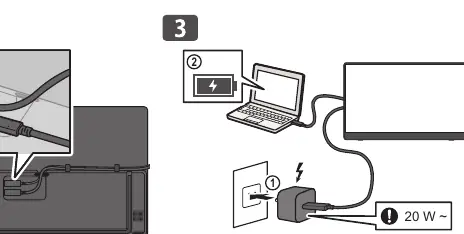
The monitor requires a power source of at least 20W for proper operation. Ensure your power adapter meets this specification.
150BW Specific Features
The 150BW model includes a built-in battery and wireless connectivity features. Monitor the battery level indicator on the screen. When the battery is low (0-15%), connect the power adapter immediately.
Safety Warnings
- Do not press on the screen surface.
- Do not force the stand angle.
- Use only the provided cables and power adapters.
Manufacturer information
Ricoh Company, Ltd.
Practical help
Common problems
Monitor not powering on
Ensure the power adapter provides at least 20W of power.
Battery low warning
Connect the power adapter immediately if the battery level is between 0-15%.
Before use
- Check package contents
- Ensure power source is at least 20W
- Adjust stand to desired angle (15°, 90°, 148°)
- Route cables through the back panel channel
Specs in practice
- Stand Angles
- Supports 15°, 90°, and 148° viewing angles.
Images and diagrams
- Stand angles: 15°, 90°, 148°
- Cable routing: Ensure cables are properly seated in the back panel.
Model compatibility
- 150BW model supports wireless connectivity and battery operation.
- 150 model is wired only.

Manual page author
Michael Turner
Technical manual editor
Reviews PDF manuals for structure, safety notes, and practical product details so readers can find the right information quickly.