Power / Batteries Chargers
Ring Indoor Cam (2nd Gen) Setup and Installation Guide
Learn how to set up, install, and operate your Ring Indoor Cam (2nd Gen). Includes safety warnings, mounting instructions, and privacy cover usage.
Table of contents
Quick Start Setup
To begin using your Ring Indoor Cam (2nd Gen), follow these simple steps:
- Download and open the Ring app on your smartphone.
- Select the option to Set Up a Device.
- Scan the QR code located on your device using the Ring app to complete the pairing process.
Installation and Mounting
The Ring Indoor Cam is designed for indoor use only. Choose a location that is not exposed to steam, extreme heat, or cold. Avoid placing the device near heat sources like radiators, space heaters, or vents.
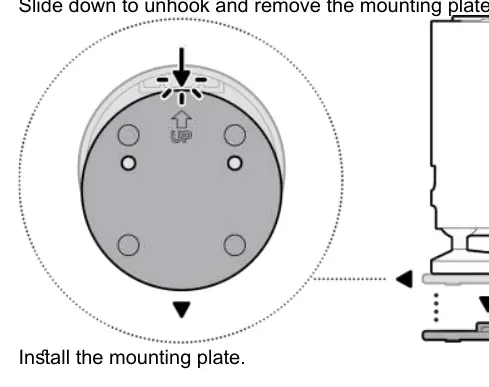
For wall or ceiling mounting, first remove the mounting plate by sliding it down to unhook it. Secure the mounting plate to your chosen surface using the provided hardware. Once the plate is installed, slide the camera onto the mounting plate and adjust the camera angle to your preference.
Power and Safety
The device does not have a dedicated on/off button. To power it down, simply unplug the power cord from the electrical socket. Use only the accessories supplied with your device; third-party accessories may impact performance or cause damage. Ensure the power outlet is easily accessible. Do not plug multiple devices into the same wall socket to prevent overheating and fire hazards. If the power cable or adapter appears damaged, discontinue use immediately.
Privacy Features
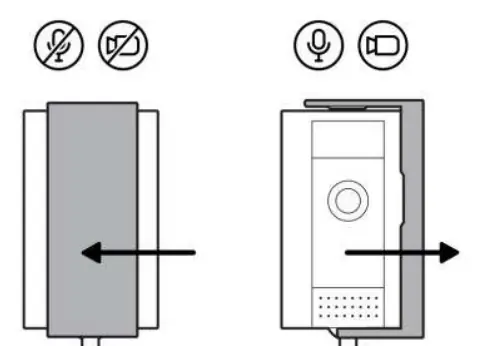
The Ring Indoor Cam (2nd Gen) includes a manual privacy cover. This cover allows you to physically block the camera lens and microphone when you want to ensure privacy. You can easily attach or remove the privacy cover by rotating it onto the camera housing as indicated in the device diagrams.
Maintenance and Troubleshooting
Keep the device clean and free of dust. If you encounter issues, ensure the power connection is secure and the device is within range of your Wi-Fi network. For further assistance, consult the Ring app or the official support resources. Always dispose of electronic equipment according to your local environmental regulations.
Related manuals
Related manuals from the same brand or category.
Electronics / Cameras
Ring Stick Up Cam Plug-in User Manual
RINGPower / Batteries Chargers
Ring Stick Up Cam Battery User Guide
RINGGeneral / Other Manuals
Ring Floodlight Cam Wired Pro User Guide
RING
Manual page author
David Miller
Documentation analyst
Organizes user manual content into clear summaries, with attention to model details, product context, and everyday usability.