Power / Batteries Chargers
Ring Stick Up Cam Pro Battery User Guide
Comprehensive setup, installation, and safety guide for the Ring Stick Up Cam Pro Battery. Learn how to charge, mount, and configure your device for indoor or outdoor use.
Table of contents
Getting Started
To begin using your Ring Stick Up Cam Pro, download the Ring app on your smartphone and select Set Up a Device. Follow the in-app instructions to scan the QR code located on your device or in this guide to complete the initial configuration.
Battery Preparation and Charging
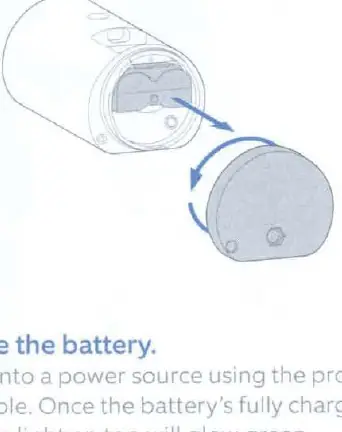
Before installation, remove the protective film from the camera. To charge the battery, twist the battery compartment counterclockwise to unlock and remove the cover. Remove the battery and discard the orange insulator. Connect the battery to a power source using the provided USB cable. A green light on top indicates the battery is fully charged. Once charged, slide the battery back into the camera until it clicks, then lock the compartment cover by twisting it clockwise and tightening the security screw.
Installation Options
The camera is suitable for both indoor and outdoor use. It can be placed on a flat surface or mounted on a wall or ceiling.
Wall Mounting
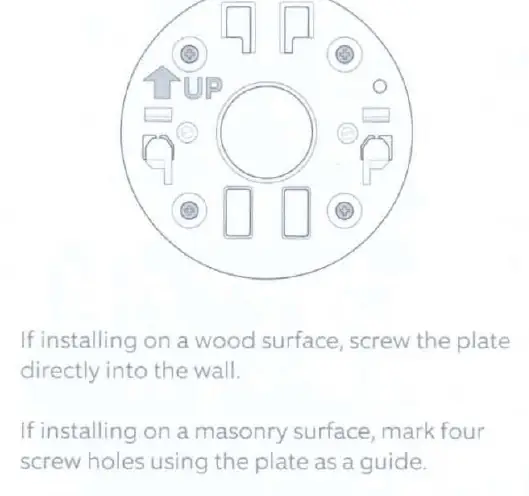
Remove the decorative cover from the mount and detach the mount from the camera using a Phillips-head screwdriver. Slide off the mounting plate, place it on the wall with the UP arrow pointing up, and secure it using the provided screws and anchors. Attach the mount back to the camera, slide the unit onto the mounting plate, and tighten the security screw. Finally, replace the decorative cover and adjust the camera angle as needed.
Ceiling Mounting
Follow similar steps as wall mounting, but ensure the mounting plate is positioned with the UP arrow pointing in the opposite direction from where the camera will face. Adjust the angle after installation to ensure the desired field of view.
Safety and Maintenance
Handle the device with care. The camera is water-resistant but not intended for underwater use. Do not expose the device or adapter to extreme conditions, salt water, or high-velocity water. If the device gets wet, allow it to dry completely before use. Always use the provided power adapter and avoid overloading wall sockets. Keep small parts away from children to prevent choking hazards. For battery safety, only use approved rechargeable lithium-ion batteries and avoid damaging or short-circuiting the battery pack.
Troubleshooting and Support
If you encounter issues, ensure the battery is properly charged and the device is within range of your Wi-Fi network. For further assistance, visit ring.com/help or contact customer support via the phone numbers provided on the official Ring website. Always dispose of electronic devices and batteries in accordance with local laws and regulations.
Related manuals
Related manuals from the same brand or category.
Electronics / Cameras
Ring Stick Up Cam Plug-in User Manual
RINGGeneral / Accessories
Ring Indoor Cam (2nd Gen) Setup and Installation Guide
RINGGeneral / Other Manuals
Ring Floodlight Cam Wired Pro User Guide
RING
Manual page author
Michael Turner
Technical manual editor
Reviews PDF manuals for structure, safety notes, and practical product details so readers can find the right information quickly.