Electronics / Amplifiers Receivers
Owner's Manual for Rockville House Party System 10 Speaker System
Quick guide for the Rockville House Party System 10. Learn how to set up Bluetooth, USB/SD playback, FM radio, adjust settings, and troubleshoot common issues.
Table of contents
Manual images
Click an image to enlargeQuick guide from the manual
The Rockville House Party System 10 is a 3-way powered Bluetooth speaker system. To get started, ensure the unit is placed on a stable surface, connected to a power source, and the voltage selector switch is set correctly for your region (115V/230V). Use the MODE button to cycle through inputs like Bluetooth, USB/SD, FM, Coaxial, Optical, PC, and AUX.
Safety Instructions
- Do not open the unit; there are no user-serviceable parts inside.
- Do not expose the unit to moisture.
- Ensure the unit is placed in a properly ventilated area on a level and stable surface.
Included Items
- (2) Speakers
- 15 ft cable to connect active/passive speakers
- Remote control
- 6 ft power cord
- FM antenna
- Owner's manual and warranty card
Functions and Controls
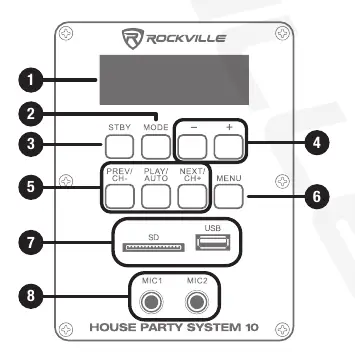
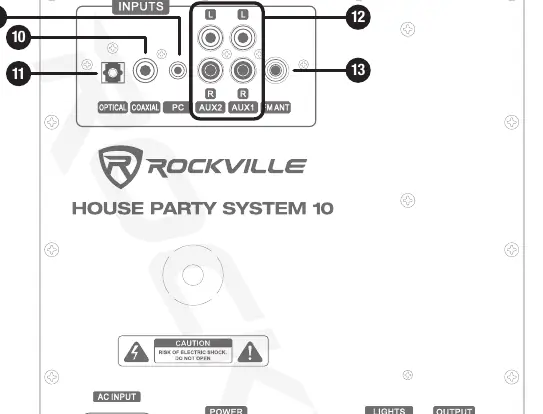
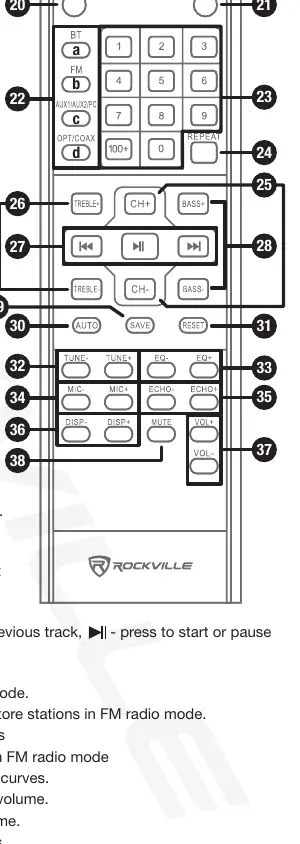
The system features a front panel display and control buttons for Mode, Stand-by, Master Volume, Play/Auto, and Menu. The rear panel contains various inputs including Optical, Coaxial, PC, AUX, and FM antenna jack. The remote control allows for direct input selection, track navigation, EQ adjustments, and microphone/echo volume control.
Operation
Bluetooth
- Ensure the speaker is ON.
- Press the MODE button until Bluetooth mode is enabled.
- Turn on Bluetooth on your device and select "HOUSE PARTY SYSTEM 10".
- Use the PLAY/AUTO button to pause/resume and PREV/NEXT buttons for track selection.
USB/SD Playback
- Insert a USB flash drive or SD card (max 32GB).
- Music should begin playing automatically.
- Use the remote or unit buttons to control playback.
FM Radio
- Connect and extend the included antenna.
- Select FM mode using the MODE button.
- Press PLAY/AUTO to initiate auto-scan and save stations.
Features and Specifications
- Power: 250W RMS / 1000W peak power.
- Design: 3-way speaker with 10" woofer, 5" mid-range, and 3" tweeter.
- Inputs: Bluetooth, USB/SD (up to 32GB), FM, RCA, 3.5mm Aux, Optical, Coaxial, and two 1/4" mic inputs.
- Frequency Response: 40Hz – 20kHz.
- Dimensions: 15" x 23.6" x 11.8".
- Weight: 66 lbs (combined).
Troubleshooting
If you encounter issues, check the following:
- No Power: Ensure the unit is plugged in and the power switch is ON.
- No Sound/Distorted: Check cable connections, volume settings, and ensure the input source volume is set properly.
- Bluetooth Fails: Ensure the device is within 5 feet of the unit, discoverable, and not paired to another device.
- Mic Feedback: Point microphones away from the speaker and ensure they are behind the speaker.
Fuse Replacement
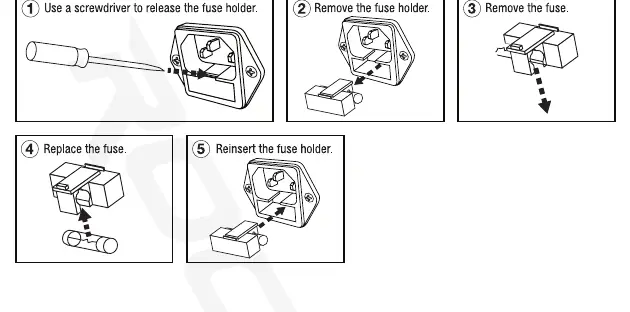
If the unit fails to power on, check the fuse. Use a screwdriver to release the fuse holder from the IEC power socket, remove the old fuse, replace it, and reinsert the holder.
Manufacturer information
Rockville
Practical help
Common problems
No power
Ensure the unit is plugged in, the power cable is tight, and the power switch is in the ON position.
No sound or distorted sound
Check that all input cables are plugged in correctly, volume settings are adjusted, and the input source volume is set properly.
Bluetooth pairing fails
Ensure the device is within 5 feet of the unit, discoverable, and not paired to another speaker. Turn both devices off and on.
Mic feedback
Point the microphones away from the speaker and ensure they are positioned behind the speaker.
Before use
- Check the voltage selector switch (115V/230V) on the rear panel.
- Connect the included FM antenna if using radio.
- Connect the active and passive speakers using the provided 15 ft cable.
- Ensure the unit is on a level and stable surface.
- Verify that the power cable is securely connected.
Specs in practice
- Power Output
- 250W RMS / 1000W peak power for high-volume audio.
- USB/SD Capacity
- Supports drives up to 32GB; formats accepted are MP3, WMA, and WAV.
- Bluetooth Range
- Built-in chipset with a 70ft range; Bluetooth 5.0 recommended for maximum range.
Images and diagrams
- Front panel: Contains display, mode selection, volume, and playback controls.
- Rear panel: Contains input ports (Optical, Coaxial, PC, AUX), power input, voltage selector, and output to left speaker.
- Remote control: Provides full access to input selection, EQ, mic/echo volume, and radio tuning.
- Fuse replacement: Shows the step-by-step process to remove and replace the fuse in the power socket.
Model compatibility
- USB/SD drives must be 32GB or smaller.
- Recommended to use professional unbalanced dynamic microphones for best performance.
- Bluetooth 5.0 devices are recommended for optimal range.

Manual page author
David Miller
Documentation analyst
Organizes user manual content into clear summaries, with attention to model details, product context, and everyday usability.