Electronics / Amplifiers Receivers
User Manual for Rockville SINGMIX 45 Professional Powered Mixing Amplifier
Quick guide for the Rockville SINGMIX 45 mixing amplifier. Learn how to connect speakers, pair Bluetooth devices, adjust EQ and echo settings, and troubleshoot common audio issues.
Table of contents
Manual images
Click an image to enlargeQuick guide from the manual
The Rockville SINGMIX 45 is a 1000W professional powered mixing amplifier designed for karaoke, DJ, and home audio applications. This guide provides essential information on setting up your device, connecting speakers, and using the built-in features like Bluetooth, USB/SD playback, and microphone mixing.
Safety Instructions
- To reduce the risk of electric shock, never open the unit; there are no user-serviceable parts inside.
- Do not expose the unit to moisture or rain.
- Avoid placing the unit near heat sources or in direct sunlight.
- Ensure the unit is situated in a properly ventilated area to prevent overheating.
- Do not place objects on top of the unit, as this blocks vents.
Inputs and Outputs
- Front: Two 1/4" line inputs, 3.5mm AUX input, USB/SD inputs, and Bluetooth connectivity.
- Rear: Two XLR microphone inputs, two pairs of RCA line inputs, two pairs of RCA outputs (line and record), and four pairs of speaker outputs (banana and bare wire).
Functions and Controls
The front panel features independent controls for channels, music, and master volume:
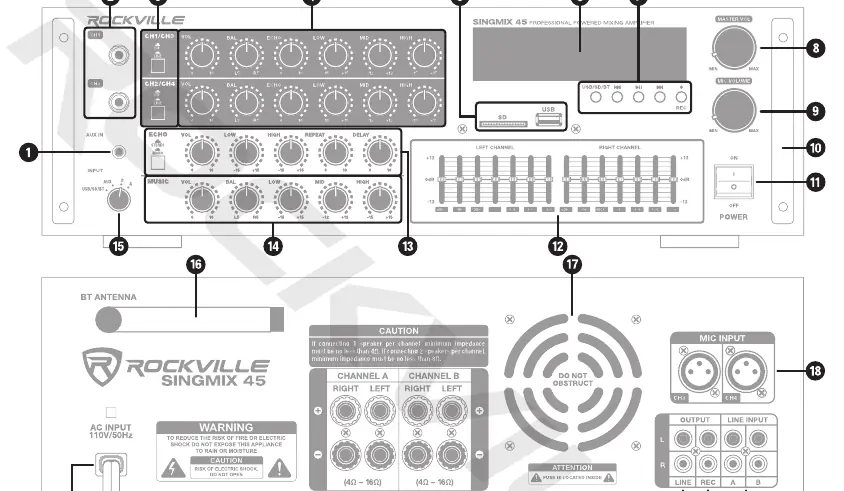
- Master Volume: Controls the overall output level.
- Master Mic Volume: Controls the overall microphone output level.
- Channel Controls: Each channel (CH1/CH3, CH2/CH4) has independent volume, balance, echo, low, mid, and high EQ controls.
- Music Controls: Includes volume, balance, low, mid, and high EQ for music sources.
- Echo Controls: Adjusts echo volume, low/high EQ, repeat, and delay.
- Equalizer: Dual 7-band graphic equalizer (left/right) for adjusting frequencies from 60Hz to 15kHz.
Bluetooth Pairing
- Turn on the Bluetooth feature on your device and ensure it is in discoverable mode.
- Press the MODE key on the unit until the display reads "BLUE". The word will flash, indicating pairing mode.
- Search for "SINGMIX 45" on your device and select it.
- Once paired, the "BLUE" text will stop flashing.
USB and SD Playback
- Insert a USB drive or SD card into the corresponding port on the front panel.
- The unit will automatically begin to play music stored on the external device.
- Use the playback controls (Play/Pause, Previous/Next) to navigate tracks.
- Supported formats include MP3, WMA, FLAC, and APE.
Speaker Setup
The SINGMIX 45 supports various speaker configurations. Important: The total impedance of your speakers must not be less than 4 ohms.
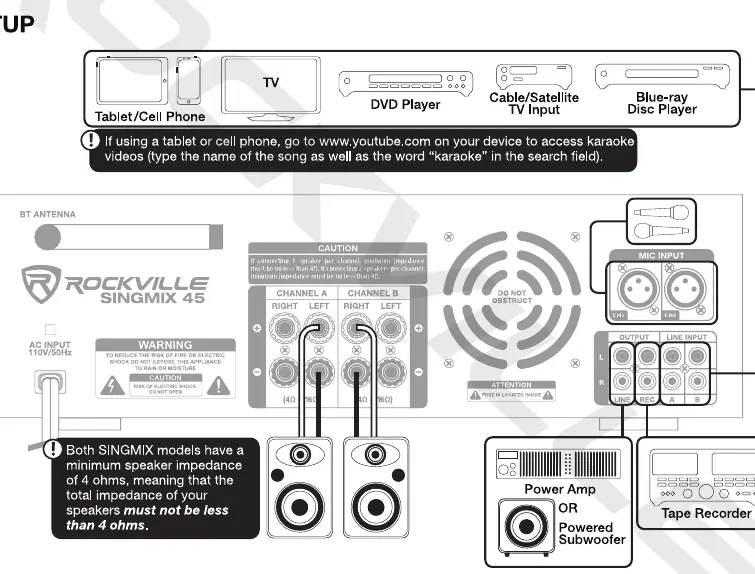
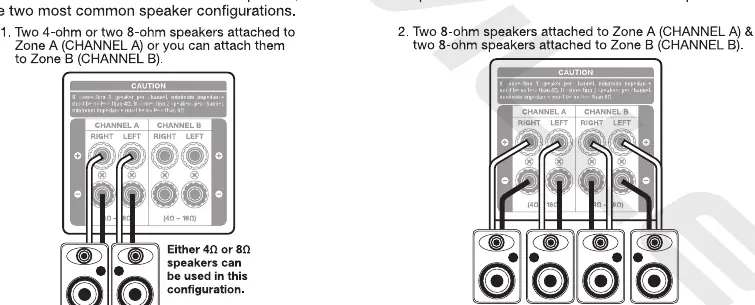
- Speaker Outputs: The unit has two zones (Channel A and Channel B).
- Configuration: You can connect two 4-ohm or 8-ohm speakers to Channel A, or split them between Channel A and Channel B.
- Caution: If connecting only 1 speaker per channel, the minimum impedance must be no less than 4 ohms.
Microphone and Echo Controls
The unit allows for professional vocal mixing:
- Mic/Line Inputs: Connect wired microphones to the front 1/4" jacks or rear XLR jacks.
- Echo Effect: Use the echo controls to add depth to vocals. You can select between Stereo or Mono echo modes.
- Delay: Adjusts the time between echoes (e.g., 100ms setting creates a 1/10th of a second delay).
Troubleshooting
- No power: Ensure the unit is properly plugged in and check the fuse.
- Bluetooth pairing fails: Ensure the device is within 5ft of the unit, discoverable, and not paired to another device.
- No sound: Verify the correct input source is selected and check master volume and cable connections.
- Microphone feedback: Ensure speakers are not pointed toward or too close to the microphones; adjust the treble settings on the mic EQ panel.
Specifications
- Peak Power: 500W x 2 @ 4 Ohm
- RMS Power: 150W x 2 @ 4 Ohm / 100W x 2 @ 8 Ohm
- Frequency Response: 20Hz - 20kHz (±2dB)
- THD: Less than 0.5%
- Signal to Noise Ratio: >78dB
- Dimensions: 1" x 13" x 5"
- Weight: 14lbs (6.35kg)
Manufacturer information
Rockville
Practical help
Common problems
No power
Make sure the unit is properly plugged in and check the fuse.
Bluetooth pairing fails
Ensure both devices are on, the unit is in pairing mode, the device is within 5ft, and not paired to another device.
No sound
Verify the correct input source is selected, check master volume, and inspect all input/output cable connections.
Microphone feedback
Move speakers away from microphones or adjust the treble settings on the mic EQ panel.
Before use
- Ensure the unit is placed in a properly ventilated area.
- Verify that the total speaker impedance is not less than 4 ohms.
- Check that all input and output cables are securely connected.
- Ensure the power switch is in the OFF position before connecting speakers.
Specs in practice
- Frequency Response
- The range of audio frequencies the amplifier can reproduce (20Hz - 20kHz covers the full human hearing range).
- Signal to Noise Ratio
- The ratio of signal power to background noise power; higher is better (>78dB).
Images and diagrams
- Front Panel: Contains all volume, EQ, echo, and input source controls.
- Rear Panel: Contains speaker terminals, XLR mic inputs, and RCA line inputs/outputs.
- Speaker Configuration: Illustrates how to connect speakers to Channel A and B terminals.
Model compatibility
- Supports 4-ohm or 8-ohm speakers.
- USB/SD drives up to 32GB max.
- Bluetooth range is approximately 35ft.

Manual page author
Michael Turner
Technical manual editor
Reviews PDF manuals for structure, safety notes, and practical product details so readers can find the right information quickly.