Electronics / Speakers Soundbars
Rockville RPA16 10,000-Watt Pro Rack Amplifier
Quick guide for the Rockville RPA16 10,000-Watt Pro Rack Amplifier. Learn about rack mounting, operating modes (Stereo, Parallel, Bridged), crossover settings, and troubleshooting.
Table of contents
Quick guide from the manual
The Rockville RPA16 is a high-power professional rack amplifier. Before operation, ensure the unit is placed in a well-ventilated area and that all connections are secure. The amplifier supports three main operating modes: Stereo, Parallel, and Bridged. Always verify that your speaker impedance is not less than 4 ohms to prevent damage. If you encounter issues, check the fuse, cable connections, and input signal levels.
Safety Instructions
- Indoor use only: Do not expose the unit to moisture.
- Ventilation: Ensure cooling fan vents are free of obstructions.
- Fuse: Replace only with a fuse of the same type, size, and rating (25A, 250V).
- Power: Do not operate if the power cord is damaged. Do not remove the ground prong.
- Maintenance: No user-serviceable parts inside. Refer repairs to a qualified technician.
Front Panel Features
- Power Switch: Turns the unit on/off.
- Signal Level Knobs: Controls incoming signal level for each channel. Turn counterclockwise if the Clip LED remains on.
- LED Indicators:
- Clip: Indicates output is within 3dB of clipping.
- Signal: Indicates input signal >100mV.
- Protect: Indicates short circuit, low impedance, or internal malfunction.
- On: Indicates power is active.
- LCD Screen: Displays signal level and temperature for each channel.
Rear Panel Features
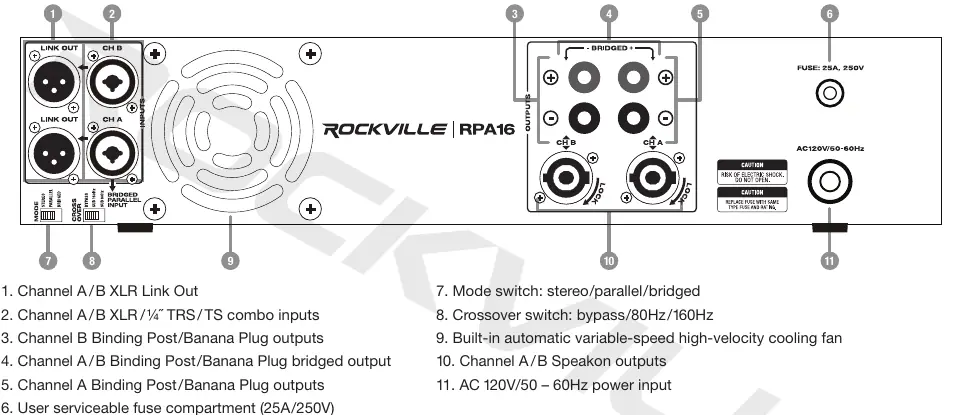
- Inputs: XLR and 1/4" TRS/TS combo inputs.
- Outputs: Binding post/banana plug, Speakon, and XLR Link Out.
- Mode Switch: Selects between Stereo, Parallel, and Bridged modes.
- Crossover Switch: Selects between Bypass, 80Hz, or 160Hz.
Rack Mounting
The RPA16 is designed for standard 19" rack mounting and requires 2U of rack space. Use the included heavy-duty rack mount ears, 4 screws, and 4 washers. For optimal cooling, ensure the side walls are at least 2" from the amplifier sides and the back of the rack is open. Support the rear of the amplifier, especially for mobile use.
Configuration Modes
- Stereo Mode: Each channel is independent with separate level controls. Use for standard left/right configurations.
- Parallel Mode: Channel A is the dedicated input. The signal is fed to both channels as a mono signal.
- Bridged Mode: Combines power from both channels into one mono channel. Channel A is the dedicated input. Primarily used for subwoofers.
Crossover Settings
- Bypass: Use when connecting full-range speakers.
- SUB 80Hz / 160Hz: Use when connecting subwoofers. This limits frequencies to 80Hz or 160Hz and below.
Troubleshooting
- No Power: Check power cable, wall socket, and fuse.
- No Sound: Verify cable connections, channel level settings, input device volume, and mixer settings. Ensure speakers are connected to OUTPUT, not INPUT.
- Clipping Light On: Turn down signal level controls (gain) or check speaker impedance.
Manufacturer information
Rockville
Practical help
Common problems
No power
Ensure the unit is plugged in, the power switch is ON, and check the fuse.
No sound
Verify all cables are connected to the correct ports (Output to speakers, Input from mixer), check channel levels, and ensure the mixer is not muted.
Clipping light is on
Reduce the signal level controls (gain) or check that speaker impedance is not too low.
Before use
- Ensure the unit is in a well-ventilated area with at least 2" of clearance.
- Verify that the power source is 120V/50-60Hz.
- Check that speaker impedance is not less than 4 ohms.
- Ensure the fuse is 25A/250V.
- Confirm the correct operating mode (Stereo, Parallel, or Bridged) is selected.
Specs in practice
- Damping Factor
- The amplifier's ability to control speaker movement.
Images and diagrams
- Stereo Mode: Independent left and right channels for standard speaker setups.
- Parallel Mode: Mono signal fed to both channels, ideal for monitors.
- Bridged Mode: Combines power from both channels into one mono output, ideal for subwoofers.
Model compatibility
- Requires 2U rack space.
- Minimum speaker impedance: 4 ohms.
- Power input: 120V/50-60Hz.

Manual page author
David Miller
Documentation analyst
Organizes user manual content into clear summaries, with attention to model details, product context, and everyday usability.