Electronics / Cameras
User Guide for Rollei Actioncam 10s Plus
Quick guide for the Rollei Actioncam 10s Plus. Learn how to set up, charge the battery, use the touch screen, connect via WiFi, and operate the camera modes.
Table of contents
Manual images
Click an image to enlargeQuick Guide
The Rollei Actioncam 10s Plus is a versatile action camera. Before first use, ensure the battery is fully charged and a compatible Micro SD card (U3 or V30 speed rating) is inserted and formatted. The camera features a 2-inch touch screen for easy navigation and supports WiFi connectivity for control via a smartphone app.
Camera Overview
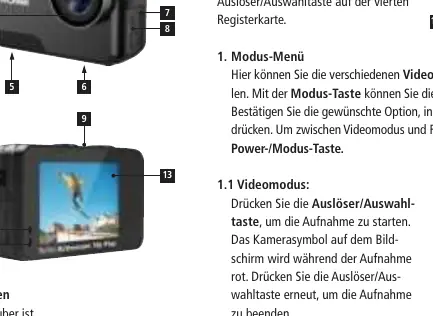
The camera features a lens, power/mode button, shutter/select button, and mode button. The battery compartment and Micro SD slot are located on the side, along with Micro HDMI and Micro USB ports. The device includes a built-in microphone and speaker.
Getting Started
Charging the Battery: Connect the camera to a computer or USB power supply (DC 5V 2A). The charging indicator light will turn on during charging and turn off when fully charged.
Powering On/Off: Press and hold the Power/Mode button for 3 seconds to turn the camera on or off.
Operation
Menu Navigation: Turn the camera on and press the Mode button to access the menu. Use the Shutter/Select button to enter a mode.
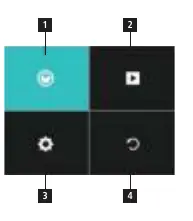
- Mode Menu: Choose between Video or Photo modes.
- Video Mode: Press the Shutter/Select button to start and stop recording. The camera symbol on the screen turns red during recording.
- Photo Mode: Press the Shutter/Select button to take a single picture.
- Playback: Access the playback menu to view recorded videos and photos.
Touch Screen Gestures:
- Swipe left/right to switch between video and photo modes.
- Swipe up to access the mode menu.
- Swipe down for quick shortcuts (WiFi, sound, lock, power off).
- Swipe down in playback mode to see file information.
WiFi & App Connection
Connect the camera to your smartphone via the integrated WiFi function. Turn on the camera and press the Shutter/Select button for 3 seconds, or use the touch screen shortcut to enable WiFi. The camera will display WiFi information (network name and password '1234567890'). Connect your smartphone to this network and use the '5s/6s/7s/10s Plus Actioncam' app to control the camera.
Storage & External Monitor
The camera supports Micro SD and Micro SDXC cards up to 64 GB. A card with at least U3 or V30 speed rating is required. You can connect an external monitor via the Micro HDMI port.
Waterproof Case
Ensure the case is clean before inserting the camera. Place the camera inside, ensuring the lens fits neatly, and close the locking clamps. The camera is waterproof up to 5 meters on its own, and up to 30 meters when inside the underwater housing.
Technical Data
- Video Resolution: Up to 4K at 30 fps.
- Battery: Li-Ion 3.7 V / 850 mAh.
- Operating Temperature: -10°C to 60°C.
- Dimensions: 4.4 x 6.6 x 2.7 cm.
Safety & Disposal
Do not expose the camera to strong magnetic fields or high temperatures. Dispose of the packaging and electronic waste according to local regulations. Batteries must not be disposed of in household waste.
Manufacturer information
Rollei GmbH & Co. KG
Practical help
Common problems
Camera does not turn on
Ensure the battery is fully charged and correctly inserted.
WiFi connection fails
Ensure the camera is in WiFi mode and you are connected to the correct network name displayed on the camera screen.
Data loss or corruption
Do not use Micro SD cards near magnetic sources and ensure you are using a high-speed (U3/V30) card.
Before use
- Fully charge the battery.
- Insert a compatible Micro SD card (U3 or V30 speed rating).
- Format the memory card on the camera.
- Ensure the waterproof case is clean before use.
Specs in practice
- 4K Resolution
- High-definition video recording at 30 frames per second.
Images and diagrams
- The camera diagram identifies the lens, power/mode button, shutter/select button, battery compartment, and various ports.
Model compatibility
- Supports Micro SD/SDXC cards up to 64GB.
- Requires U3 or V30 speed rating for reliable recording.

Manual page author
Michael Turner
Technical manual editor
Reviews PDF manuals for structure, safety notes, and practical product details so readers can find the right information quickly.