Electronics / Cameras
User Manual for Rollei F:X Pro Filter Holder Mark III 100 mm
Quick guide for the Rollei F:X Pro Filter Holder Mark III 100 mm. Learn how to install the filter holder, attach the CPL filter, and use optional extension rails for your photography setup.
Table of contents
Manual images
Click an image to enlargeQuick Guide
The Rollei F:X Pro Filter Holder Mark III 100 mm is designed for professional photography, allowing the use of square filters and a round CPL filter simultaneously. This guide covers the assembly, installation on camera lenses, and the use of optional extension rails.
Components
Front:
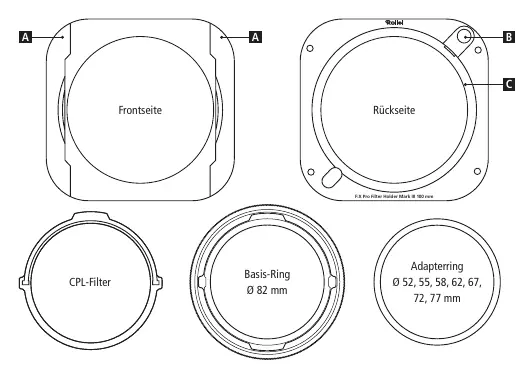
- Rails for filters
Rear:
- Easy lock button
- Adapter connection for base ring
Installation with CPL Filter
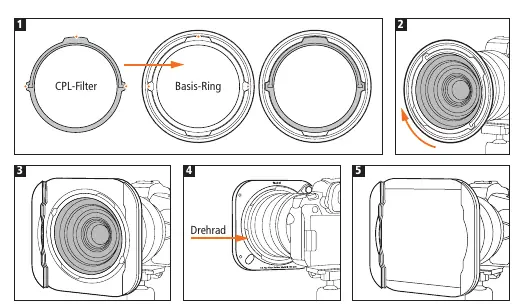
- Place the CPL filter into the base ring of the filter holder. Ensure it is aligned with the recesses (see orange markings) and held securely by the built-in magnets.
- Screw the base ring with the CPL filter onto your camera lens. Use an appropriate adapter ring if necessary.
- Attach the filter holder to the base ring by hooking it on one side and pressing the orange Easy-Lock button on the other side until it clicks into place.
- Use the rotary wheel to adjust the alignment of the CPL filter.
- Insert your rectangular filter(s) into the filter holder only after the CPL filter is aligned.
Installation without CPL Filter
- Screw the base ring onto the camera lens, using an adapter ring if required.
- Place the filter holder onto the base ring, hook one side, and press the orange Easy-Lock button on the opposite side to lock it securely.
Inserting Optional Extension Rails
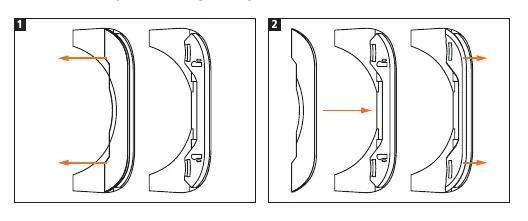
- Slide the front rail included with the filter holder inward toward the center to release it.
- Align the notches of the optional extension rail with the filter holder and push the rail outward until it clicks into place. You can now insert an additional square filter.
Important Notes
- The filter holder is compatible only with square filters that are 100 mm wide and 2 mm thick.
- Minor friction noises during rotation are normal due to the aluminum construction and do not affect performance.
- A maximum of one round filter and two square filters can be used simultaneously. Additional filters can be used with optional extension rails.
- If installed correctly, filters can be inserted from the top or bottom, and the system can be rotated.
Manufacturer information
Rollei GmbH & Co. KG
Practical help
Common problems
Friction noise during rotation
This is normal due to the aluminum construction and does not affect the performance of the filter holder or the filters.
Filter not fitting
Ensure you are using square filters with a width of 100 mm and a thickness of 2 mm.
Before use
- Check that you have the correct adapter ring for your lens diameter.
- Ensure the CPL filter is aligned with the recesses in the base ring.
- Verify the filter holder is securely locked onto the base ring using the orange button.
- Confirm your square filters are 100 mm wide and 2 mm thick.
Specs in practice
- Filter Width
- Compatible with 100 mm wide square filters.
- Filter Thickness
- Compatible with 2 mm thick filters.
Images and diagrams
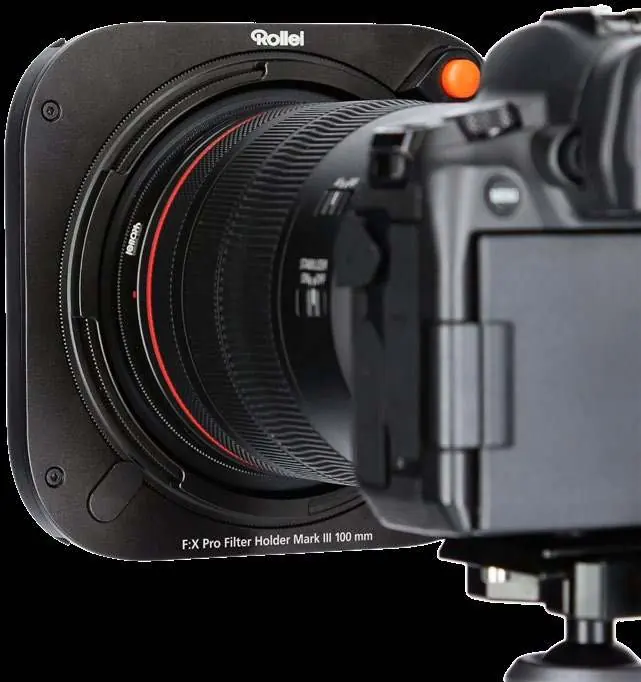
- The orange marks on the base ring indicate where to align the CPL filter.
- The orange button on the rear is the Easy-Lock mechanism for attaching the holder.
Model compatibility
- Compatible with lenses using adapter rings (52, 55, 58, 62, 67, 72, 77 mm).
- Supports up to one round filter and two square filters simultaneously (expandable with optional rails).

Manual page author
Emily Carter
User documentation editor
Prepares concise manual descriptions and highlights the most useful setup, operation, and maintenance information for readers.