Electronics / Cameras
User Manual for Rollei Powerflex 10x Digital Camera
Quick guide and user manual for the Rollei Powerflex 10x digital camera. Learn how to set up, configure shooting modes, connect to a PC, and use the Wi-Fi app.
Table of contents
Manual images
Click an image to enlargeQuick guide from the manual
The Rollei Powerflex 10x is a digital camera requiring a few initial steps before use. Ensure you have a compatible SD card (up to 64GB, U1 class or higher) and that the battery is fully charged via the USB-C port. Before first use, it is essential to format the memory card in the system settings menu. The camera features various shooting modes, including manual (M), aperture priority (Av), shutter priority (Tv), and scene modes (SCN), which can be selected via the mode dial.
Product Overview
The camera features a variety of controls and ports:
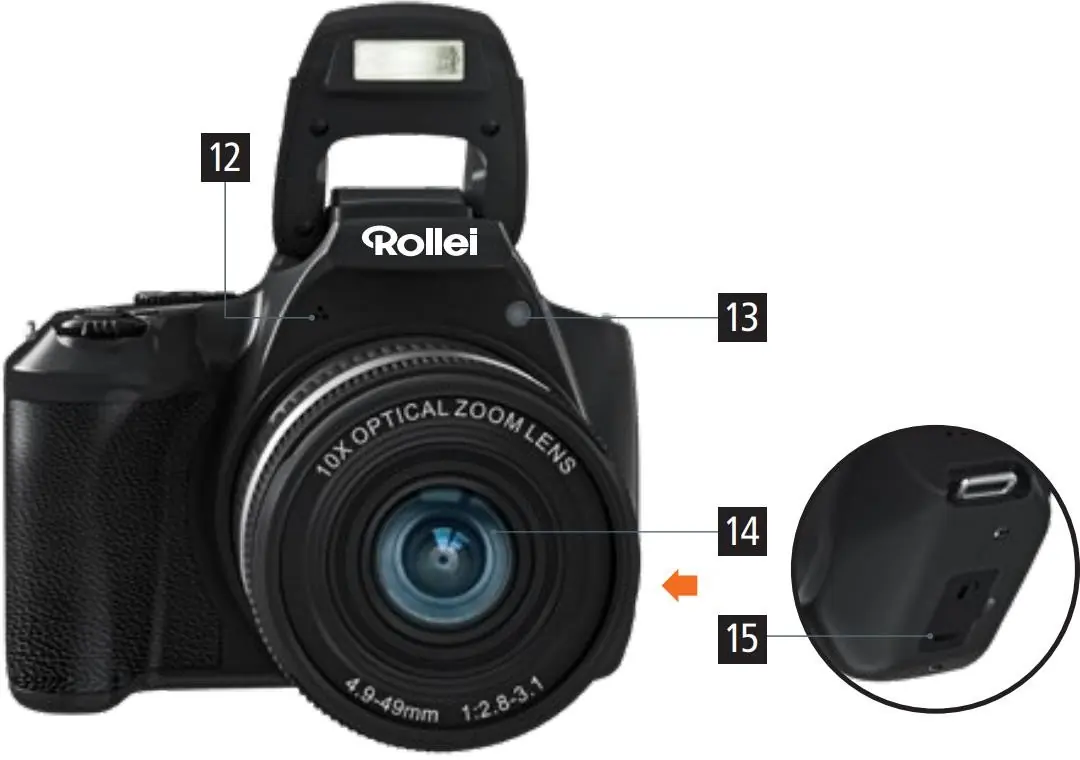
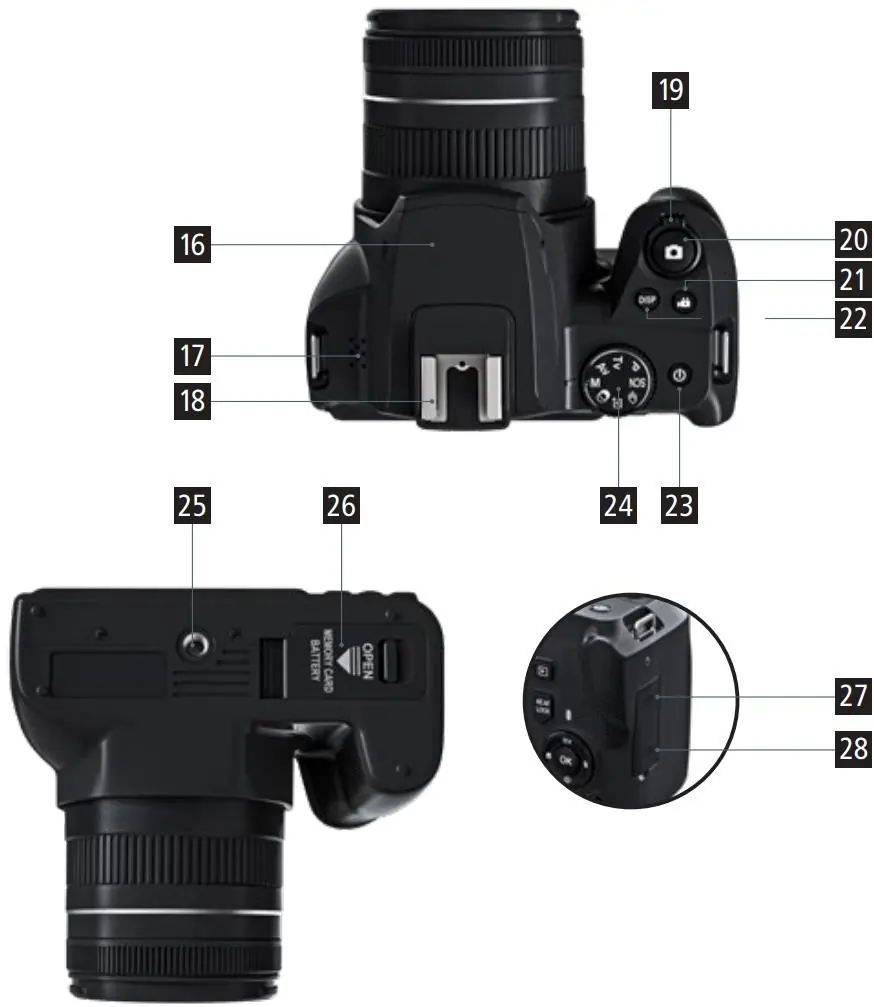
- Back: Playback button, AE/AF lock, Menu, ISO, Delete, and navigation buttons.
- Front/Side: Microphone, AF assist lamp, lens, and microphone connection.
- Top/Bottom: Flash, zoom control, shutter, video record, power button, mode dial, tripod mount (1/4"), battery/SD card compartment, HDMI port, and USB-C port.
Getting Started
Battery Installation: Open the battery compartment cover, slide the battery latch, and insert the battery. Ensure contacts align correctly.
Charging: Use the provided USB-C cable with a 5.0V 2.0A adapter or connect to a computer. The charging indicator glows red while charging and turns off when fully charged.
Initial Setup: Turn on the camera using the power button. Access the menu to set the language, date, and time. Format the SD card via the system settings menu to ensure compatibility.
Shooting Modes
Rotate the mode dial to select your preferred shooting style:
- Manual (M): Manually set aperture and shutter speed.
- Shutter Priority (Av): Camera sets shutter speed automatically; you control aperture.
- Aperture Priority (Tv): Camera sets aperture automatically; you control shutter speed.
- Program (P): Automatic settings.
- Scene (SCN): Select from presets like Landscape, Portrait, Sports, Night, etc.
Connectivity
PC Connection: Connect the camera to a computer via USB-C. You can choose between MSDC (Mass Storage Device Class) for file transfer or PC Camera mode for live streaming.
Wi-Fi App Control: Download the "VD Cam" app from the App Store or Google Play Store. Enable Wi-Fi in the camera's system menu, connect your smartphone to the camera's Wi-Fi network, and open the app to control the camera remotely.
Maintenance
If the camera will not be used for an extended period, remove the battery and store it in a dry, dust-free environment below 30°C. Clean the lens and screen gently with a soft, clean cloth. Avoid dropping the device or exposing it to strong shocks.
Manufacturer information
Rollei GmbH & Co. KG
Practical help
Common problems
Camera does not turn on
Check if the battery is inserted correctly and fully charged.
Blurry images
Ensure the lens is clean and check if image stabilization is enabled. Use appropriate focus settings.
Cannot connect to Wi-Fi
Ensure the camera's Wi-Fi is enabled in the menu and that your smartphone is connected to the camera's specific Wi-Fi network.
SD card error
Format the memory card using the camera's system menu. Note: This will erase all data on the card.
Before use
- Insert the battery correctly, ensuring contacts align.
- Insert a compatible SD card (up to 64GB, U1 class or higher).
- Charge the battery fully using the USB-C cable.
- Set the correct date and time in the system menu.
- Format the memory card before taking the first photo.
Images and diagrams
- Buttons 1-11: Controls for playback, menu navigation, ISO, and deletion.
- Buttons 16-28: Controls for flash, zoom, shutter, power, and mode selection.
- Ports 27-28: HDMI and USB-C connections for external devices.
Model compatibility
- App: VD Cam (available on iOS and Android).
- Memory: SD card up to 64GB, U1 class or higher.
- Charging: 5.0V 2.0A adapter.

Manual page author
Emily Carter
User documentation editor
Prepares concise manual descriptions and highlights the most useful setup, operation, and maintenance information for readers.