General / Other Manuals
User Manual for Rollei Compactline 10x Digital Camera
Quick guide for the Rollei Compactline 10x digital camera, covering battery installation, SD card setup, shooting modes, flash settings, and PC connectivity.
Table of contents
Quick guide from the manual
This document provides essential instructions for operating the Rollei Compactline 10x digital camera. It covers initial setup, including battery and SD card installation, basic operation, shooting modes, and connecting the camera to a computer.
Device Description
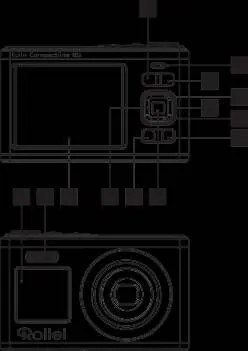
The camera features a mode dial, zoom controls, a flash, a rear LCD screen, and a front display. It includes a 1/4" tripod socket and a USB-C port for charging and data transfer.
Preparation for Use
- Battery: Open the battery compartment on the bottom, insert the lithium-ion battery, and close the cover.
- Charging: Connect the camera to a 5.0V (1.0A - 2.0A) adapter using the USB cable. The red indicator light turns off when fully charged. Full charge takes 2-3 hours, providing approximately 70 minutes of operation.
- SD Card: Insert a compatible SD card (up to 64GB) into the slot next to the battery until it clicks into place.
Operation
Powering On/Off: Use the power switch to turn the camera on or off. The lens will extend when the camera is ready.
Shooting: Compose your shot on the LCD, press the shutter button halfway to focus (green frame indicates focus), then press fully to capture.
Modes: Use the mode dial to select from 8 different modes, including Auto, Portrait (Beauty), Beach, Night Scene, and Black/White.
Flash: Use the flash button to toggle between flash off, flash on, and auto flash modes.
System Settings
Access the settings menu by pressing the Menu button and then the right button. You can configure date/time, auto power-off, language, frequency (50Hz/60Hz), and format the SD card.
Connecting to a Computer
Connect the camera to a PC via USB. The camera will display "Mass storage and PC camera". Select "Mass storage" to transfer files or "PCCamera" to use the device as a webcam.
Safety
- Do not use in rain or humid environments; the device is not waterproof.
- Keep small parts (memory card, battery) away from children.
- If the camera emits smoke or strange odors, remove the battery immediately.
- Use only the specified charger.
- Operating temperature range: -10 °C to +60 °C.
Manufacturer information
Rollei GmbH & Co. KG
Practical help
Common problems
Camera does not turn on or shows low battery
Charge the battery using a 5.0V USB adapter. If the battery is low, the camera will display 'Low Battery' and shut down.
Camera is unresponsive or frozen
Turn the camera off, wait approximately 10 seconds, and turn it back on.
Cannot record video
Ensure a compatible SD card is inserted into the camera.
Flash not working
Flash cannot be used while in zoom mode.
Before use
- Insert the lithium-ion battery correctly.
- Insert a compatible SD card (up to 64GB).
- Fully charge the battery before first use.
- Set the date and time in the system menu.
- Ensure the lens is clear of obstructions.
Specs in practice
- SD Card Compatibility
- Supports SD cards up to 64GB for storage.
- Charging Input
- Requires 5.0V, 1.0A - 2.0A USB power adapter.
- Video Resolution
- Supports 1080p (30 fps) and 720p (30 fps).
- Operating Temperature
- Safe to use between -10 °C and +60 °C.
Images and diagrams
- The camera features a mode dial (3) for selecting shooting modes.
- The shutter button is used for capturing photos and starting/stopping video recording.
- The rear LCD (20) displays the battery level and remaining photo count.
- The USB-C port (15) is located on the side for charging and data transfer.
Model compatibility
- The camera is not waterproof.
- Requires an external SD card for normal operation.
- Compatible with standard USB-C charging adapters.

Manual page author
Michael Turner
Technical manual editor
Reviews PDF manuals for structure, safety notes, and practical product details so readers can find the right information quickly.