Home Appliances / Cooktops Hobs
User Manual for Rommelsbacher CT 2020/IN and CT 3420/IN Induction Cooktops
Quick guide and user manual for Rommelsbacher CT 2020/IN and CT 3420/IN induction cooktops. Learn about operation modes, safety, cleaning, and troubleshooting.
Quick answers from the manual
Quick answer
- The Rommelsbacher CT 2020/IN and CT 3420/IN are portable induction cooktops. They feature two main cooking modes: 'Power level' (1-10) and 'Temperature level' (60-220°C), along with a timer and key lock function. p. 3, 14, 15, 33
Key actions
- Turn on the cooktop p. 13, 32
- Switch cooking modes p. 17, 36
- Set the timer p. 17, 36
First start
- Plug in the device and place suitable cookware on the cooking zone. p. 13, 32
Problems and fixes
E0 Error
No pot detected. Place a suitable pot on the zone.
p. 21, 39
E5 Error
Overheating protection. Let the unit cool down.
p. 21, 39Error codes
| Code | Meaning | Action | Pages |
|---|---|---|---|
| E0 | Pot recognition error | Place a suitable pot on the zone. | p. 21, 39 |
| E5 | Overheating protection | Remove cause of overheating and let cool. | p. 21, 39 |
Maintenance and reset
- Unplug the device to reset the control system for most error codes. p. 21, 39
Technical specifications
| Parameter | Value | Meaning | Pages |
|---|---|---|---|
| Nominal Power (CT 2020/IN) | 2000 W | Maximum power consumption. | p. 6, 25 |
| Nominal Power (CT 3420/IN) | 3400 W | Maximum power consumption (left: 2000W, right: 1400W). | p. 6, 25 |
Where to find it in the PDF
- Control Panel p. 3
- Error Codes p. 21, 39
Table of contents
Quick guide from the manual
The Rommelsbacher CT 2020/IN and CT 3420/IN are portable induction cooktops designed for household use. Before first use, wipe the device with a damp cloth. Always ensure you use induction-compatible cookware (ferromagnetic material, flat bottom, 12-26 cm diameter). To operate, place the cookware on the zone, press the ON/OFF button, and select your desired mode using the Function button.
Control panel
The control panel features touch sensors for easy operation:
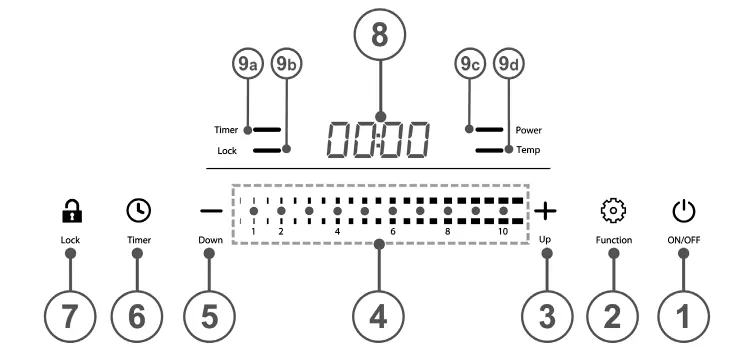
- ON/OFF: Main switch to turn the unit on or into standby.
- Function: Switches between 'Power level' and 'Temperature level' modes.
- Slider Touch (1-10): Used to adjust power or temperature settings.
- Timer: Sets runtime (1-180 minutes).
- Lock: Activates key lock to prevent accidental changes.
- Display: Shows power level, temperature, timer, or error codes.
Cooking modes
The cooktop offers two primary cooking modes:
- Power level mode: Ideal for boiling water or steaming. Levels range from 01 to 10.
- Temperature level mode: Ideal for roasting, grilling, or frying. Temperatures range from 60°C to 220°C.
You can switch between these modes at any time by pressing the Function button.
Safety and maintenance
Safety: Do not use the device if you have a pacemaker without consulting a doctor. Do not operate near flammable materials. The device has an automatic shut-off after 2 hours if no settings are changed. The glass surface remains hot after use due to residual heat from the pot.
Cleaning: Always unplug the device and let it cool down before cleaning. Use a special glass scraper for coarse residues and a damp cloth with mild detergent for the surface. Never use steam cleaners or abrasive materials.
Troubleshooting
If an error occurs, the power supply is cut off and an error code appears on the display:
- E0: No suitable pot detected. Place a compatible pot on the zone.
- E1: Electronic short-circuit. Contact customer service.
- E2: Temperature sensor error. Allow the unit to adjust to ambient temperature.
- E3/E4: Voltage issues (too high/too low). Check power supply.
- E5: Overheating protection. Remove the cause of overheating and let it cool.
- E6: Internal temperature too high. Clean ventilation slots and improve airflow.
Manufacturer information
Rommelsbacher ElektroHausgeräte GmbH
Practical help
Common problems
Display shows E0
No suitable cookware detected. Ensure the pot is induction-compatible and placed in the center of the cooking zone.
Display shows E5
Overheating protection triggered. Remove the cause (e.g., empty pot, hot oil) and let the unit cool down.
Display shows E6
Internal temperature too high. Clean ventilation slots and ensure proper airflow.
Before use
- Wipe the device with a damp cloth before first use.
- Ensure the power supply matches the rating label.
- Use only induction-compatible cookware (ferromagnetic).
- Ensure cookware has a flat bottom and is 12-26 cm in diameter.
- Place the device on a stable, heat-resistant, non-metallic surface.
Specs in practice
- Power levels
- 10 levels (01-10) for controlling power output.
- Temperature levels
- 60°C to 220°C for precise temperature control.
Images and diagrams
- 1: ON/OFF switch
- 2: Function selection
- 3: Increase setting (+)
- 4: Slider touch area
- 5: Decrease setting (-)
Model compatibility
- Only use ferromagnetic cookware.
- Cookware diameter must be between 12 cm and 26 cm.
- Do not use aluminum, copper, glass, or ceramic cookware.

Manual page author
Michael Turner
Technical manual editor
Reviews PDF manuals for structure, safety notes, and practical product details so readers can find the right information quickly.