Power / Wireless Chargers
SBS Ultra-Slim 20,000 mAh 100W Powerbank
Quick guide for the SBS Ultra-Slim 20,000 mAh 100W Powerbank. Learn how to charge your devices, understand port capabilities, and view technical specifications.
Table of contents
Quick guide from the manual
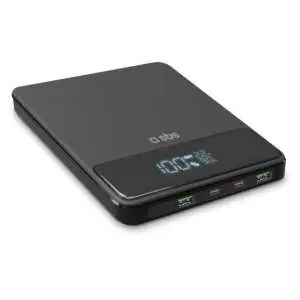
The SBS Ultra-Slim 20,000 mAh powerbank is designed to charge multiple devices simultaneously, including smartphones, tablets, speakers, e-readers, smartwatches, TWS earphones, and laptops or MacBooks. It features an LCD screen for real-time status updates and supports fast charging technologies.
Charging your devices
The powerbank allows you to charge up to 4 devices at the same time. Note the following port capabilities:
- USB-A ports: Feature Adaptive Fast Charge (AFC) technology. These are ideal for smaller electronic devices like smartphones and can deliver up to 30W.
- USB-C ports: Feature Power Delivery (PD) technology. These are perfect for high-power devices like laptops and can transfer up to 100W when used individually.
- Simultaneous charging: When connecting four devices at the same time, the total output is up to 30W.
LCD Screen and Safety
The integrated LCD screen displays the percentage of power remaining in the powerbank and the power level at which your devices are being charged in real-time. The device utilizes Adaptive Fast Charge (AFC) and Power Delivery (PD) technologies to optimize power requirements, helping to prevent overheating and short-circuits.
Technical Specifications
- Capacity: 20,000 mAh
- Maximum Output: 100W
- Connectors: 2x USB-A, 2x USB-C
- Dimensions: 134.1 x 155.8 x 18.9 mm
- Weight: 501 g
- Input: 5V DC 3A / 9V DC 3A / 12V DC 3A / 15V DC 3A / 20V DC 5A (100W)
Package Contents
- 1x Powerbank
- 1x USB-C to USB-C charging cable (0.5m)
- 1x Instruction manual
Practical help
Common problems
Charging speed is slow
Ensure you are using the correct port. Use the USB-C port for high-power devices like laptops to achieve up to 100W. USB-A ports are limited to 30W.
Device not charging at maximum speed
Charging speed may decrease when multiple devices are connected simultaneously (total output up to 30W).
Before use
- Check the battery percentage on the LCD screen before starting.
- Use the included USB-C cable for optimal performance.
- Ensure your device supports Power Delivery (PD) or Adaptive Fast Charge (AFC) for best results.
Specs in practice
- PD (Power Delivery)
- A charging standard that allows for safe, high-speed power transfer.
- AFC (Adaptive Fast Charge)
- Technology that detects device power requirements to optimize charging speed.
Images and diagrams
- The powerbank features an LCD screen on the top surface and four ports (2x USB-A, 2x USB-C) on the side edge.
Model compatibility
- Suitable for smartphones, tablets, speakers, e-readers, smartwatches, TWS earphones, and laptops/MacBooks.
- Safe for use aboard aircraft.

Manual page author
Michael Turner
Technical manual editor
Reviews PDF manuals for structure, safety notes, and practical product details so readers can find the right information quickly.