Power / Batteries & Chargers
User Guide for D'Addario XPND Pedal Power Battery Kit
Quick start guide for the D'Addario XPND Pedal Power Battery Kit. Learn how to power your guitar pedals using the battery or USB supply, understand polarity requirements, and safely operate your power gateway.
Table of contents
Manual images
Click an image to enlargeQuick Guide
This guide covers the setup and operation of the D'Addario XPND Pedal Power Battery Kit. It provides instructions for powering your pedalboard via the included battery or an external USB power supply, along with critical safety and polarity information.
Powering with Battery
To power your pedalboard using the portable battery:
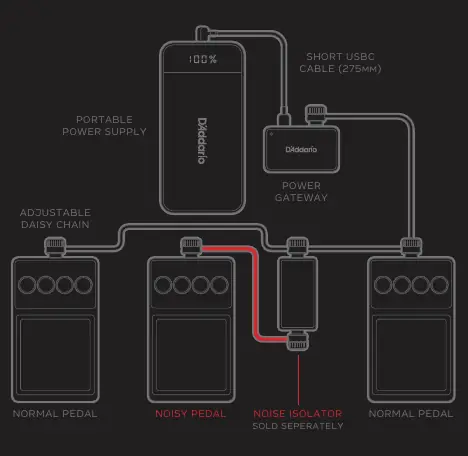
- Connect the Power Gateway to the portable power supply using the short USB-C cable (275mm).
- Connect the adjustable daisy chain to the Power Gateway and your pedals.
- Press and hold the power button on the battery to turn it on or off.
- When active, the battery will display the current charge level.
Powering with USB Power Supply
To power your pedalboard using an external USB charger:
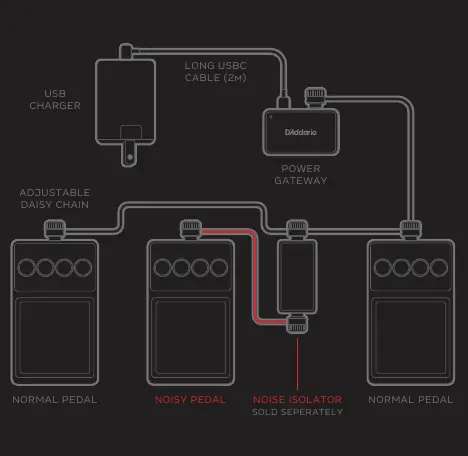
- Connect the Power Gateway to a USB charger using the long USB-C cable (2m).
- Connect the adjustable daisy chain to the Power Gateway and your pedals.
- Ensure you are using a compatible USB charger.
Charging the Battery
To charge the portable power supply:
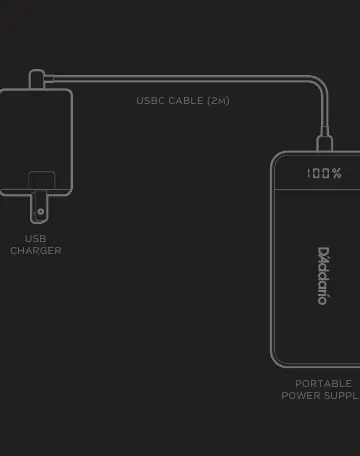
- Connect the portable power supply to a USB charger using the 2m USB-C cable.
- The battery will display the charge level during the process.
Important Safety and Polarity Information
Polarity is critical. The standard 5.5mm jack used on effects pedals must match the following configuration:
- Center pin (tip): Negative (ground)
- Outer barrel (sleeve): Positive (hot)
Connecting a tip-positive power supply to your system could cause permanent damage to your effects pedals. Do not exceed 1500mA total power draw. The device is intended for indoor use only. Do not attempt to open the adapter or battery. If you experience noise issues, especially when mixing analog and digital pedals, use the Pedal Noise Isolator (PW-XPNDPNI-01, sold separately) to provide galvanic isolation.
Practical help
Common problems
Noise issues with pedals
Use the Pedal Noise Isolator (PW-XPNDPNI-01, sold separately) to provide galvanic isolation, especially when mixing analog and digital pedals.
Powering issues or malfunction
Only use the included D'Addario USB battery or USB charger. Only D'Addario circuitry is guaranteed to provide clean 9V power and proper function.
Before use
- Verify the polarity of your pedals (Center pin negative, outer barrel positive).
- Ensure total power draw does not exceed 1500mA.
- Check that you are using the correct USB-C cable length for your setup (275mm for battery, 2m for USB charger).
- Ensure the device is used indoors only.
Specs in practice
- Max Power Draw
- Do not exceed 1500mA total load.
Images and diagrams
- The diagrams illustrate the signal flow from the Power Gateway to the pedals via the daisy chain.
- The Noise Isolator is placed between the noisy pedal and the daisy chain.
Model compatibility
- Compatible with standard 5.5mm jack pedals.
- Not for use with pedals requiring reversed polarity (rare).

Manual page author
David Miller
Documentation analyst
Organizes user manual content into clear summaries, with attention to model details, product context, and everyday usability.