Industrial / Cooling Units
User Manual for Seifert 42701001 Control Cabinet Air Conditioner
Comprehensive user guide for the Seifert 42701001 control cabinet air conditioner. Includes installation steps, electrical connection, maintenance, troubleshooting, and technical specifications.
Table of contents
Manual images
Click an image to enlargeQuick guide from the manual
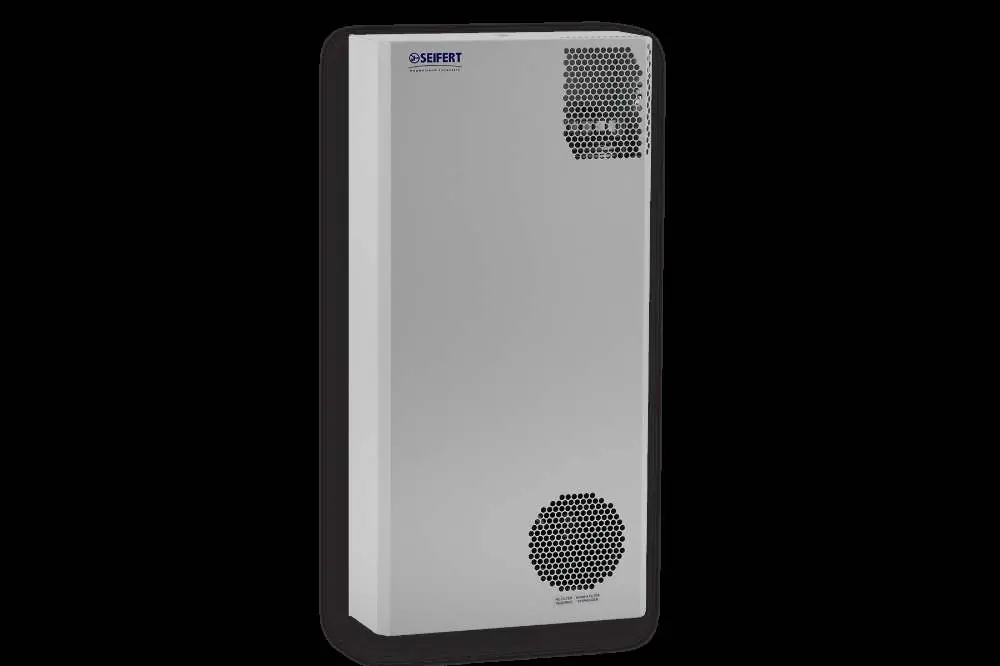
The Seifert 42701001 is a cooling unit designed exclusively for dissipating heat from stationary industrial control cabinets. It is not intended for household use. Key operational requirements include ensuring the unit is mounted horizontally, the cabinet is sealed to IP54 standards, and the unit is allowed to stand for at least 30 minutes after mounting before being powered on to allow compressor lubrication.
Safety Instructions
Warning: Only qualified personnel are permitted to install, maintain, or clean the unit. Ensure the cabinet is disconnected from the electrical supply and protected against unauthorized reconnection before starting any work. Dangerous voltages (above 50V AC or 100V DC) are present behind cabinet doors and on the power supply.
Functional Principle
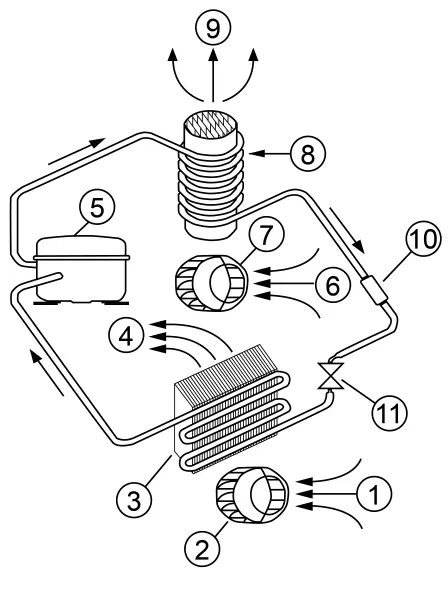
The unit operates on a refrigeration circuit consisting of a compressor, evaporator, condenser, and expansion device. It uses R134a refrigerant to dissipate heat from the cabinet interior to the ambient air, maintaining a set internal temperature.
Mounting and Installation
Before mounting, ensure the cabinet location allows for sufficient air circulation. Use the provided mounting template to drill holes and cut apertures. The unit must be mounted horizontally (max deviation 3 degrees). Ensure a good seal exists between the unit and the cabinet to maintain IP54 protection. Secure the unit using the supplied M6 hex head screws, washers, and locking washers.
Condensate Management
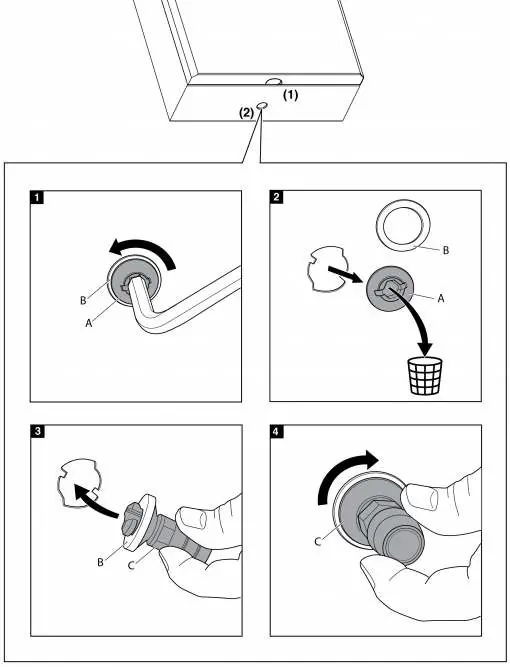
The condensation drain is located at the base of the unit. To install the oil and cleaning drain pipe: remove the plastic stopper from the base, keep the silicon washer, insert the drain connector, and lock it clockwise.
Electrical Connection
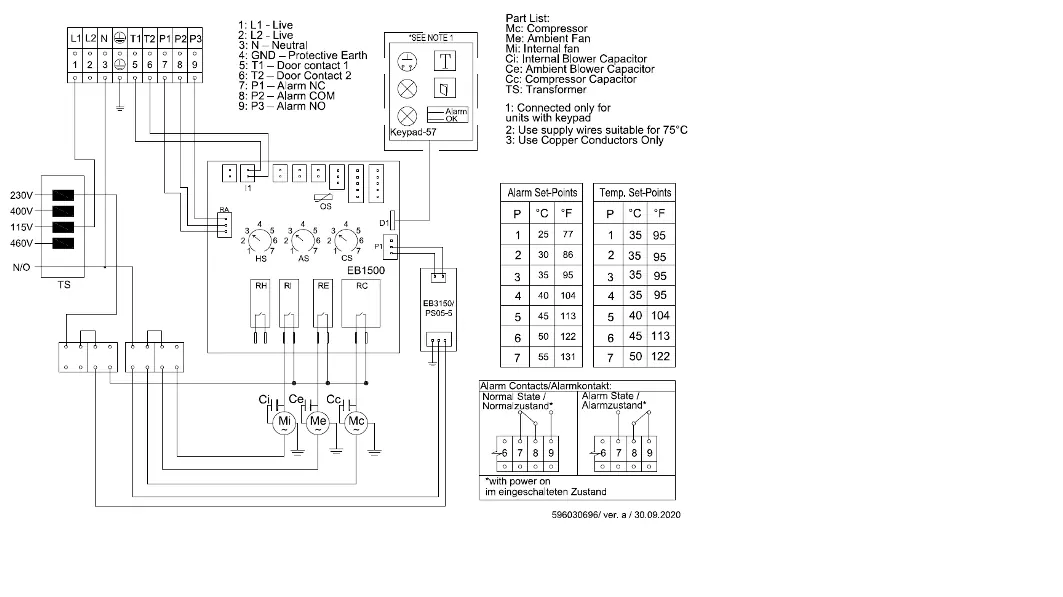
Mains connection is made via the terminal block. Ensure correct polarity is maintained and fans rotate clockwise. Terminals T1 and T2 are for a door contact switch (must be bridged if not used). Terminals P1, P2, and P3 are for fault warnings; the alarm temperature is factory-preset at 50°C. To adjust the alarm setting, remove the outer cover and PCB cover, then use a screwdriver to turn the alarm temperature potentiometer on the PC-board.
Taking into Operation
After mounting, wait at least 30 minutes before powering on. The unit is controlled based on the cabinet internal temperature, which can be adjusted via the potentiometer on the PC-board (range 20°C to 50°C). A start-up delay of 4-7 minutes occurs during the first operation.
Maintenance and Cleaning
Units are virtually maintenance-free. Regularly check the condenser profile for dirt (approx. every 2,000 hours). If cleaning is required, disconnect from the mains and blow out with compressed air. For wet cleaning, the unit must be removed from the cabinet. Never use aggressive cleaning fluids. After cleaning, allow a two-hour delay before restarting.
Troubleshooting
If the unit does not start, check the power supply, door contact, or temperature set point. If it does not cool, check the compressor, evaporator/condenser cleanliness, or refrigerant levels. If the evaporator is iced up, check the cabinet seal and ambient temperature. If there is excessive condensate, ensure the cabinet door is closed and the gasket is intact.
Technical Data
The unit operates at 120V (50/60 Hz) with a cooling capacity of 600W (L35L35). It features an IP54 ingress protection rating and an operating temperature range of +10°C to +50°C.
Transport and Storage
Store in locations with temperatures between -40°C and +70°C and a maximum relative humidity of 95% at 25°C. When returning the unit, use original packaging or ensure at least 30mm of space between the unit and external packing, protected by shock-resistant padding.
Practical help
Common problems
Unit does not start
Check electrical connection, ensure door contact is closed (or bridged), and verify if cabinet temperature is above the set point.
Unit does not cool
Check if the compressor is faulty, if the circuit breaker tripped, or if the evaporator/condenser is dirty.
Evaporator is iced up
Check for refrigerant leaks, ensure the cabinet is properly sealed, and verify ambient temperature is within the operating range.
Too much condensate
Ensure the cabinet door is closed properly, the cabinet is sealed, and the gasket between the unit and cabinet is intact.
Before use
- Ensure the cabinet is disconnected from the electrical supply.
- Check the carton for transport damage.
- Verify the cabinet is in a horizontal position (max 3-degree deviation).
- Ensure the cabinet is sealed to IP54 standards.
- Wait at least 30 minutes after mounting before connecting to mains.
- Verify the door contact switch is connected or bridged.
Specs in practice
- Cooling Capacity
- 600 W at 50/60 Hz (L35L35 condition).
- Ingress Protection
- IP54, indicating protection against dust and splashing water.
- Operating Temperature
- +10°C to +50°C.
Images and diagrams
- Wiring Diagram: Details connections for mains, door switch (T1/T2), and alarm contacts (P1/P2/P3).
- Condensate Drain: Shows the removal of the plastic stopper and installation of the drain connector.
- Mounting Principle: Illustrates recessed and external mounting configurations.
Model compatibility
- Not intended for household use.
- Requires MCB Type D or K protection.
- Alarm signal setting must be at least 5°C higher than the cabinet internal temperature setting.

Manual page author
Emily Carter
User documentation editor
Prepares concise manual descriptions and highlights the most useful setup, operation, and maintenance information for readers.