Industrial / Cooling Units
User Manual for Seifert 43101001 Control Cabinet Air Conditioner
Comprehensive user manual for the Seifert 43101001 control cabinet air conditioner. Includes installation instructions, wiring diagrams, controller programming, maintenance procedures, and troubleshooting guide.
Table of contents
Manual images
Click an image to enlargeQuick Guide
This guide provides essential information for the Seifert 43101001 control cabinet air conditioner. Important: After transport, the unit must stand for at least 30 minutes before being connected to the mains to allow compressor lubricant to flow back. The unit is pre-set at 35°C. Ensure the power supply matches the rating plate (120V) and the unit is protected by a MCB Type D or K.
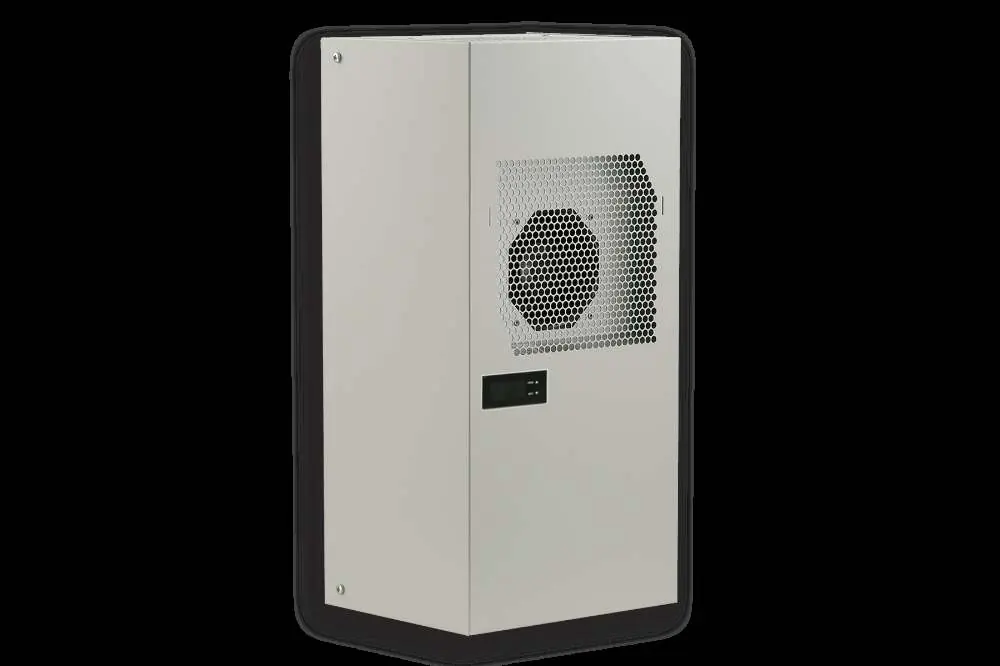
Safety Instructions
Only authorized, qualified personnel may install or maintain the unit. Always disconnect the power supply before opening the unit or performing maintenance. The unit is intended for industrial use only, not for household applications. Ensure the unit is protected externally from overloading and electrical faults.
Functional Principle
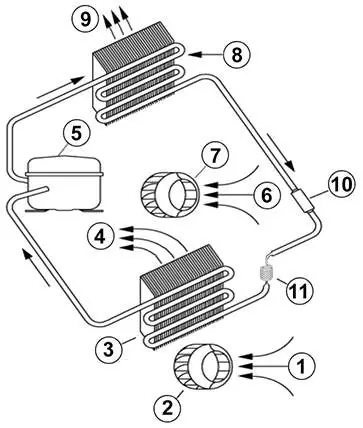
The unit operates on a refrigeration circuit consisting of a compressor, evaporator, condenser, and expansion device. It uses R134a refrigerant. The system features two separate air circuits to ensure clean cabinet air does not mix with polluted ambient air. Condensation is managed either via a drain socket or an internal condensate evaporator (depending on the specific model configuration).
Technical Data
- Order Number: 43101001
- Cooling Capacity: 1.08 kW (L35L35)
- Voltage/Frequency: 120 V ~ 60 Hz
- Operating Temperature: +10°C to +55°C
- Ingress Protection: IP 54
- Weight: 36 kg
- Fuse: 16 A (T)
Mounting
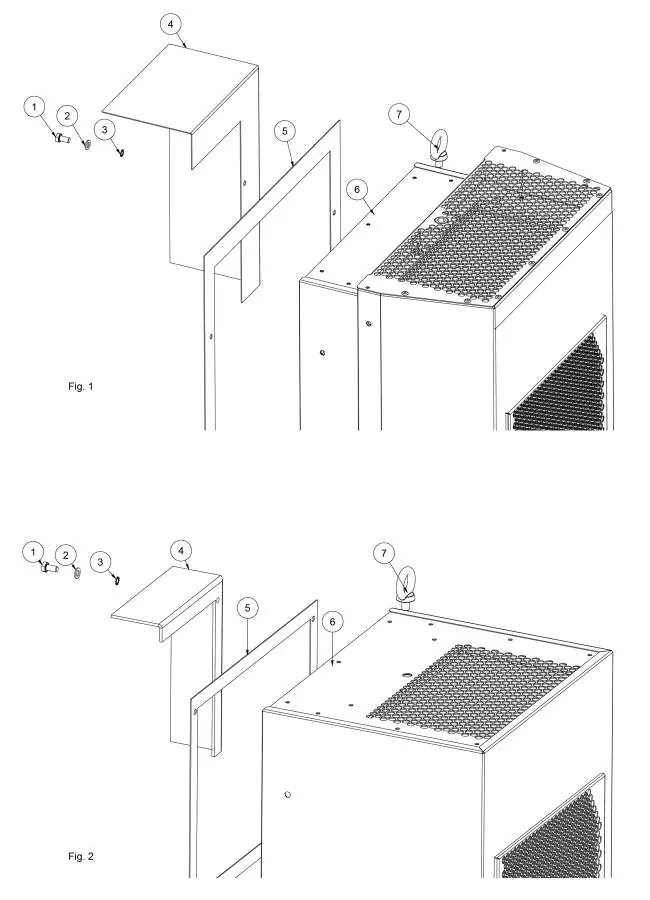
The unit is wall-mounted. Before drilling, ensure fixing elements do not interfere with internal equipment. Use the provided 1:1 scale drilling template to mark and cut the enclosure. Ensure the air suction hole is at the highest possible point. Fit the sealing strip on the unit side connected to the enclosure. Ensure the enclosure door is closed and sealed to maintain IP54 protection.
Electrical Connection
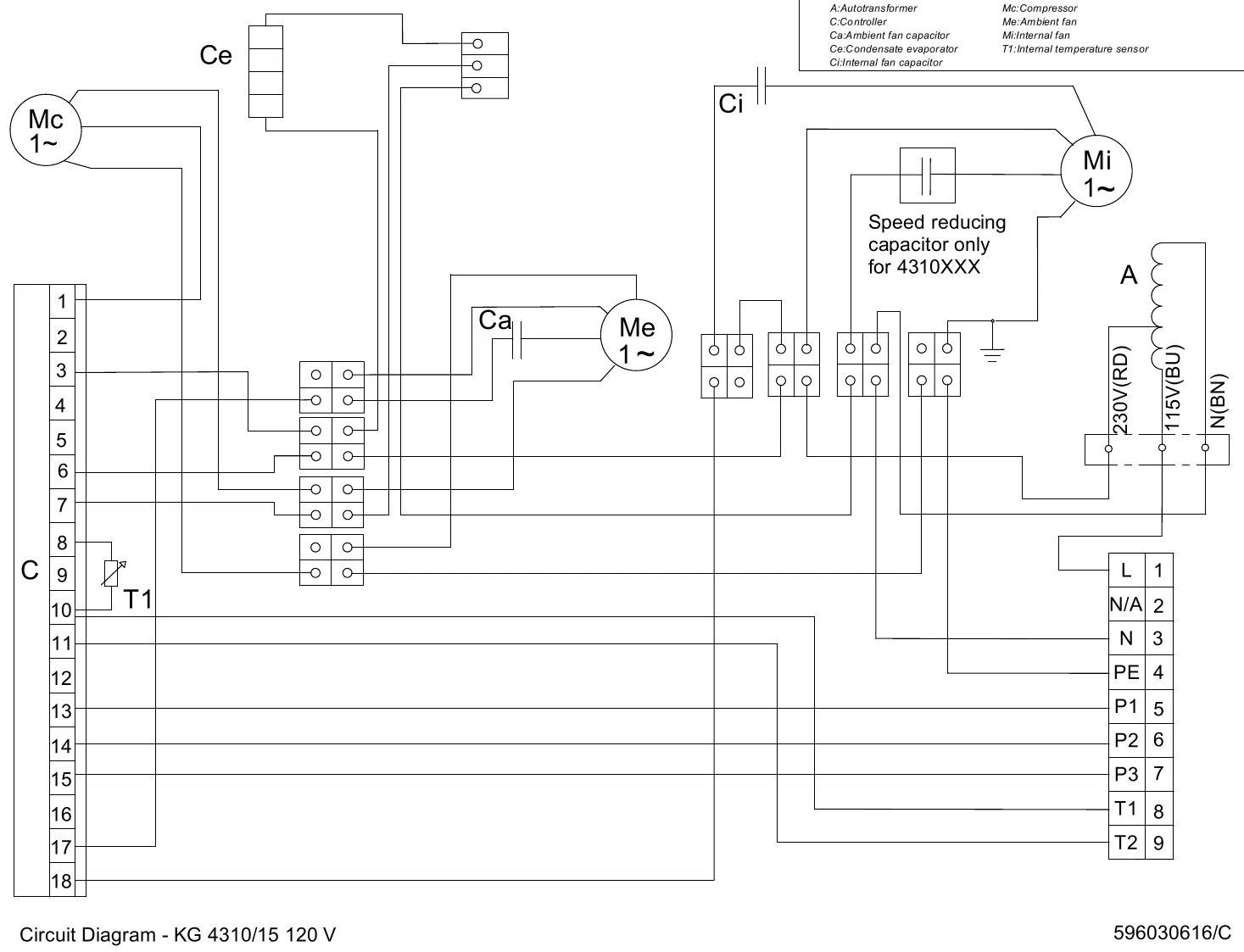
The unit can be switched on/off via a door contact switch. When delivered, the door contact terminals are bridged. To use a door switch, remove the bridge and connect the switch; the contact must be closed when the cabinet door is closed. Alarm contacts are provided for monitoring.
Controller Operation
The controller display shows the temperature and status icons. To set the cooling set point (St1):
- Press SET; the display shows St1 and the current value.
- Use the ▲ or ▼ buttons to reach the desired value.
- Press SET again to save.
To change temperature units or alarm thresholds, press PRG for 5 seconds to enter the parameter list (C18 for units, P25 for low temp alarm, P26 for high temp alarm).
Troubleshooting
If the unit does not cool, verify the power supply, check the St1 setting, ensure the door switch is closed, and verify the phase sequence. If the enclosure is too hot, check if the unit is undersized or if the condenser needs cleaning. For excessive condensate, ensure the door is closed and sealed properly.
Maintenance & Cleaning
The unit is generally maintenance-free. If equipped with filters, check and clean them regularly. Perform functional tests approximately every 2,000 hours. Do not use aggressive cleaning materials (ethanol, hydrocarbons, ammonia). Use neutral detergents and water.
Practical help
Common problems
Unit doesn't cool (Internal fan does not work)
Verify power supply.
Unit doesn't cool (Internal fan works, external fan/compressor don't)
Verify St1 setting, check door switch contact, or replace controller.
Unit doesn't cool (Display shows alternating OFF and temperature)
Check phase sequence in the power supply connector.
Enclosure temperature too hot
Verify if the unit is undersized, clean the condenser, or check for refrigerant leakage.
Excessive condensate
Ensure the enclosure door is closed, add a door switch, or repair/replace the sealing strip.
Before use
- Wait at least 30 minutes after transport before connecting to mains.
- Ensure the enclosure door is closed and sealed.
- Verify power supply matches the rating plate (120V).
- Ensure air flow is not obstructed.
- Protect the unit with a MCB Type D or K.
- Check that the drilling template dimensions match the actual unit.
Specs in practice
- Cooling Capacity L35L35
- 1.08 kW cooling performance at 35°C ambient and 35°C internal temperature.
- Ingress Protection IP 54
- Protected against dust ingress and water spray from any direction.
- Operating Temperature
- The unit functions within +10°C to +55°C.
Images and diagrams
- Functional Principle: Shows the refrigeration cycle with compressor, evaporator, condenser, and expansion device.
- Mounting Principle: Illustrates recessed vs. external mounting configurations with hardware (screws, washers, sealing tape).
Model compatibility
- Not intended for household use.
- Requires 120V ~ 60Hz power supply.
- Alarm contacts are not suitable for fluorescent loads with phase shifting capacitors.

Manual page author
Michael Turner
Technical manual editor
Reviews PDF manuals for structure, safety notes, and practical product details so readers can find the right information quickly.