Automotive / Car Audio
User Manual for Baby Sleep Aid Bluetooth Speaker
A quick guide to using your Baby Sleep Aid Bluetooth Speaker, including charging instructions, Bluetooth pairing, night light controls, and timer settings.
Table of contents
Quick Guide
This device is a baby sleep aid with a built-in Bluetooth speaker. To get started, ensure the device is charged via the Type-C port. Use the power button to turn the device on or off, and double-tap it to enter Bluetooth pairing mode (device name: SLEEP MACHINE). The device features a night light, timer settings, and built-in music tracks.
Device Overview
The device features the following controls and indicators:
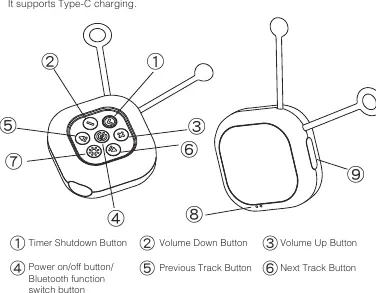
- 1: Timer Shutdown Button
- 2: Volume Down Button
- 3: Volume Up Button
- 4: Power on/off button / Bluetooth function switch button
- 5: Previous Track Button
- 6: Next Track Button
- 7: Night Light Button
- 8: Charging Indicator
- 9: Type-C Charging Port
Charging
The device uses a Type-C charging port. Connect the device to a power source to charge.
- Charging Indicator: Turns red during charging and green when fully charged.
- Charging Time: Approximately 2.5 hours to reach 100% charge.
Power & Light Controls
- Power On/Off: Long press the power button for 1.5 seconds.
- Night Light Toggle: Short press the light button to turn the light on or off. This works even when the device is powered off.
- Adjust Brightness: Long press the light button to increase brightness, release, and hold again to decrease.
Bluetooth & Music
- Bluetooth Pairing: Double-tap the power button to enter pairing mode. The device will appear as SLEEP MACHINE on your phone or tablet.
- Auto-revert: If no device is connected, it will auto-revert to built-in music after 3 minutes.
- Play/Pause: Short press the power button during playback.
- Volume: Use the + and - buttons to adjust volume.
- Built-in Tracks: Cycle through 7 tracks using the Previous/Next buttons.
Timer Settings
The device includes a timer for automatic shutdown:
- 60-minute shutdown: Press the timer button once (indicator lights up).
- 120-minute shutdown: Press the timer button twice.
- Cancel timer: Press the timer button again.
Technical Specifications
- Product Size: 80 x 80 x 35 mm
- Product Weight: 116g
- Battery Capacity: 1200mAh
- Battery Life: Over 200 minutes; over 7 hours of built-in playback
- Operating Temperature: 0°C to 40°C
Practical help
Common problems
Device not pairing via Bluetooth
Double-tap the power button to enter pairing mode. Ensure your device is searching for 'SLEEP MACHINE'.
Charging status unknown
Check the charging indicator: Red means charging, Green means fully charged.
Timer not working
Press the timer button once for 60 minutes or twice for 120 minutes. The indicator should light up.
Before use
- Charge the device fully using a Type-C cable (approx. 2.5 hours).
- Verify the charging indicator turns green when fully charged.
- Ensure the device is within the operating temperature range (0-40°C).
- Check that the device is in pairing mode (double-tap power button) before connecting via Bluetooth.
Specs in practice
- Charging Time
- Approximately 2.5 hours to charge from 0% to 100%.
- Battery Life
- Provides over 200 minutes of operation or over 7 hours of built-in music playback.
- Operating Temperature
- The device should be used in environments between 0°C and 40°C.
Images and diagrams
- The control panel is located on the top of the device, featuring buttons for timer, volume, power/Bluetooth, track navigation, and night light.
- The Type-C charging port is located on the side of the device.
Model compatibility
- Bluetooth device name: SLEEP MACHINE
- Supports Type-C charging

Manual page author
Michael Turner
Technical manual editor
Reviews PDF manuals for structure, safety notes, and practical product details so readers can find the right information quickly.