Baby / Children Products
Oricom 08KBEAR Sleep Trainer Digital Clock User Guide
Quick guide for the Oricom 08KBEAR Sleep Trainer Digital Clock. Learn how to set the time, configure wake-up and sleep schedules, use the alarm, and manage battery settings.
Table of contents
Manual images
Click an image to enlargeQuick Start Guide
For first-time use, insert a paper clip into the MAIN SWITCH hole located on the back of the device to power it on. Ensure the device is fully charged using a 5V 500mA USB power adapter (not supplied) before use.
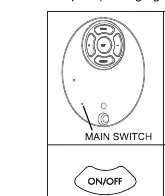
Device Overview and Controls
The device features several buttons for operation:
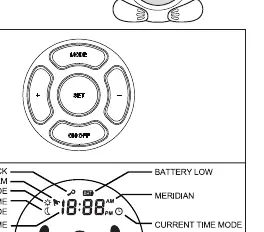
- On/Off: Turns the screen and backlight on or off.
- Mode: Cycles through display options (Koala only / Koala and time).
- Set: Used to enter setting modes and confirm selections.
- +/- Buttons: Adjust brightness (7 levels) and change time/settings values.
Setting the Current Time
- Press the MODE button until the current time mode icon is displayed.
- Press and hold the SET button for 3 seconds.
- The hours will begin to flash; use + or - to adjust.
- Press SET again to switch to minutes; adjust with + or -.
- Press SET to confirm.
Configuring Sleep and Wake-up Schedules
The device allows you to set specific times for daytime (wake-up) and nighttime (sleep) modes.
Setting Daytime (Wake-up)
- Press MODE until the daytime icon is displayed.
- Press and hold SET for 3 seconds.
- Adjust hours and minutes using + or -, pressing SET to confirm each step.
- The daytime mode is active between 04:00 AM and 02:59 PM.
Setting Nighttime (Sleep)
- Press MODE until the nighttime icon is displayed.
- Press and hold SET for 3 seconds.
- Adjust hours and minutes using + or -, pressing SET to confirm each step.
- The nighttime mode is active between 03:00 PM and 03:59 AM.
Alarm and Display Settings
- Activating/Deactivating Alarm: Press MODE to display the daytime setting, then press MODE to toggle the alarm. A bell icon indicates the alarm is active.
- Locking Controls: To prevent accidental changes, press and hold + and - buttons simultaneously for 5 seconds. A key icon will appear.
- Reset: To restore default settings, press and hold MODE, SET, and ON/OFF simultaneously until 'Clr' appears on the display.
Maintenance and Safety
- Battery: The device uses a 3.7V 500mAh Lithium-ion battery. If the battery icon appears, charge the device immediately.
- Storage: If not in use for an extended period, charge the device every two months to protect battery life.
- Safety: This product is not a toy. Keep out of reach of children. Do not disassemble the device.
Technical Specifications
- Power Input: 5V 500mA USB power adapter.
- Battery: 3.7V 500mAh Lithium-ion.
- Backlight: 7 adjustable brightness levels.
Practical help
Common problems
Device not turning on
Ensure the battery is charged. Use a 5V 500mA USB power adapter to charge the device.
Buttons unresponsive
Check if the Key Lock is active. Press and hold the + and - buttons for 5 seconds to unlock.
Settings not saving
Ensure you press the SET button to confirm each step after adjusting hours or minutes.
Before use
- Insert a paper clip into the MAIN SWITCH hole for first-time use.
- Ensure the device is fully charged using a 5V 500mA USB power adapter.
- Check that the battery icon is not flashing (low battery).
Images and diagrams
- The main display shows icons for Key Lock, Alarm, Daytime, Nighttime, and Time.
- The back of the device contains the Mode, Set, and On/Off buttons.
Model compatibility
- Not a toy; keep out of reach of children.
- Contains a lithium-ion battery; dispose of according to local regulations.

Manual page author
Michael Turner
Technical manual editor
Reviews PDF manuals for structure, safety notes, and practical product details so readers can find the right information quickly.