HVAC / Heat Pumps
Siemens TW 86 Series Electric Kettle User Manual
Quick guide for the Siemens TW 86 series electric kettle. Learn how to boil water, set temperatures, use the keep-warm function, clean, and descale your appliance.
Table of contents
Manual images
Click an image to enlargeQuick guide from the manual
This manual provides instructions for the Siemens TW 86 series electric kettle. Key operations include boiling water, selecting specific temperatures (70°C, 80°C, 90°C, 100°C), and using the keep-warm function. Always ensure the lid is closed and the limescale filter is in place before use. Do not fill the kettle with milk or instant beverages.
Parts and operating controls
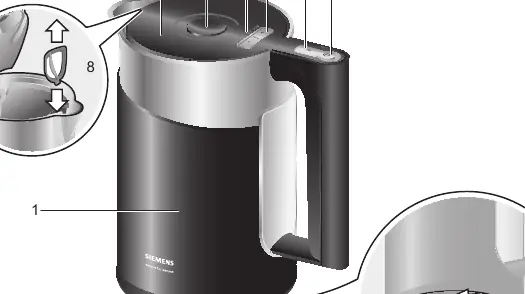
- 1: Kettle (with water level indicator)
- 2: Lid
- 3: Lid release button
- 4: ON/OFF switch
- 5: Temperature indicator (illuminated)
- 6: + / - buttons (temperature setting)
- 7: Keep warm button
- 8: Limescale filter (removable)
- 9: Base
- 10: Cable tidy
Before using for the first time
Remove any stickers or film. Unroll the required length of cable from the cable tidy and plug it in. Fill the kettle with water, bring to a boil, and discard. Repeat this process to ensure the kettle is clean. During the first boil, add a tablespoon of white vinegar.
Boiling water
Fill the kettle with fresh water through the spout or the open lid. Check the water level using the min and max markings. Close the lid until it locks and place the kettle on the base. Press the ON/OFF switch; the kettle will emit a signal and the factory-set temperature (100°C) will light up. You can adjust the temperature using the + or - buttons. The kettle switches off automatically once the selected temperature is reached.
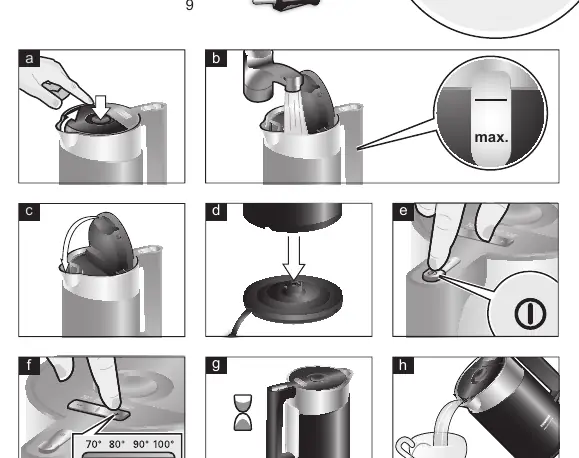
Keep warm setting
You can activate the keep warm function at any temperature setting. Press the keep warm button; the indicator will light up. To turn it off, press the button again. The feature switches off automatically after 30 minutes.
Cleaning and maintenance
Unplug the appliance before cleaning. Clean the outside of the kettle and base with a damp cloth. Do not use abrasive cleaning agents. Remove the limescale filter, soak it in a little vinegar, and rinse with clear water. Rinse the kettle and filter with clear water.
Descaling
Regular descaling extends the life of your kettle and saves energy. Fill the kettle with water to the 1.5 mark and bring to a boil. Add a small amount of white vinegar and let it sit for several hours, or use a commercial descaling agent according to the manufacturer's instructions. Rinse thoroughly with clear water.
Troubleshooting
If the kettle does not heat up and the temperature indicator does not light up, the overheat protection may have tripped. Let the kettle cool down for some time. If the unit turns off before the water boils, it may contain too much scale; descale the kettle as instructed.
Manufacturer information
Siemens AG
Practical help
Common problems
Kettle does not heat up, temperature indicator does not light up.
The overheat protection has tripped. Let the kettle cool down for some time before switching it on again.
Unit turns off before the water comes to a boil.
The kettle contains too much scale. Descale the kettle according to the instructions.
Before use
- Remove all stickers and film.
- Unroll the cable to the desired length.
- Fill the kettle with water.
- Bring the water to a boil and discard it.
- Repeat the boiling process once.
- Add a tablespoon of white vinegar during the first boil.
Specs in practice
- 70°C, 80°C, 90°C, 100°C
- Selectable water temperatures for different types of beverages.
Images and diagrams
- 1: Kettle, 2: Lid, 3: Lid release, 4: ON/OFF switch, 5: Temperature indicator, 6: Temperature setting buttons, 7: Keep warm button, 8: Limescale filter, 9: Base, 10: Cable tidy.
Model compatibility
- Use the kettle only with the included base.
- Do not fill with milk or instant beverages as they will burn and damage the appliance.

Manual page author
Emily Carter
User documentation editor
Prepares concise manual descriptions and highlights the most useful setup, operation, and maintenance information for readers.