Lighting / Fixtures
SilverStone KUBLAI 07E ATX Tower Chassis User Guide
Quick guide for the SilverStone KUBLAI 07E ATX tower chassis, covering component clearance limits, drive installation, and warranty information.
Table of contents
Manual images
Jump to the sectionQuick guide from the manual
This document provides essential technical specifications and installation guidelines for the SilverStone KUBLAI 07E ATX tower chassis. It focuses on component compatibility limits and proper drive mounting to ensure a successful build.
Device Overview
The KUBLAI 07E is an ATX tower chassis featuring sound-dampening material, a clean internal layout with PSU/drive bay covers, and front-mounted USB Type-C connectivity. It includes two 140mm fans for positive pressure airflow and supports advanced cable routing.
Hard Drive Installation
To install a hard drive:
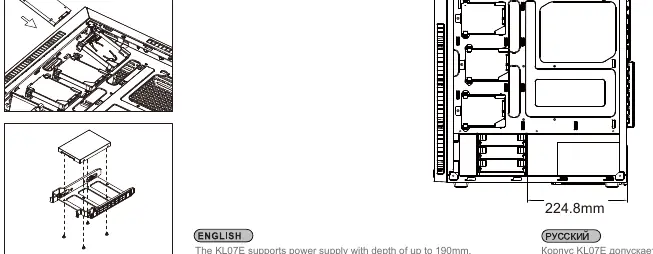
- Place the hard drive onto the tray.
- Secure it using the provided screws.
- Caution: Ensure the drive tray is oriented so that the drive connector jack is on the same side as the tray's mounting side.
Component Limitations
To ensure proper fitment of high-performance components, adhere to the following guidelines:
- CPU Cooler: Maximum height is 170mm, with a 29mm clearance above the motherboard's top edge.
- Power Supply: Supports units with a depth of up to 190mm.
- Graphics Card: Supports cards up to 15.35 inches (390mm) in length.
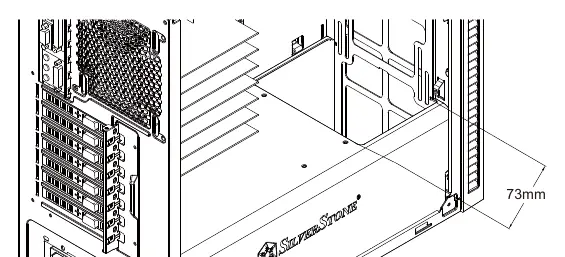
- Radiator: Maximum thickness limitation is 73mm for 360mm radiators.
Warranty Information
The product includes a limited 1-year warranty in North America and Australia. Warranty coverage is subject to proper usage, no unauthorized modifications, and proof of purchase. For service, contact your retailer or visit the official website at http://www.silverstonetek.com. You must obtain an RMA number before returning any defective product.
Official resources from the manual
Manufacturer information
SilverStone Technology Co., Ltd.
Practical help
Common problems
Component does not fit
Verify your CPU cooler height (max 170mm), PSU depth (max 190mm), or GPU length (max 390mm) against the chassis specifications.
Hard drive connector alignment
Ensure the drive tray is mounted so the connector jack faces the correct side for cable routing.
Before use
- Check that your CPU cooler height does not exceed 170mm.
- Ensure your power supply depth is 190mm or less.
- Verify your graphics card length is within the 390mm limit.
- Keep your original sales receipt for warranty eligibility.
- Obtain an RMA number from SilverStone before returning any product for service.
Specs in practice
- CPU Cooler Height
- Maximum allowed height from the motherboard surface to the top of the cooler is 170mm.
Images and diagrams
- The manual provides specific clearance diagrams for CPU coolers, power supplies, and graphics cards to help visualize internal space constraints.
- HDD tray diagrams illustrate the correct orientation of the drive connector relative to the tray mounting.
Model compatibility
- Designed for ATX motherboards.
- Supports 360mm radiators with a thickness limit of 73mm.

Manual page author
David Miller
Documentation analyst
Organizes user manual content into clear summaries, with attention to model details, product context, and everyday usability.