Electronics / Audio Processors
Quickstart Guide for Solid State Logic THE BUS+ 2-Channel Bus Compressor
Quickstart guide for the Solid State Logic THE BUS+ 2-Channel Bus Compressor and Dynamic Equalizer. Learn about connectivity, compressor modes, D-EQ settings, and front panel controls.
Quick answers from the manual
Quick answer
- THE BUS+ is a 2-channel analogue bus compressor and dynamic equalizer. It features digitally-controlled analogue circuitry for precise recall and stereo matching. p. 3
Key actions
- Powering on the unit p. 3
- Connecting audio I/O p. 2
First start
- Connect power, connect XLR inputs/outputs, and use the front panel controls to shape the sound. p. 2, 3
Where to find it in the PDF
- Front Panel Controls p. 2, 3
- Rear Panel Connectivity p. 3
Table of contents
Manual images
Click an image to enlargeQuick guide from the manual
The Solid State Logic THE BUS+ is an all-analogue processor featuring a classic Bus Compressor and a 2-band Dynamic EQ (D-EQ). This guide provides an overview of the controls and connectivity required to integrate the unit into your studio setup.
Front Panel Controls
The front panel provides tactile control over the compressor and EQ sections. Key controls include:
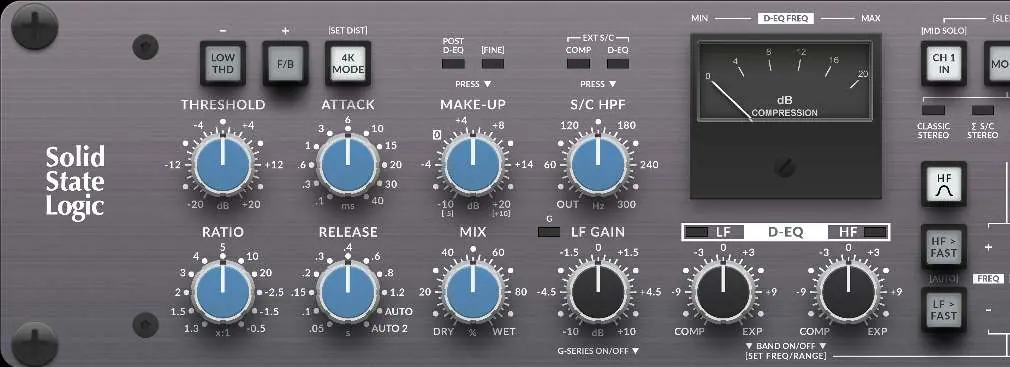
- Threshold: Sets the level at which compression begins.
- Ratio: Determines the amount of compression applied.
- Attack & Release: Controls the timing of the compressor. Includes specific options like .05s release for drums or AUTO 2 for mix bus.
- Mix: Allows for parallel compression by blending dry and wet signals.
- Make-up: Adjusts the output gain. Push and hold to switch between coarse (1dB) and fine (0.5dB) steps.
- S/C HPF: Variable sidechain high-pass filter to control low-end triggering.
- D-EQ: 2-band Dynamic Equalizer. Use the LF/HF Gain knob to adjust gain. Push the knob to add classic G-Series overshoot/undershoot resonance.
Compressor Modes
THE BUS+ offers three distinct sonic options for shaping the sound:
- LOW THD: Provides a cleaner bottom-end.
- F/B: Offers a more 'relaxed' style of compression.
- 4K MODE: Adds character and variable harmonic content.
Rear Panel Connectivity
The rear panel handles all audio and power connections:
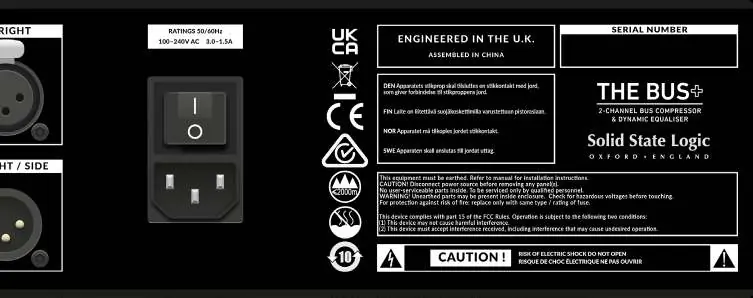
- Balanced XLR I/O: Connect the unit as a hardware insert across your audio interface or analogue desk.
- External Sidechain Inputs: Connect external sources to trigger the sidechain.
- Sidechain Send: Allows for creative duplication of the input signal, useful for external processing or Mid/Side encoding.
- Power: Connect the IEC cable to a mains power socket and use the rocker switch to power the unit on or off.
Recallability and Precision
THE BUS+ utilizes a digitally-controlled analogue approach. Stepped pots are read by an on-board micro-controller, which controls the analogue circuitry. This ensures immunity from pot tolerances, eliminates stereo mismatch, and provides precise, reliable control for recall.
Practical help
Common problems
Unit does not power on
Ensure the IEC power cable is securely connected to a mains socket and the rear rocker switch is set to the ON position.
Need to trigger sidechain from an external source
Connect the external source to the EXT S/C IN inputs located on the rear panel.
Stereo image mismatch
The unit uses digitally-controlled analogue circuitry to eliminate pot tolerances, ensuring precise stereo matching automatically.
Before use
- Connect the unit to an earthed mains power socket using the provided IEC cable.
- Connect your audio interface or analogue desk to the XLR INPUT and OUTPUT ports.
- Ensure the rear rocker switch is accessible for power control.
- Verify that the unit is placed in a well-ventilated area.
Images and diagrams
- The front panel features knobs for Threshold, Attack, Release, Ratio, Mix, and Make-up.
- The rear panel contains XLR I/O, External Sidechain inputs, and the power switch.
Model compatibility
- Requires earthed mains connection.
- Compatible with standard analogue desks and audio interfaces via balanced XLR.

Manual page author
Michael Turner
Technical manual editor
Reviews PDF manuals for structure, safety notes, and practical product details so readers can find the right information quickly.