Electronics / Cameras
Sony FE PZ 16-35mm F4 G Lens Operating Instructions
Comprehensive operating instructions for the Sony FE PZ 16-35mm F4 G (SELP1635G) E-mount lens, covering installation, zoom operation, focusing, aperture control, and maintenance.
Table of contents
Product Overview
The Sony FE PZ 16-35mm F4 G (SELP1635G) is a high-performance E-mount lens designed for Sony Alpha cameras. It features a power zoom mechanism, making it ideal for both still photography and video recording. The lens is compatible with 35mm full-frame sensors and can be used on APS-C cameras with a corresponding crop factor.
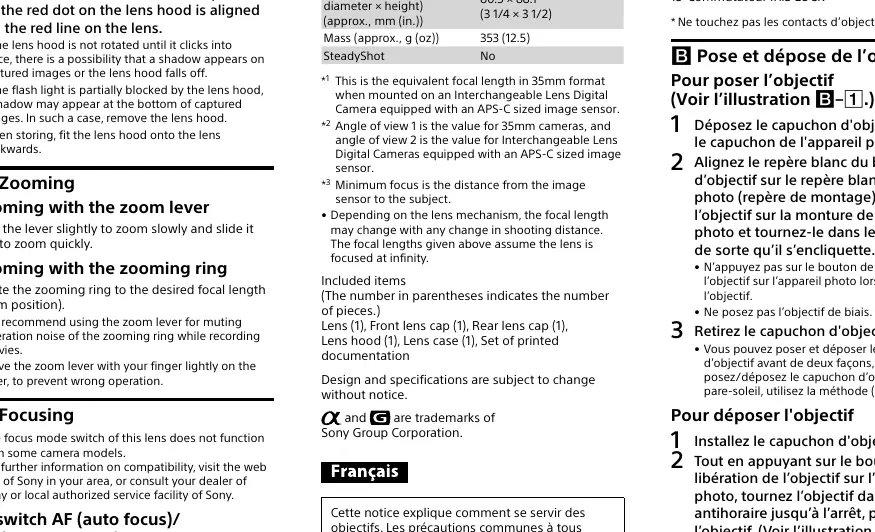
Technical Specifications
- Focal Length: 16-35mm
- Aperture Range: F4 to F22
- Minimum Focus Distance: 0.28-0.24m
- Filter Diameter: 72mm
- Dimensions: Approx. 80.5 x 88.1mm
- Weight: Approx. 353g
- Lens Construction: 12 groups, 13 elements
Safety and Handling
Do not leave the lens exposed to direct sunlight or intense light sources, as this can cause internal damage, smoke, or fire due to light focusing. While the lens is designed with dust and moisture resistance, it is not waterproof. Always hold both the camera and lens firmly when carrying the equipment.
Installation and Operation
To attach the lens, align the white index on the lens barrel with the mounting index on the camera and rotate clockwise until it locks. The lens features a zoom lever for smooth power zooming and a dedicated zoom ring for manual control. The focus mode can be toggled between AF and MF using the switch on the lens barrel. Some camera models also support the AF/MF control button and focus hold button for enhanced shooting flexibility.
Aperture Control
The lens includes an aperture ring with an IRIS LOCK switch. Setting the ring to 'A' allows the camera to control the aperture automatically. For manual control, the ring can be adjusted between F4 and F22. For video recording, the aperture click switch can be set to 'OFF' to ensure silent aperture adjustments.
Maintenance and Troubleshooting
If the lens is shaken, internal components may rattle; this is normal and does not indicate a malfunction. If you experience vignetting (darkened corners), close the aperture by 1 to 2 stops. Use the included lens hood to reduce flare and protect the front element. When storing the lens, attach the lens caps and store the hood in reverse position.
Related manuals
Related manuals from the same brand or category.
Electronics / Cameras
Sony E 15mm F1.4 G Interchangeable Lens
SONYElectronics / Cameras
Sony FE 14mm F1.8 GM Interchangeable Lens
SONYElectronics / Audio
SONY XS-692ES 2-Way Component Speaker System
SONYElectronics / Audio
SONY XS-690GS 2-Way Speaker Instructions
SONY
Manual page author
Emily Carter
User documentation editor
Prepares concise manual descriptions and highlights the most useful setup, operation, and maintenance information for readers.