Electronics / AV Accessories
StarTech.com Wireless Infrared IR Remote Extender IREXT2 User Manual
Quick guide for the StarTech.com IREXT2 Wireless Infrared IR Remote Extender. Includes installation steps for both probe and non-probe setups, technical specifications, and usage requirements.
Table of contents
Manual images
Click an image to enlargeQuick guide from the manual
The StarTech.com Wireless Infrared IR Remote Extender (IREXT2) allows you to control IR-enabled devices from a distance of up to 100 meters (330 ft). The system consists of a transmitter and a receiver unit.
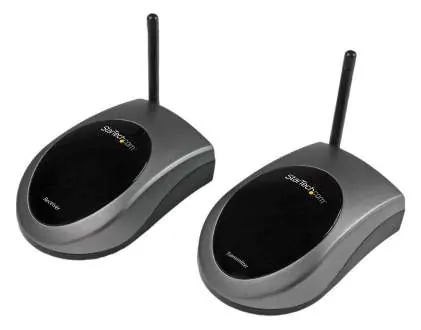
Packaging Contents
- 1 x IR Extender transmitter
- 1 x IR Extender receiver
- 1 x IR extender probe
- 2 x 12VDC, 250mA power adapters
System Requirements
- Available power outlets near both transmitter and receiver locations.
- An IR-controlled device (e.g., Television, Home Theater Receiver) with a remote.
Installation
Follow these steps to set up your IR extender system:
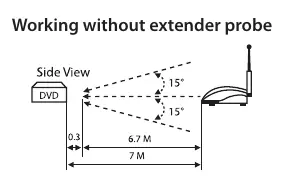
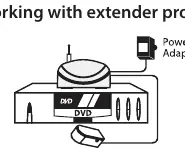
- Power the Receiver: Connect one of the provided AC power adapters to an available power outlet and then to the DC jack on the back of the receiver unit.
- Position the Receiver: Place the receiver unit near the device you wish to control. If you are not using the extender probe, position the receiver unit so it faces the IR sensor receiving window of the device.
- Using the Extender Probe (Optional): If using the included probe, insert the metal connector into the IR Extender port on the back of the receiver unit. Situate the probe near the IR sensor receiving window of the device you wish to control. The probe should be within 0.5m and at angles of +/- 15°.
- Antenna Setup: Extend the antenna on the receiver unit and position it vertically.
- Position the Transmitter: Place the transmitter unit near the location from which you wish to initiate control. Ensure an available power outlet is nearby.
- Power the Transmitter: Connect the remaining AC power adapter to an available power outlet and then to the DC jack on the back of the transmitter unit.
- Finalize Setup: Extend the antenna on the transmitter unit and position it vertically. The system is now ready for use.
Specifications
- Transmission Frequency: 433.92 MHz +/- 1 MHz
- IR Frequency: 30kHz - 60kHz
- Maximum Transfer Distance: 100 m / 330 ft
- Power Adapter: 12V DC, 250 mA
- Dimensions: 93 x 65 x 32 mm
- Weight: 267 g
- Operating Temperature: 0°C to 43°C (32°F to 109°F)
Technical Support
StarTech.com offers lifetime technical support. For assistance, documentation, and downloads, visit www.startech.com/support. For the latest drivers and software, visit www.startech.com/downloads.
Official resources from the manual
Practical help
Common problems
Device not responding to remote commands
Ensure the receiver unit (or probe) is positioned correctly facing the IR sensor window of the device. Verify that antennas on both units are extended vertically.
Signal range issues
Ensure the distance between the transmitter and receiver does not exceed 100 meters (330 ft) and that there are no significant obstructions.
Before use
- Verify you have two available power outlets (one for transmitter, one for receiver).
- Ensure the IR-controlled device is within range of the receiver.
- If using the probe, ensure it is placed within 0.5m of the device's IR sensor.
- Check that the IR sensor window of the target device is accessible.
Specs in practice
- Transmission Frequency (433.92 MHz)
- The wireless radio frequency used to communicate between the transmitter and receiver units.
- IR Frequency (30kHz - 60kHz)
- The range of infrared frequencies supported by the extender, compatible with most standard remote controls.
- Maximum Transfer Distance (100m)
- The maximum operating range between the transmitter and receiver in an open environment.
Images and diagrams
- The diagrams illustrate the optimal placement of the receiver unit relative to the controlled device, highlighting the 15-degree angle and distance requirements for reliable signal reception.
Model compatibility
- Compatible with standard IR-controlled devices such as Televisions and Home Theater Receivers.

Manual page author
Emily Carter
User documentation editor
Prepares concise manual descriptions and highlights the most useful setup, operation, and maintenance information for readers.