Electronics / Monitor Accessories
User Manual for SIIG 04-1353A 3x1 HDMI 2.0 Switch
Quick guide for the SIIG 04-1353A 3x1 HDMI 2.0 Switch. Learn how to connect your devices, set up the Magic Home app for Wi-Fi control, configure Amazon Alexa, and troubleshoot common connection issues.
Table of contents
Manual images
Click an image to enlargeQuick Start Guide
The SIIG 04-1353A is a 3x1 HDMI 2.0 switch that supports 4K@60Hz resolution, HDR, and Dolby Vision. It can be controlled via the included IR remote, the physical switch button, the Magic Home app, or Amazon Alexa voice commands. Ensure you use high-quality HDMI 2.0 cables and a stable 5V/1A power supply for optimal performance.

Package Contents
- 3x1 HDMI 2.0 Switch
- Power adapter DC 5V/1A
- IR Remote control
- User Manual
Device Layout
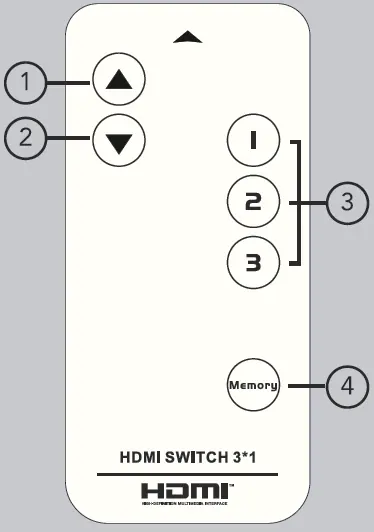
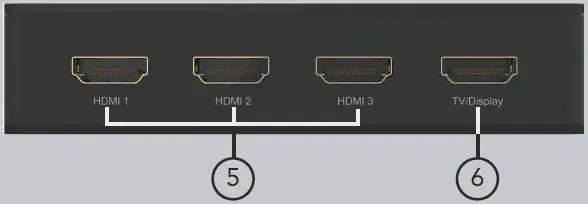
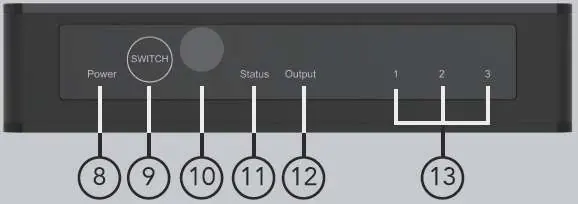
Remote Control
The remote allows you to select inputs 1, 2, or 3 directly, navigate with previous/next buttons, and use the Memory function to save the active input for automatic selection upon restart.
Rear Panel
Contains three HDMI input ports (labeled 1-3) and one HDMI output port (labeled TV/Display) for connection to your screen.
Side and Front Panels
The side panel features the DC 5V power input. The front panel includes the Power LED, a physical Switch button (short press to change input, long press to reset Wi-Fi), an IR receiver, and LED indicators for Wi-Fi status, output status, and active input channels.
App Control and Wi-Fi Setup


- Download and install the Magic Home app from the Google Play or Apple Store.
- Sign up for an account and log in.
- Long press the physical switch button on the device for 10 seconds to reset the Wi-Fi module until the status LED flickers quickly.
- In the app, select Add Device and choose the universal remote device.
- Follow the on-screen instructions to connect to your 2.4GHz Wi-Fi network.
- Once matched, you can control the switch via the app interface.
Amazon Alexa Integration
- Open the Amazon Alexa app and navigate to Skills.
- Search for and enable the Magic Home Lite skill.
- Link your Magic Home account.
- Select the American region as default if prompted.
- Once linked, you can use voice commands like "Alexa, turn on [device name]" or "Alexa, switch [device name] to HDMI 1".
Troubleshooting
If you encounter issues, check the following:
- Power light off: Ensure the power adapter is properly connected.
- Screen splash/flicker: Use standard HDMI 2.0 cables. Ensure cable length does not exceed 5 meters for 4K@60Hz.
- Cannot match app: Keep the device and phone close to the router during pairing. Ensure you are using a 2.4GHz network and avoid guest mode Wi-Fi.
- Voice control not working: Ensure the device is successfully paired in the Magic Home app and the Alexa skill is enabled.
Manufacturer information
SIIG, Inc.
Practical help
Common problems
Power light is off and product is not working
Check if the power adapter is properly connected to the device and the wall outlet.
Screen splash or signal issues
Use standard HDMI 2.0 cables. Ensure cable length is under 5 meters for 4K@60Hz signals.
Cannot match the switcher with the phone via app
Keep the device and phone close to the router during pairing. Ensure you are using a 2.4GHz Wi-Fi network and not a guest network.
Cannot control via Alexa
Ensure the device is paired in the Magic Home app and the Magic Home Lite skill is enabled in the Alexa app.
Before use
- Ensure you have a 5V/1A power adapter.
- Use HDMI 2.0 certified cables for 4K support.
- Verify your Wi-Fi network is 2.4GHz.
- Download the Magic Home app.
- Keep the device near the router during initial setup.
Images and diagrams
- Rear Panel: Shows HDMI inputs 1-3 and the TV/Display output port.
- Front Panel: Includes power button, status LEDs, and IR receiver.
- Remote: Buttons for input selection (1-3), navigation, and memory function.
Model compatibility
- Supports 2.4GHz Wi-Fi only.
- Compatible with Amazon Alexa voice control.
- Supports LPCM, DTS, Dolby Digital 5.1 & 7.1 audio.

Manual page author
David Miller
Documentation analyst
Organizes user manual content into clear summaries, with attention to model details, product context, and everyday usability.