Electronics / Televisions
Matchmaster 04MM-SB01 Universal Wall or TV Soundbar Mount
Quick installation guide for the Matchmaster 04MM-SB01 soundbar mount. Learn how to assemble the bracket, choose between wall or TV mounting, and select the correct hardware for your setup.
Table of contents
Manual images
Jump to the sectionQuick guide from the manual
The Matchmaster 04MM-SB01 is a universal mount designed to hold soundbars either on a wall or directly attached to a TV. The maximum rated weight capacity for this mount is 15kg (33lbs). Before installation, ensure the mounting surface (wall or TV) is capable of supporting this weight. Always follow the assembly steps carefully and ensure all hardware is tightened securely.
Parts and Assembly
The kit includes various components labeled A through O and a set of mounting screws labeled M-A through M-I. Begin by assembling the main bracket structure:
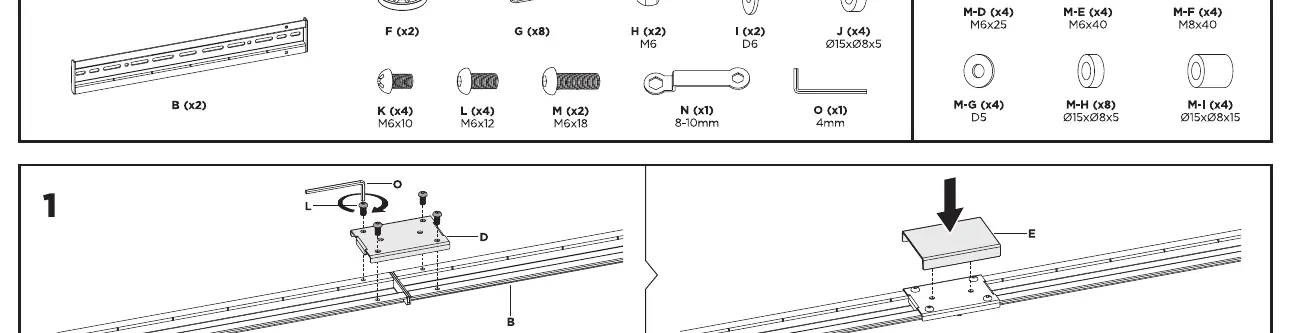
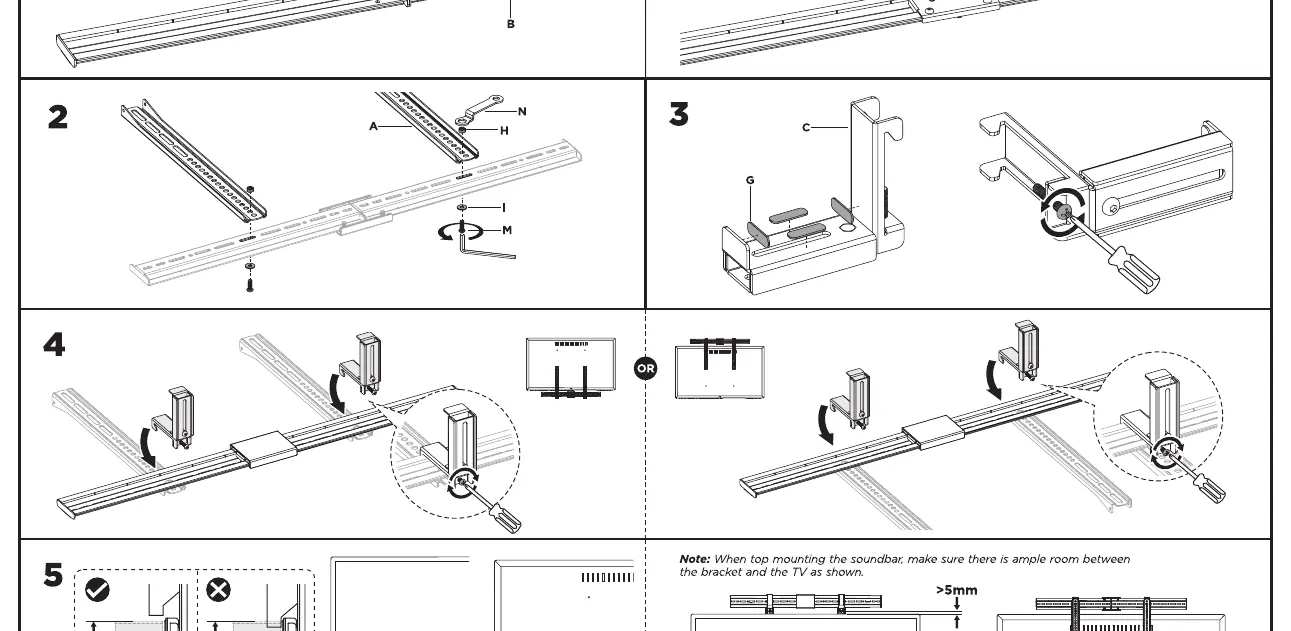
- Attach the support plates to the main rails using the provided screws and tools.
- Ensure all connections are firm.
- Refer to the parts list diagram to identify all components before starting.
Mounting Options
The 04MM-SB01 offers two primary installation methods:
- Wall Mount: The soundbar bracket can be installed directly onto a wall using the provided screws and expansion anchors.
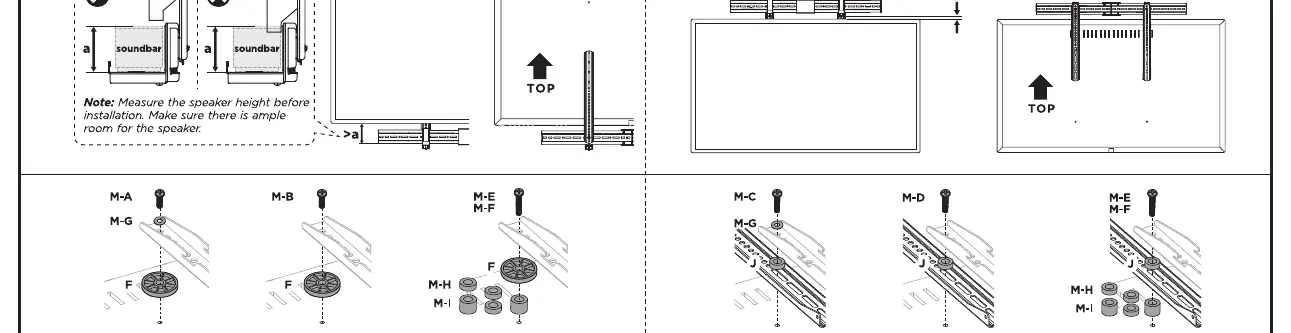
- TV Mount: The bracket can be attached to the back of a TV. When mounting to a TV, ensure there is ample room between the bracket and the TV body. Measure the speaker height before installation to ensure proper clearance.
Hardware Selection
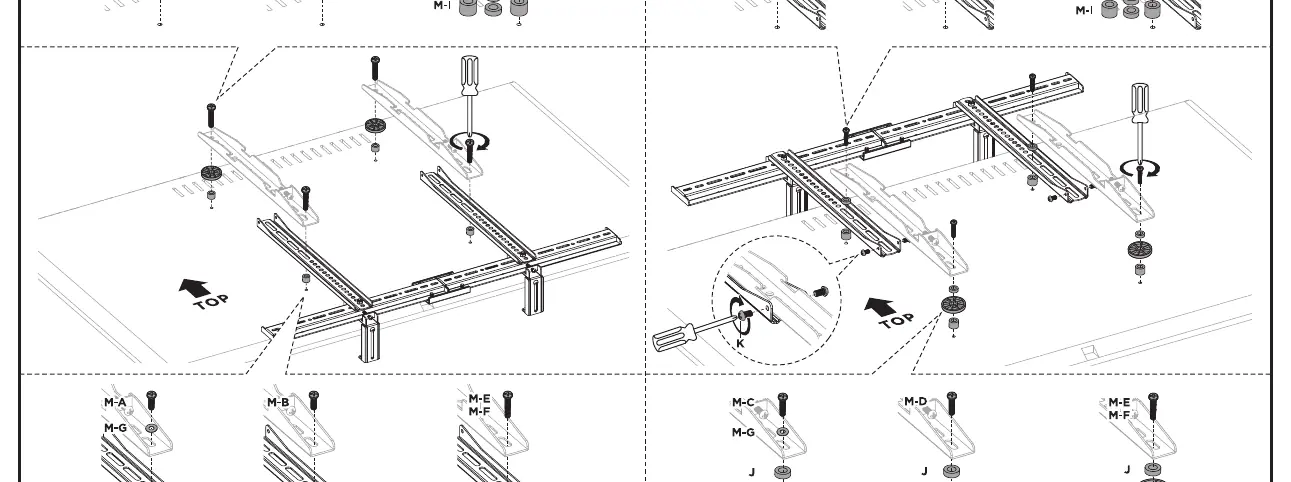
When attaching the mount to a TV, use the appropriate hardware from the M-A to M-I set. The manual provides specific combinations of screws, washers, and spacers (F, G, H, I, J) to accommodate different TV mounting hole depths and configurations. Always verify that the screw length is appropriate for your TV to avoid damage to internal components.
Manufacturer information
Matchmaster Communications Pty Ltd
Practical help
Common problems
Soundbar does not fit or is obstructed by the TV
Ensure there is ample room between the bracket and the TV as shown in step 5. Measure the speaker height before installation.
Hardware does not fit the TV mounting holes
Use the provided M-A to M-I hardware set. Select the combination of screws, washers, and spacers that matches your specific TV mounting depth.
Before use
- Verify the wall or TV structure can support the weight of the soundbar.
- Ensure the total weight does not exceed 15kg (33lbs).
- Check that all parts (A-O) are present before starting assembly.
- Measure the speaker height before installation to ensure clearance.
- Ensure you have the correct tools for wall mounting (drill, screwdriver).
Images and diagrams
- Steps 1-3: Assembly of the main bracket rails and support arms.
- Step 4: Shows the two mounting configurations: Wall mount vs. TV mount.
- Step 5: Details the hardware selection (M-A to M-I) and spacing requirements for TV mounting.
Model compatibility
- Universal design compatible with most TVs and wall types.
- Requires solid wall or TV VESA mounting points.

Manual page author
Emily Carter
User documentation editor
Prepares concise manual descriptions and highlights the most useful setup, operation, and maintenance information for readers.