Lighting / Fixtures
Sunco Lighting 4-Inch Slim Selectable White LED Light
Installation guide for the Sunco Lighting 4-inch Slim Selectable White LED Light. Includes step-by-step wiring instructions, CCT color temperature selection, and safety precautions.
Table of contents
Quick guide from the manual
This document provides installation instructions for the Sunco Lighting 4-inch Slim Selectable White LED Light. Before beginning, ensure the power is turned off at the circuit breaker. The light features a selectable CCT switch on the junction box, allowing you to choose between five color temperatures (2700K, 3000K, 3500K, 4000K, 5000K) before final installation.
Installation
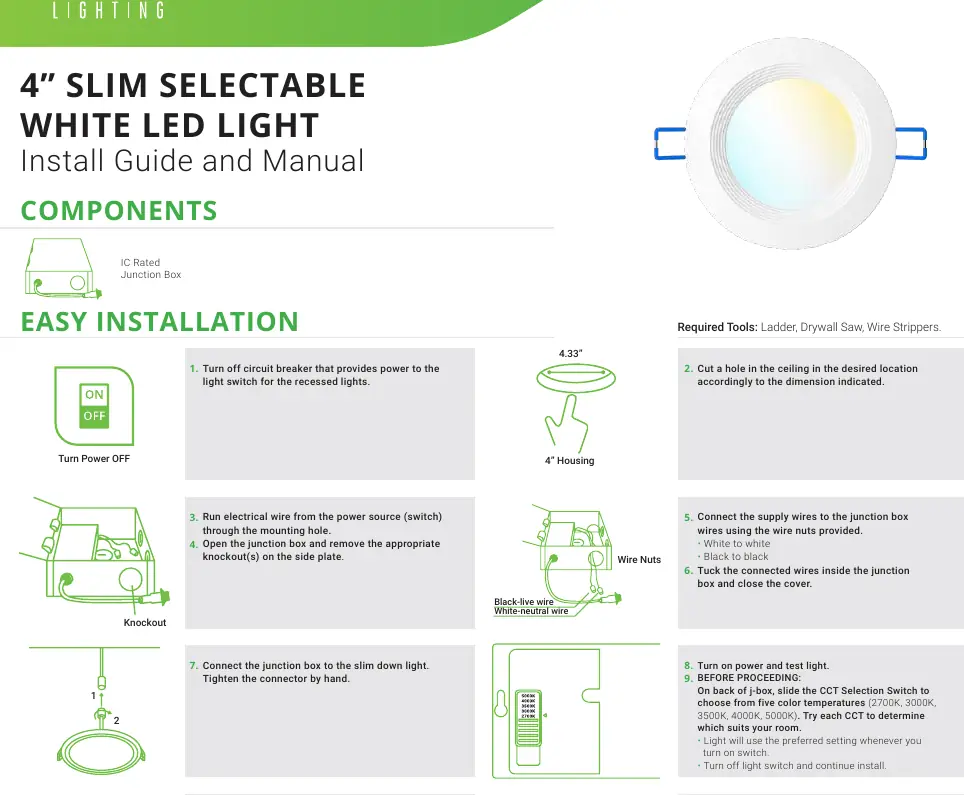
- Preparation: Turn off the circuit breaker that provides power to the light switch.
- Cutout: Cut a hole in the ceiling at the desired location, measuring 4.33 inches.
- Wiring: Run electrical wire from the power source through the mounting hole. Open the junction box and remove the appropriate knockout on the side plate.
- Connections: Connect the supply wires to the junction box wires using the provided wire nuts (White to White, Black to Black). Tuck the connected wires inside the junction box and close the cover.
- CCT Selection: On the back of the junction box, slide the CCT Selection Switch to your preferred color temperature.
- Mounting: Connect the junction box to the slim down light and tighten the connector by hand. Insert the junction box through the ceiling hole.
- Final Step: Push up the spring clips to insert the luminaire into the opening in the ceiling. Turn on the circuit breaker to test the light.
Specifications
- Voltage: 120V
- Wattage: 10W
- Usage: Indoor
- Housing: Polycarbonate
- Weight: 0.42 lbs
- Warranty: 7 years
Safety Warnings
- This product should be installed in accordance with applicable installation codes by a person familiar with the construction and operation of the product.
- Abide by related regional and local laws or regulations.
- Do not alter, relocate, or remove wiring.
- Proper grounding is required to ensure safety.
- Check for damage during shipping prior to installation.
- Use safety precautions, including safety eyeglasses and gloves.
Practical help
Common problems
Light does not turn on after installation
Verify that the circuit breaker is turned on and that the wiring connections (white-to-white, black-to-black) inside the junction box are secure.
Need to change color temperature
Turn off the light switch, access the back of the junction box, and slide the CCT Selection Switch to the desired setting (2700K-5000K).
Before use
- Turn off power at the circuit breaker
- Ensure you have a ladder, drywall saw, and wire strippers
- Check product for shipping damage
- Verify ceiling hole dimension (4.33 inches)
Images and diagrams
- The junction box features a side plate with knockouts for wire entry.
- Spring clips are used to secure the luminaire into the ceiling opening.
Model compatibility
- Designed for indoor use only.
- Requires hardwire connection to a junction box.

Manual page author
Michael Turner
Technical manual editor
Reviews PDF manuals for structure, safety notes, and practical product details so readers can find the right information quickly.